


'%3e%3cpath%20d='M21.0949%203.79395L13.9961%209.82854H21.0949V3.79395Z'%20stroke='black'%20stroke-width='1.38'%20stroke-miterlimit='10'/%3e%3cpath%20d='M13.998%209.82854L7.44531%203.79395V9.82854H13.998Z'%20stroke='black'%20stroke-width='1.38'%20stroke-miterlimit='10'/%3e%3cpath%20d='M13.9961%202.69922V25.1919'%20stroke='black'%20stroke-width='1.38'%20stroke-miterlimit='10'/%3e%3cpath%20d='M20.5488%2016.4113L13.9961%209.82812V18.2217L20.5488%2024.0918V16.4113Z'%20stroke='black'%20stroke-width='1.38'%20stroke-miterlimit='10'/%3e%3cpath%20d='M7.44531%2016.4113L13.998%209.82812V18.0526L7.44531%2024.0918V16.4113Z'%20stroke='black'%20stroke-width='1.38'%20stroke-miterlimit='10'/%3e%3cpath%20d='M4.71094%209.82812V18.6057H7.44125V16.4113L13.9941%209.82812H4.71094Z'%20stroke='black'%20stroke-width='1.38'%20stroke-miterlimit='10'/%3e%3cpath%20d='M13.9961%209.82812L20.5488%2016.4113V18.6057H23.2792V9.82812H13.9961Z'%20stroke='black'%20stroke-width='1.38'%20stroke-miterlimit='10'/%3e%3c/g%3e%3c/svg%3e)

'%3e%3cmask%20id='mask0_21456_29260'%20style='mask-type:luminance'%20maskUnits='userSpaceOnUse'%20x='0'%20y='0'%20width='28'%20height='28'%3e%3cpath%20d='M27.5%200.5H0.5V27.5H27.5V0.5Z'%20fill='white'/%3e%3c/mask%3e%3cg%20mask='url(%23mask0_21456_29260)'%3e%3cpath%20d='M14%2027.5C13.4854%2024.1035%2011.8974%2020.9608%209.46828%2018.5317C7.03922%2016.1026%203.89651%2014.5146%200.5%2014C3.89651%2013.4854%207.03922%2011.8974%209.46828%209.46828C11.8974%207.03922%2013.4854%203.89651%2014%200.5C14.5147%203.89644%2016.1028%207.03905%2018.5318%209.46816C20.9609%2011.8972%2024.1035%2013.4853%2027.5%2014C24.1035%2014.5147%2020.9609%2016.1028%2018.5318%2018.5318C16.1028%2020.9609%2014.5147%2024.1035%2014%2027.5Z'%20fill='url(%23paint0_linear_21456_29260)'/%3e%3c/g%3e%3c/g%3e%3cdefs%3e%3clinearGradient%20id='paint0_linear_21456_29260'%20x1='9.5'%20y1='9.5'%20x2='20.75'%20y2='21.875'%20gradientUnits='userSpaceOnUse'%3e%3cstop%20stop-color='%23F0DCD6'/%3e%3cstop%20offset='0.914506'%20stop-color='%231D6DFF'/%3e%3c/linearGradient%3e%3cclipPath%20id='clip0_21456_29260'%3e%3crect%20width='28'%20height='28'%20fill='white'/%3e%3c/clipPath%3e%3c/defs%3e%3c/svg%3e)
'%3e%3cpath%20d='M22.8019%2011.2412L23.5234%2011.6807V12.0103L23.3172%2012.7796L14.5579%2014.9771L13.7344%2012.7951L22.8019%2011.2412Z'%20fill='%23D97757'/%3e%3cpath%20d='M19.5236%204.77832L20.5322%205.00396L20.8%205.35575L21.0552%206.19876L20.9494%206.73644L15.0712%2015.3068L13.1133%2013.2191L18.5338%205.63471L19.5236%204.77832Z'%20fill='%23D97757'/%3e%3cpath%20d='M14.4577%203.43951L15.0761%203L15.5912%203.21976L16.1065%203.9889L14.6949%2013.0345L13.7364%2012.3397L13.3242%2011.131L14.0456%204.31853L14.4577%203.43951Z'%20fill='%23D97757'/%3e%3cpath%20d='M7.84766%203.5851L8.48285%202.7199L8.89716%202.61914L9.71923%202.74717L10.125%203.08581L13.0815%2010.0748L14.1509%2013.3954L12.8997%2014.1372L8.13117%204.91019L7.84766%203.5851Z'%20fill='%23D97757'/%3e%3cpath%20d='M4.77232%208.38688L4.56641%207.50742L5.18478%206.73828L5.90613%206.84816H6.11223L10.4403%2010.2544L11.78%2011.3531L13.6349%2012.8914L12.6044%2014.7594L11.6769%2013.9903L11.0586%2013.331L5.08168%208.82593L4.77232%208.38688Z'%20fill='%23D97757'/%3e%3cpath%20d='M3.53288%2014.0982L3.06641%2013.5489L3.06647%2013.0601L3.53288%2012.8896L8.78833%2013.2193L13.9408%2013.6588L13.7736%2014.7528L3.94502%2014.2082L3.53288%2014.0982Z'%20fill='%23D97757'/%3e%3cpath%20d='M6.62378%2019.8178H5.59334L5.18359%2019.3146V18.7132L6.93299%2017.3946L14.045%2012.5674L14.7648%2013.8785L6.62378%2019.8178Z'%20fill='%23D97757'/%3e%3cpath%20d='M8.57739%2022.8884L8.16518%2022.9984L7.54688%2022.6687L7.64995%2022.1193L13.7299%2013.5488L14.5543%2014.7574L10.0201%2021.1305L8.57739%2022.8884Z'%20fill='%23D97757'/%3e%3cpath%20d='M13.7361%2023.9861L13.4271%2024.4257L12.8088%2024.6454L12.2935%2024.2058L11.9844%2023.5466L13.5301%2014.6465L14.4576%2014.7563L13.7361%2023.9861Z'%20fill='%23D97757'/%3e%3cpath%20d='M18.9869%2021.5713V22.4503L18.8838%2022.7799L18.4716%2022.9997L17.7503%2022.8974L12.7969%2015.0367L14.7617%2013.4404L16.4104%2016.6269L16.5652%2017.7805L18.9869%2021.5713Z'%20fill='%23D97757'/%3e%3cpath%20d='M21.3629%2020.2507L21.4659%2020.8L21.1568%2021.2396L20.8476%2021.1297L19.0958%2019.8112L16.4165%2017.284L14.3555%2015.7457L14.9736%2013.6582L16.0041%2014.3175L16.6226%2015.5259L21.3629%2020.2507Z'%20fill='%23D97757'/%3e%3cpath%20d='M20.0232%2014.6482L22.5995%2014.8679L23.2178%2015.3074L23.6299%2015.9667V16.441L22.4964%2016.9556L16.7256%2015.4173L14.3555%2015.3074L14.9737%2013L16.6226%2014.3185L20.0232%2014.6482Z'%20fill='%23D97757'/%3e%3c/g%3e%3c/svg%3e)
Key Takeaways:
- Post the Best Instagram Videos to VMEG AI: It can be done with clear audio and visuals in Reels, Stories, or IGTV videos to be properly transcribed.
- Create AI-Driven Transcripts: VMEG AI transcribes audio into text using AI and can capture conversations, narration and background sound effectively.
- Localize on Global Audiences: Translating transcripts into various languages, making subtitles or captions, or voiceovers created by artificial intelligence, and having on-screen content culturally adapted.
- Export and Publish: Save transcripts and subtitles in SRT/VTT formats, align dubbing where necessary, and upload completely localized videos to Instagram to get the most interactions.
By 2025, Instagram will be among the strongest platforms of video content, including Reels and Stories, as well as IGTV videos. Having a global following, it is not enough to come up with interesting visuals. To reach and engage as many as possible, your videos must be easy to follow and watched by the people who cannot speak other languages or watch videos with sound. So, how to transcribe Instagram videos?
Instagram video transcribing and localization is a disruptive approach to creators, marketers, and businesses. Transcription is the process of transcribing the audio on your video into written form, and localization is the process of transcribing the written material into other languages and cultures. Not only does it increase accessibility, but it also increases engagement, reaches many more people and makes your content resonate with audiences around the globe.
Within the further context of this guide, we will provide an idea of how to properly transcribe Instagram videos, then localize them to appeal to any global audience and use sophisticated services such as VMEG AI to get professional outcomes.
Why Transcribe and Localize Your Instagram Videos?
The process of transcription and localization is not merely a technical procedure; it is a crucial policy to creators who want to influence the world. First, the process of transcription enhances interaction. Most Instagram users watch videos with the sound off at the workplace, during travel, or in silent areas.
Even in the absence of audio, subtitles will keep the viewers following what is being said and ensure that they do not lose interest in what you are saying.
Localization will help you to reach a universal audience. With captions translation or audio dubbing in other languages, you can widen your scope to other people who would not otherwise have realized your videos. It is especially significant to those brands or creators who aim at a range of regions at the same time.
Another important rationale is accessibility. Writings and subtitles help individuals with hearing disabilities to access the content and improve inclusivity. They also assist in enhancing searchability in social media. Transcription textual material can be indexed, which enhances searchability and search engine optimization.
Lastly, there can be transcribed, localized videos, and content can be repurposed. One video and transcript can be converted into a series of blog posts, social media snippets, infographics, or marketing content and provide your content with more lives in many different places.
How to Transcribe Instagram Videos Step-by-Step
- Export Your Video: The first one is to download the video file on Instagram. This may be a Reel, Story or IGTV video. Export the original or use the download view of Instagram. Make sure that your video is compatible like MP4 or MOV so that it would be easily processed.
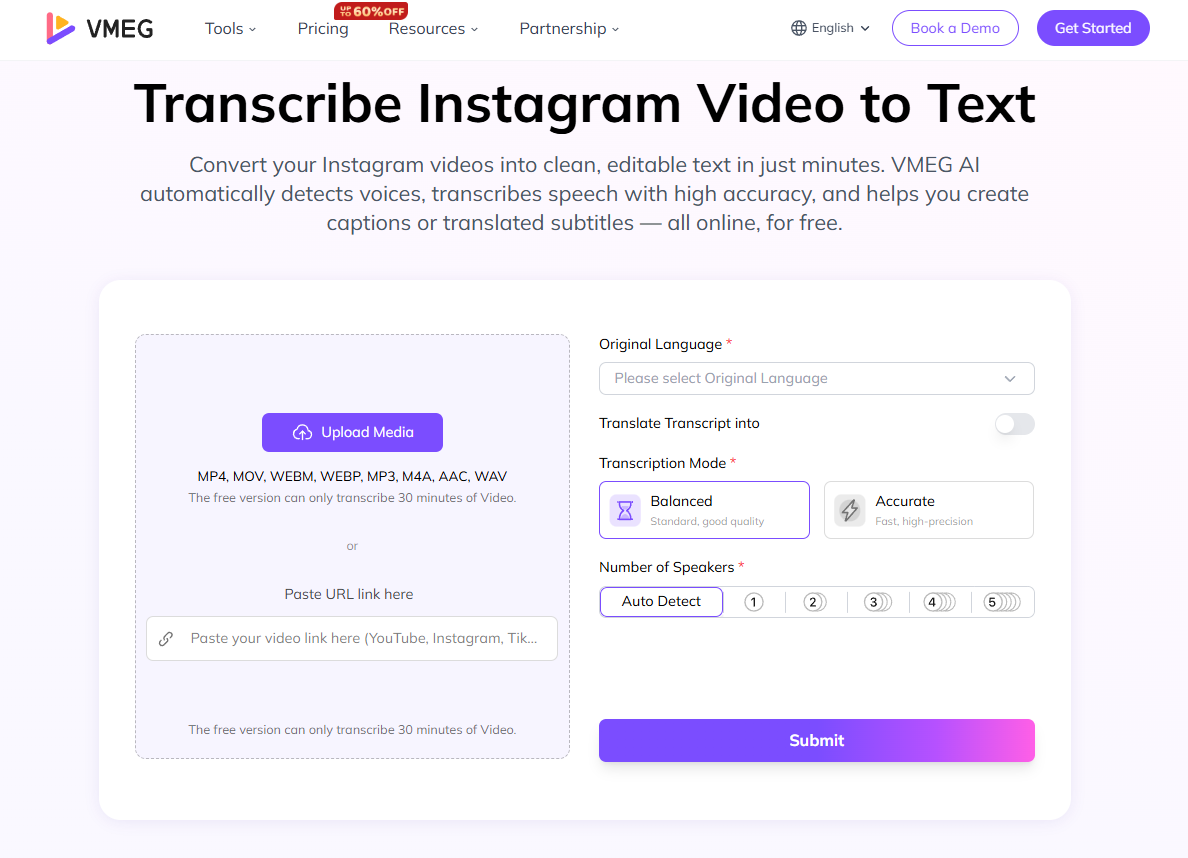
- Upload to Transcription Tool: Upload your video to an AI-based transcription tool that will automatically transcribe what is said in your video. This saves time as opposed to the manual transcription and it is also able to capture accurately the dialogue, narration, or the background conversation.
- Proofread and Revise the Transcript: AI transcription is quick and relatively precise, yet it should be proofread by humans. Fix the mistakes, particularly the name, brand names and technical expressions. Mark any text, images, or scene changes on the screen that ought to be in subtitles or captions.
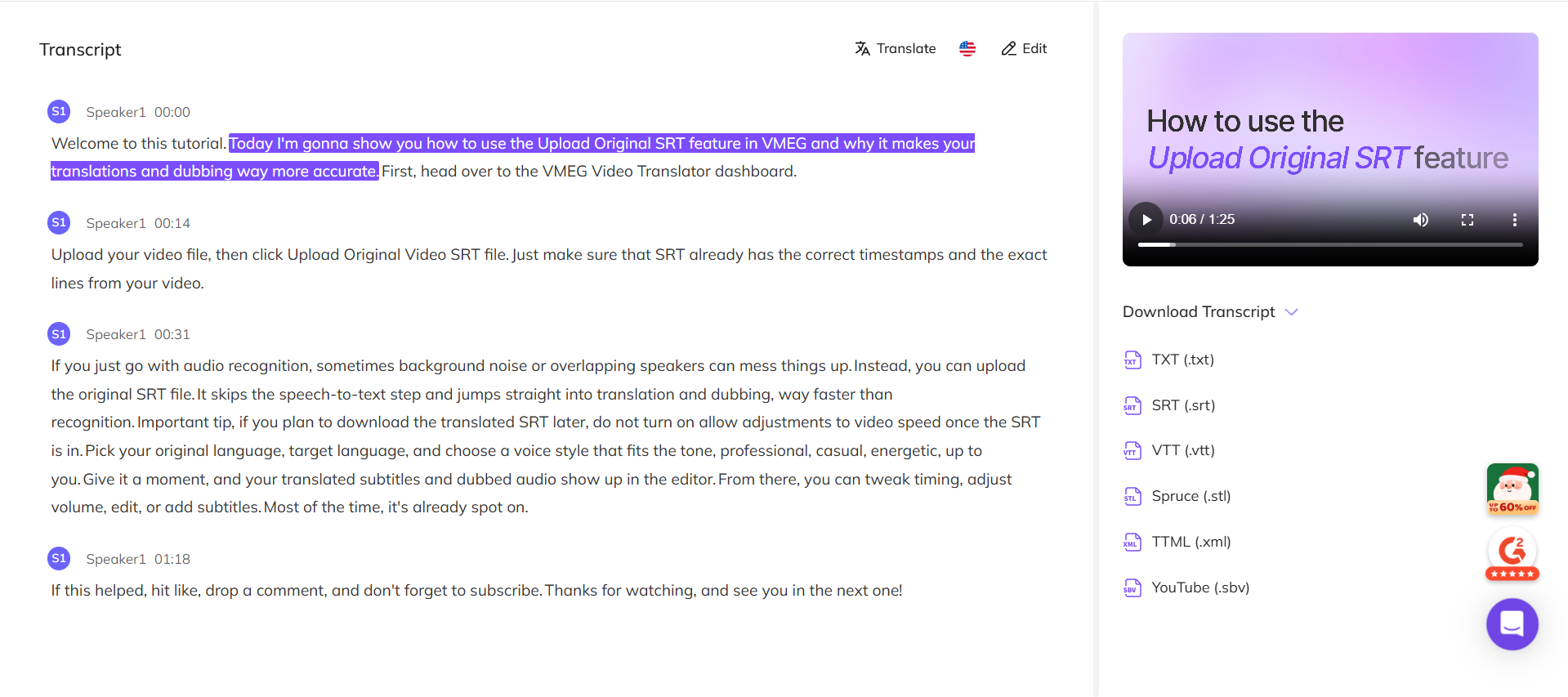
- Format of Subtitles: Divide the transcript into parts that can be subheadings. One or two sentences should be inserted in each segment in an appropriate time to correlate with the video. Avoiding blurred time creates readability, and viewer experience is improved.
- Translator or Preparation to Localization: In case your target audience is located in other languages, then translate the transcript. Determine how you are going to use subtitles, dubbing or both. It is better to prepare translations in advance so that the localization process will take a smoother form.
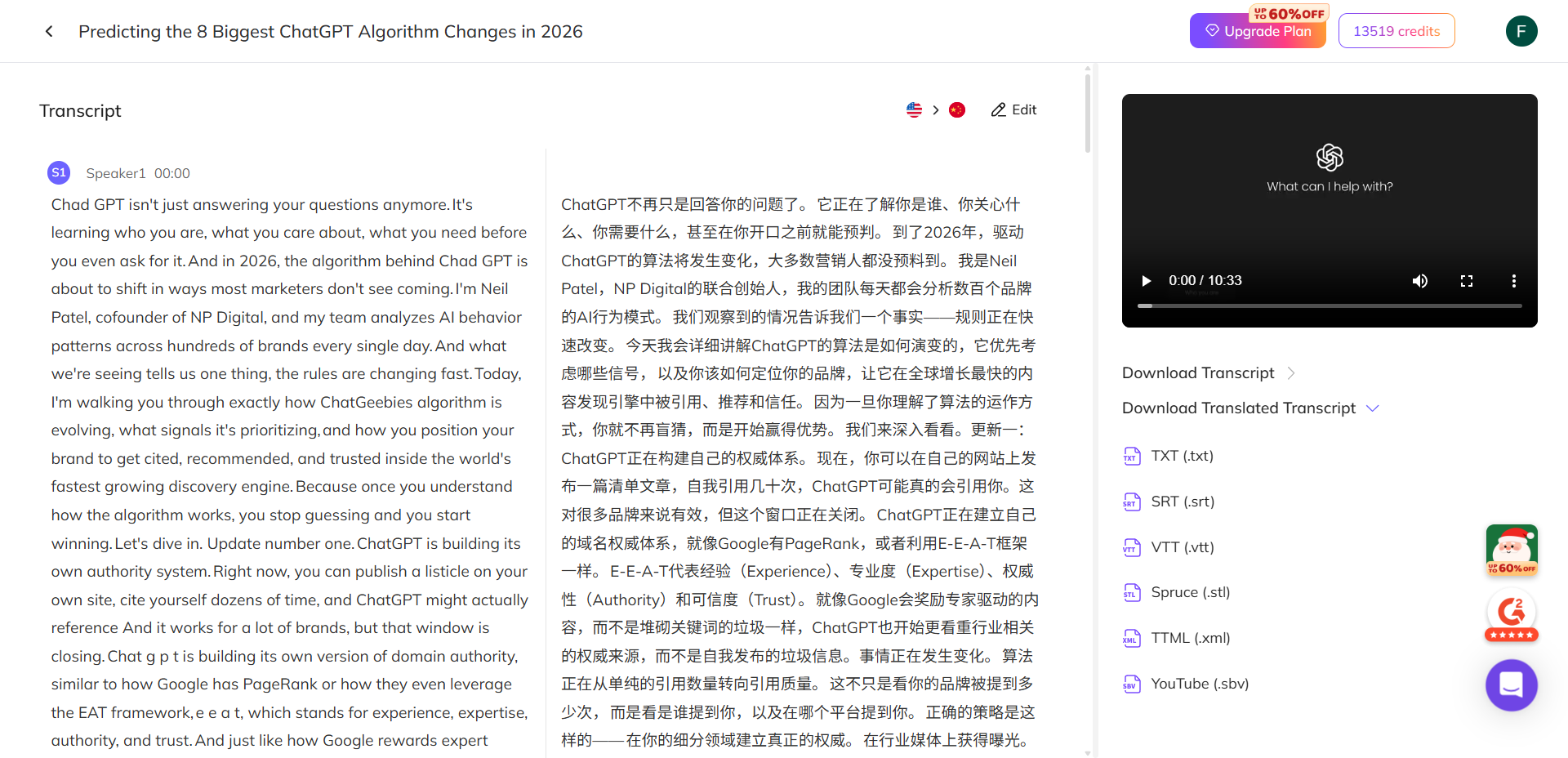
VMEG AI x Instagram Transcription
Convert your Instagram videos into clean, editable text in just minutes. VMEG AI automatically detects voices, transcribes speech with high accuracy, and helps you create captions or translated subtitles.
How to Localize Your Transcribed Videos
- Add Subtitles or Captions: Delete your transcript and form captions or subtitles. To reach in multiple languages, include translated versions in the preferred languages. Make sure that the text is clear and it does not cover key visuals in the video.
- Dubbing or Voice-Over: To be more immersive, switch the original audio with voice-overs in the target language. New AI applications allow dubbing and give the voices natural, sounding, with proper lip- sync and emotional expression.
- Modify Visual Elements: Customize graphics, titles and text on the screen to fit the target language. Taking into consideration cultural standards, reading orientation, and visualization. Correct visual adjustment makes the video look native and close to the audience.
- Quality Assurance: Once the video has been localized, check the accuracy of the timing, subtitles and dubbing. Readability of checks, lip-synch, and cultural suitability. The testing will avoid errors that may make the engagement less and may lead to misunderstandings.
- Publish Strategically: Upload to Instagram a localized version, or produce the different versions on behalf of various audiences. Post relevant captions and hashtags in every language to reach as many people as possible. The localized content should be published strategically to gain more attention and enhance the presence of the global character.
The Way VMEG AI Makes the Process of Instagram Video Transcription Simple
VMEG AI provides an effective tool in order to make video transcription in Instagram efficient. It automatizes the process of transcription producing the correct text in minutes with regard to verbatim speech.
The transcript can be used to add captions, prepare translations or create voice-overs by creators. The platform of VMEG AI is made to suit creators and marketers with a smooth export and editing. This tool is also time- and energy-saving and delivers a professional quality of results.
Using VMEG AI, you will be able to have your Instagram content on-demand, interesting, and exportable to international markets without taking hours of time trying to do it manually.
Pro Tips for Maximum Impact
- Make the Source Videos of High Quality: Transcription is better with clear audio and clear visuals that enhance the readability of subtitles.
- Retain Original and Translated Masters Copy: Save all transcripts and localized copy to use in future edits or use.
- Continuity in Branding and Tone: Even in translation or dubbing, keep the voice and style of your brand in other languages.
- Recycle Content: Transcripts may be used to write blogs and social media posts or even marketing content.
- Secure Privacy and Consent: Be sure that videos involving people have consent; in particular, when sharing at a global scale or through AI voice replication.
Localized Videos Applications of Transcribed and Localized Videos
Instagram can be improved through transcription and localization to serve several functions:
- Social Media Interaction: Subtitles and translations raise the viewer and engagement.
- Marketing Campaigns: Advertise to people abroad with culturally sensitive advertisements or videos.
- Tutorials or Courses In Various Languages: Have educational content which is easily accessible and easily understood by the learners.
- Entertainment: Make memes, Reels or fan content more global understandable.
- Business Communication: Communicate with employees and clients using different languages, company updates, product demonstrations, or announcements.
Final Words
Instagram videos are no longer to be transcribed and localized as an option; it is a necessity of the creators aiming to appeal to a wider global community. Transcription to text, localization of video to other languages and cultures get you higher involvement, easier delivery, and chance of discovery. Now you know, I hope so, how to transcribe Instagram videos?
Such tools as VMEG AI can make this process easier, and the subtitles, translations, and voice-over localization can be translated correctly and integrated without any difficulties. As a content creator, marketer or business owner, it is best to use AI-driven transcription and localization techniques to get your videos to the global audience to save your time and maximize the impact.
Begin transcribing and localizing your Instagram videos to unlock the potential and engage global audiences and take your content to a professional level. It can expand internationally with the tools and workflow, only a few clicks.
FAQs: Instagram Video Transcription and Localization
1. Can you transcribe an Instagram video?
Yes. Instagram video can be transcribed in bulk and with high accuracy in the number of AI tools, such as VMEG AI; Reels, Stories or IGTV videos can be transcribed as well.
2. How do I turn on Transcribe on Instagram?
Some videos can be auto-captured with Instagram, but to have more accurate and easily edited transcripts, it is advisable to export the video and use a transcription service, such as VMEG AI.
3. How to get a transcript on Instagram?
Get your video off Instagram and post it on VMEG AI. The AI will turn the audio text into an editable text transcript to subtitles, translation, or dubbing.
4. How do I turn a video into a transcript?
Instagram can be transcribed to a transcript by any video, using AI transcription tools. VMEG AI lets you have the text generated off of audio, automatically, and ready to localize or provide subtitles.


Fay
Behind VMEG stands a passionate team of creatives, engineers, and language lovers. At the crossroads of AI and storytelling, they craft tools that bridge languages and cultures.