

'%3e%3cpath%20d='M21.0949%203.79395L13.9961%209.82854H21.0949V3.79395Z'%20stroke='black'%20stroke-width='1.38'%20stroke-miterlimit='10'/%3e%3cpath%20d='M13.998%209.82854L7.44531%203.79395V9.82854H13.998Z'%20stroke='black'%20stroke-width='1.38'%20stroke-miterlimit='10'/%3e%3cpath%20d='M13.9961%202.69922V25.1919'%20stroke='black'%20stroke-width='1.38'%20stroke-miterlimit='10'/%3e%3cpath%20d='M20.5488%2016.4113L13.9961%209.82812V18.2217L20.5488%2024.0918V16.4113Z'%20stroke='black'%20stroke-width='1.38'%20stroke-miterlimit='10'/%3e%3cpath%20d='M7.44531%2016.4113L13.998%209.82812V18.0526L7.44531%2024.0918V16.4113Z'%20stroke='black'%20stroke-width='1.38'%20stroke-miterlimit='10'/%3e%3cpath%20d='M4.71094%209.82812V18.6057H7.44125V16.4113L13.9941%209.82812H4.71094Z'%20stroke='black'%20stroke-width='1.38'%20stroke-miterlimit='10'/%3e%3cpath%20d='M13.9961%209.82812L20.5488%2016.4113V18.6057H23.2792V9.82812H13.9961Z'%20stroke='black'%20stroke-width='1.38'%20stroke-miterlimit='10'/%3e%3c/g%3e%3c/svg%3e)

'%3e%3cmask%20id='mask0_21456_29260'%20style='mask-type:luminance'%20maskUnits='userSpaceOnUse'%20x='0'%20y='0'%20width='28'%20height='28'%3e%3cpath%20d='M27.5%200.5H0.5V27.5H27.5V0.5Z'%20fill='white'/%3e%3c/mask%3e%3cg%20mask='url(%23mask0_21456_29260)'%3e%3cpath%20d='M14%2027.5C13.4854%2024.1035%2011.8974%2020.9608%209.46828%2018.5317C7.03922%2016.1026%203.89651%2014.5146%200.5%2014C3.89651%2013.4854%207.03922%2011.8974%209.46828%209.46828C11.8974%207.03922%2013.4854%203.89651%2014%200.5C14.5147%203.89644%2016.1028%207.03905%2018.5318%209.46816C20.9609%2011.8972%2024.1035%2013.4853%2027.5%2014C24.1035%2014.5147%2020.9609%2016.1028%2018.5318%2018.5318C16.1028%2020.9609%2014.5147%2024.1035%2014%2027.5Z'%20fill='url(%23paint0_linear_21456_29260)'/%3e%3c/g%3e%3c/g%3e%3cdefs%3e%3clinearGradient%20id='paint0_linear_21456_29260'%20x1='9.5'%20y1='9.5'%20x2='20.75'%20y2='21.875'%20gradientUnits='userSpaceOnUse'%3e%3cstop%20stop-color='%23F0DCD6'/%3e%3cstop%20offset='0.914506'%20stop-color='%231D6DFF'/%3e%3c/linearGradient%3e%3cclipPath%20id='clip0_21456_29260'%3e%3crect%20width='28'%20height='28'%20fill='white'/%3e%3c/clipPath%3e%3c/defs%3e%3c/svg%3e)
'%3e%3cpath%20d='M22.8019%2011.2412L23.5234%2011.6807V12.0103L23.3172%2012.7796L14.5579%2014.9771L13.7344%2012.7951L22.8019%2011.2412Z'%20fill='%23D97757'/%3e%3cpath%20d='M19.5236%204.77832L20.5322%205.00396L20.8%205.35575L21.0552%206.19876L20.9494%206.73644L15.0712%2015.3068L13.1133%2013.2191L18.5338%205.63471L19.5236%204.77832Z'%20fill='%23D97757'/%3e%3cpath%20d='M14.4577%203.43951L15.0761%203L15.5912%203.21976L16.1065%203.9889L14.6949%2013.0345L13.7364%2012.3397L13.3242%2011.131L14.0456%204.31853L14.4577%203.43951Z'%20fill='%23D97757'/%3e%3cpath%20d='M7.84766%203.5851L8.48285%202.7199L8.89716%202.61914L9.71923%202.74717L10.125%203.08581L13.0815%2010.0748L14.1509%2013.3954L12.8997%2014.1372L8.13117%204.91019L7.84766%203.5851Z'%20fill='%23D97757'/%3e%3cpath%20d='M4.77232%208.38688L4.56641%207.50742L5.18478%206.73828L5.90613%206.84816H6.11223L10.4403%2010.2544L11.78%2011.3531L13.6349%2012.8914L12.6044%2014.7594L11.6769%2013.9903L11.0586%2013.331L5.08168%208.82593L4.77232%208.38688Z'%20fill='%23D97757'/%3e%3cpath%20d='M3.53288%2014.0982L3.06641%2013.5489L3.06647%2013.0601L3.53288%2012.8896L8.78833%2013.2193L13.9408%2013.6588L13.7736%2014.7528L3.94502%2014.2082L3.53288%2014.0982Z'%20fill='%23D97757'/%3e%3cpath%20d='M6.62378%2019.8178H5.59334L5.18359%2019.3146V18.7132L6.93299%2017.3946L14.045%2012.5674L14.7648%2013.8785L6.62378%2019.8178Z'%20fill='%23D97757'/%3e%3cpath%20d='M8.57739%2022.8884L8.16518%2022.9984L7.54688%2022.6687L7.64995%2022.1193L13.7299%2013.5488L14.5543%2014.7574L10.0201%2021.1305L8.57739%2022.8884Z'%20fill='%23D97757'/%3e%3cpath%20d='M13.7361%2023.9861L13.4271%2024.4257L12.8088%2024.6454L12.2935%2024.2058L11.9844%2023.5466L13.5301%2014.6465L14.4576%2014.7563L13.7361%2023.9861Z'%20fill='%23D97757'/%3e%3cpath%20d='M18.9869%2021.5713V22.4503L18.8838%2022.7799L18.4716%2022.9997L17.7503%2022.8974L12.7969%2015.0367L14.7617%2013.4404L16.4104%2016.6269L16.5652%2017.7805L18.9869%2021.5713Z'%20fill='%23D97757'/%3e%3cpath%20d='M21.3629%2020.2507L21.4659%2020.8L21.1568%2021.2396L20.8476%2021.1297L19.0958%2019.8112L16.4165%2017.284L14.3555%2015.7457L14.9736%2013.6582L16.0041%2014.3175L16.6226%2015.5259L21.3629%2020.2507Z'%20fill='%23D97757'/%3e%3cpath%20d='M20.0232%2014.6482L22.5995%2014.8679L23.2178%2015.3074L23.6299%2015.9667V16.441L22.4964%2016.9556L16.7256%2015.4173L14.3555%2015.3074L14.9737%2013L16.6226%2014.3185L20.0232%2014.6482Z'%20fill='%23D97757'/%3e%3c/g%3e%3c/svg%3e)
Transcription and caption both play a role in content creation and localization. Some individuals, primarily those who create content, may want to know the difference to determine which one best suits their needs or projects. Choosing which one to choose will help them boost their SEO goals and reach their target audience.
According to Fortune Business Insights (2025), the global market for language services is forecasted to increase from USD 76.24 billion in 2025 to USD 127.53 billion in 2032. Transcription and subtitling are service types within this language services ecosystem that support localization and accessibility.
Key Takeaways
- Transcription converts audio into standalone text for reading, documentation, and repurposing, while captions provide a visual description and display synchronized text on videos to support accessibility and the viewing experience.
- Transcripts provide searchable, indexable text that helps videos and audio content rank higher, increases engagement, and supports content repurposing into blogs, articles, and documentation.
- Captions improve watch time, reduce bounce rates, and make content accessible to hearing-impaired and global audiences, especially on social and video platforms.
- Combining transcripts (for search visibility and reuse) with captions (for accessibility and engagement) creates stronger overall SEO, usability, and audience reach.
- The choice depends on the content type and goals. Use transcription for podcasts, documentation, research, and SEO-focused content. Use captioning for videos, social media, compliance, and audience engagement. For video-based, global, or educational content, both are ideal.
What Is Transcription?
Transcription Explained in Simple Terms
Transcription is described in Merriam-Webster as a process of transcribing. It converts spoken audio into plain text and is usually delivered as TXT, DOCX, and PDF. For example, a YouTube video is transcribed to repurpose it into different use cases, such as blogs, articles, scripts, etc.
Types of Transcription
- Verbatim transcription. This is the type of transcription in which every word, filler, and sound from the audio is transcribed.
- Clean and edited transcription. In this type of transcription, the transcribed text is edited to make it polished and more formal.
- Automated vs. Human Transcription. Automated transcription is the process of transcribing using AI-powered tools. On the other hand, human transcription is usually done manually by transcribing audio.
- Multilingual transcription. It is an act of transcription where an audio contains two or more languages.
Common Use Cases for Transcription
- Podcasts
- Convert episodes into text for blogs, show notes, and captions.
- Improve accessibility for audiences with hearing impairments.
- Boost SEO by making content searchable.
- Interviews
- Create accurate records for research and other documents.
- Save time by reviewing the text instead of listening to the audio multiple times.
- Easily quote and analyze responses and whole conversations.
- Meetings & webinars
- Keep written records of discussions or minutes.
- Help participants catch up on the part they missed.
- Helps in creating notes, summaries, and other documents.
- Research & legal documentation
- Create transcripts for lectures, study notes, and investigations.
- Ensure accuracy and fast referencing.
- Simplify the process of analyzing and archiving.
- SEO blog repurposing
- Turn video or audio content into SEO - optimized blog posts
- Extract summaries, highlights, and keywords.
- Reach a wider audience, especially those who prefer text.
What Is Caption?
Caption Defined
Caption refers to a text that describes the photos, videos, and other graphics. It explains the illustration's content to show what’s happening. It is designed to make the posts or content easier to understand.
According to Business Research Insights (2025), various factors influenced the growth of the captioning and subtitling solutions market, including multilingual accessibility requirements in digital content, regulatory requirements for accessibility, the rising popularity of online video consumption, and advancements in AI and automation.
Here’s the data from Business Research Insights on the Captioning and Subtitling Solution Market Size.
Year | Market Size |
2026 | 0.43 USD Billion |
2035 | 0.8 USD Billion |
Source: Data adapted from Business Research Insights (2026)
Types of Captions
- Closed captions (CC)
Closed captions are captions that viewers can turn on or off. This includes spoken words or dialogue and sound information—for example, applause or a phone ringing.
- Open captions
Open captions are always visible and cannot be turned off because they are burned directly into the video. These types of open captions are usually used in social media videos.
- Live captions
Live captions are created in real-time during live events. It is used for live streams, TV, and meetings. These captions may have slight delays or some errors as they are real-time.
- SDH (Subtitles for the Deaf and Hard of Hearing)
It is a subtitle-based caption format that includes dialogue and sound cues. These make the content more accessible to more viewers.
Transcription vs. Caption: Side-by-Side Comparison
Aspect | Transcription | Caption/Captioning |
Definition | Converting spoken audio into written text. | Displaying text of spoken audio synchronized with video. |
Timing | Not time-synchronized | Time-synchronized with the audio/video |
Format | Usually, a text document (DOC, TXT, PDF) | Appears on screen during video playback |
Includes non-speech sounds | Usually no (often just spoken words) | Yes (e.g., [music], [laughter], [door slams]) |
Primary use | Reading, studying, documentation | Accessibility for viewers while watching videos |
Examples | Interview transcript, lecture notes | YouTube captions, TV subtitles (closed captions) |
Transcription vs. Caption
How Transcription Improves SEO
Here are the direct impacts of transcription on SEO:
Search engines easily crawl the text
The text is easily read by search engines, making the content more visible.
Better indexing for video and audio pages
Aside from the video title and short description, transcribed text can help the video appear in search results.
Improved user engagement
Users have different preferences, and transcribed text will improve engagement, especially for those who want to skim, quote, and search within the content, which increases the time they spend on the page.
How Captions Help SEO (Indirectly)
Unlike transcriptions, captions don’t usually get indexed, but they also help in SEO.
Improving accessibility
Captions help make the content more accessible, reach a wider audience, and improve the user experience.
Increasing watch time and retention
If there are captions, viewers are more likely to finish watching the content.
Reducing bounce rates
It helps users stay longer because they can better understand the content, even when watching without sound.
Best Practice: Use Both Together
Transcriptions improve search visibility, and captions can improve user experience. Transcriptions and captions can make the content more discoverable and usable, so it is best to use both for strong SEO results.
- Add captions to videos to make them more accessible and increase engagement.
- Publish full transcriptions on the webpage for search engines
- Format transcriptions properly to make it easier to read
When You Should Choose Transcription
Transcription is best if you:
Want searchable text
If you want to make your content more searchable, you need transcription.
Need documentation or records.
Choose transcription if you need to document or record something for easier referencing.
Plan to repurpose content into blogs or eBooks.
If you want to repurpose your content into written files or documents, such as articles, blogs, or eBooks.
Optimizing for organic search.
Transcription is effective for optimizing organic search because it includes relevant keywords and other phrases users search for.
When You Should Choose Captioning
Captioning is best if you:
Publish videos online
If you are publishing videos online, captioning is best because it improves the viewing experience.
Serve global or hearing-impaired audiences.
Captions are ideal for a global audience as well as for those with hearing impairments and those who prefer to watch without sound. Some platforms also have a translation feature that allows users to translate between languages.
Want higher engagement on social platforms.
Videos with captions help increase engagement on social media platforms, as viewers can easily resonate with them.
Need compliance coverage
If you need to comply with some rules and regulations, use captions for accessibility and compliance.
Transcription vs. Caption for Different Content Types
YouTube & Social Media Videos
- Best choice: Both
- Captions
Captions are essential for silent autoplay on platforms like YouTube, Instagram, and TikTok. It helps in improving watch time, engagement, and accessibility.
- Transcriptions
Transcriptions help in adding searchable text to video descriptions or linked webpages. The long-tail keywords help videos rank higher in search results.
Podcasts & Audio-Only Content
- Best choice: Transcription
- Transcriptions
For podcasts, the best choice is transcription, as it turns audio into indexable, searchable content. It allows listeners to skim, quote, or reference episodes.
- Captions
Captions do not apply to audio formats.
Online Courses & eLearning
- Best choice: Both
- Captions
Captions support learners with different learning styles, whether they prefer video or written content. It also improves comprehension for non-native speakers.
- Transcriptions
Transcriptions are ideal for use on study guides and reference materials. It helps in quickly reviewing notes.
Corporate & Marketing Videos
- Best choice: Both
- Captions
It helps increase message retention during meetings and ensures accessibility compliance, so everyone can easily understand the message.
- Transcriptions
It helps repurpose the content into emails, blogs, white papers, and scripts. It also helps in improving SEO for websites and pages.
Global & Multilingual Content
Best choice: Both (with translation)
Captions
Some platforms support caption translations, improving audience engagement from different parts of the world.
Transcriptions
Transcripts serve as the base text for accurate translations, helping to improve search visibility across different regions.
Transcription vs. Captioning in Video Localization
Transcription and captioning support video localization by making content more accessible to audiences worldwide. Its role in multilingual expansion
How do both support localization
Transcription makes translation easier, as when the transcript is ready, it will be easier to translate it into different languages using different platforms.
On the other hand, captioning adapts translated text into a viewable format, and some platforms also support translation to make it easier accessible to the audience.
Both transcription and caption ensure linguistic accuracy and make it easier to create content that resonates well with the audience. These make the localization workflow easier, more efficient, and scalable.
How VMEG AI Simplifies Transcription & Captioning
What Is VMEG AI?
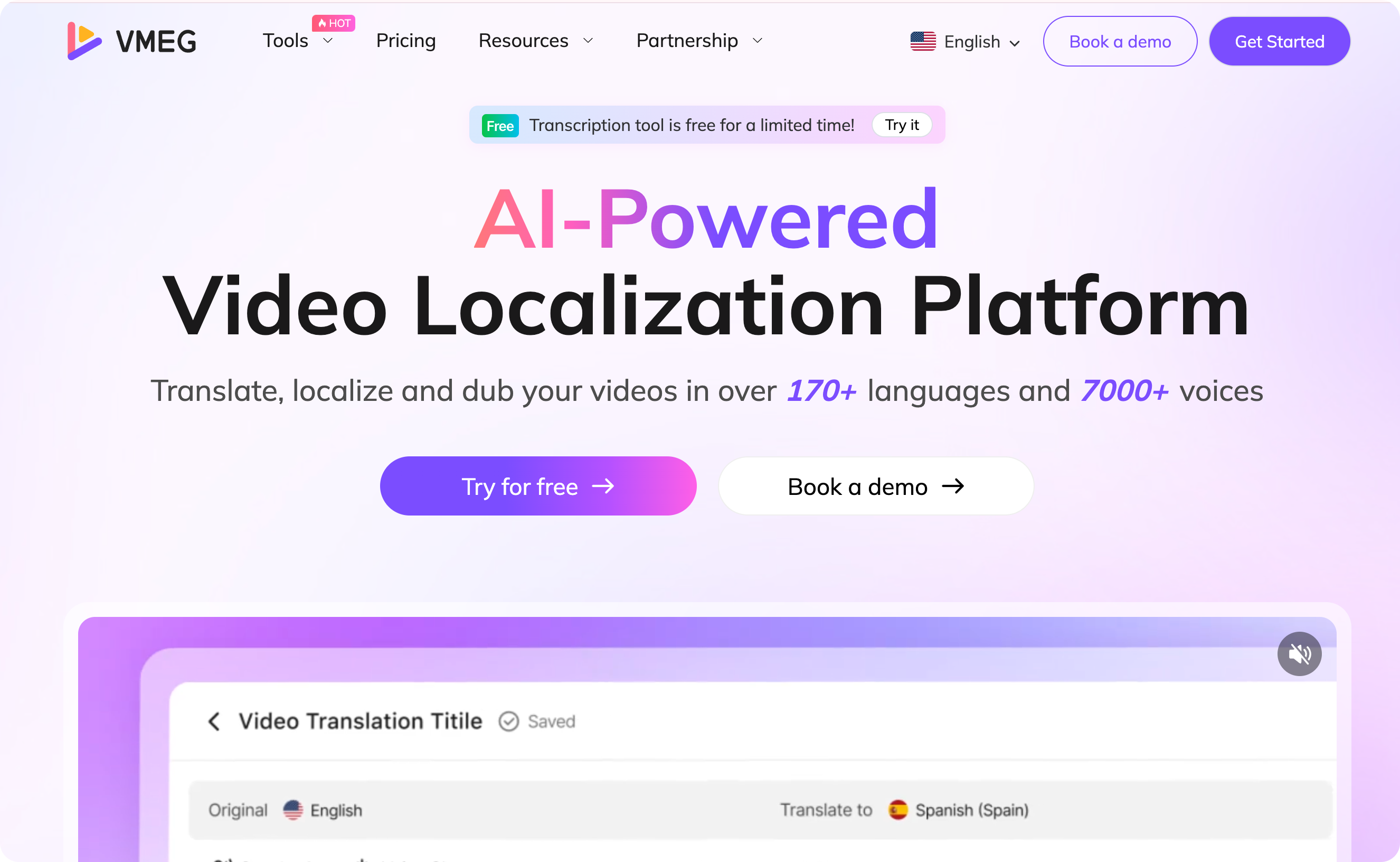
VMEG AI is a video localization platform that can simplify workflow. It offers various tools for translation, transcription, subtitles, and text-to-speech. With more than 170 languages and 7,000 lifelike voices, you will be able to localize content in just a few minutes.
How VMEG AI Handles Transcription
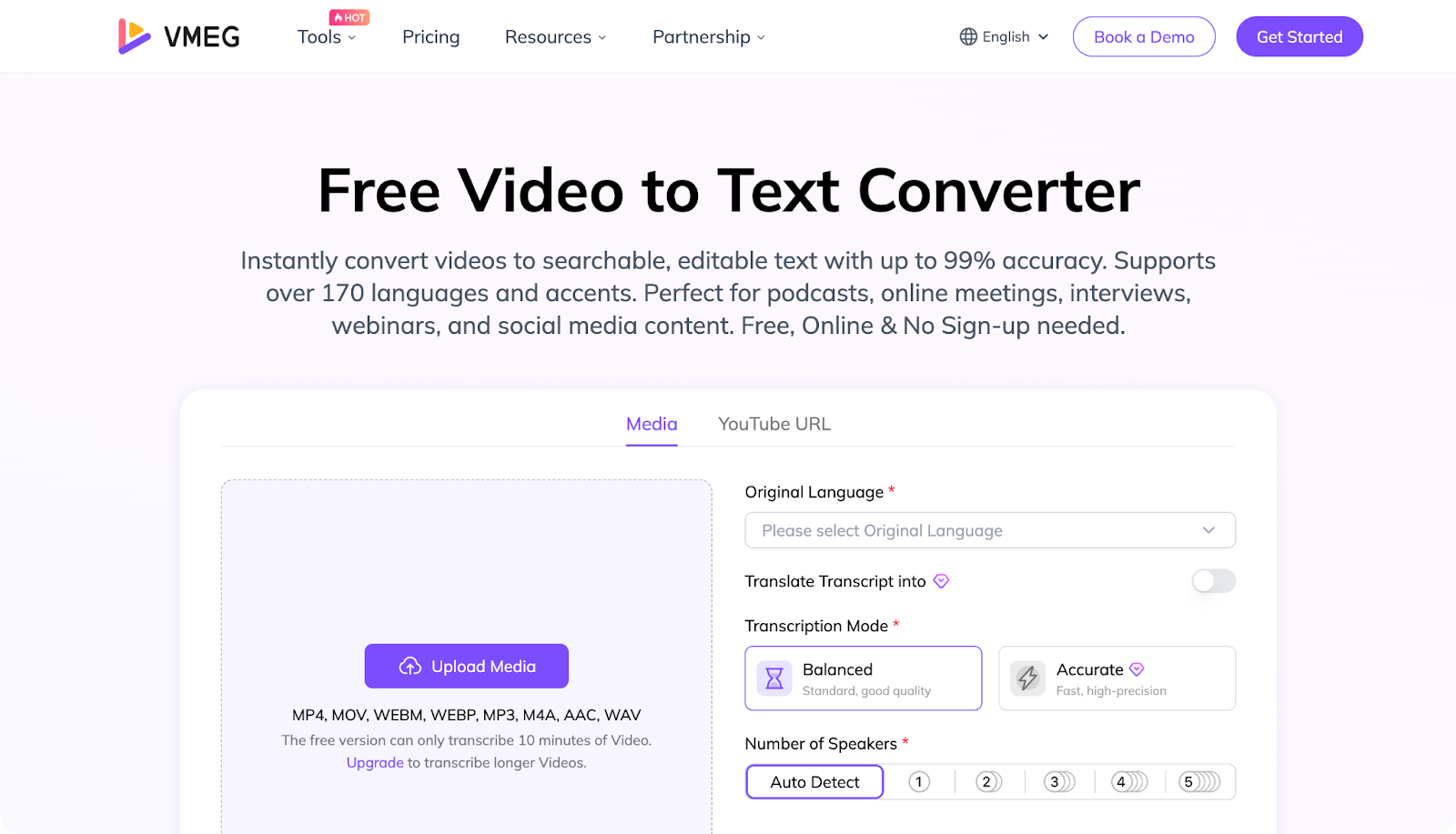
VMEG AI offers various transcription tools that allow you to transcribe audio and video to text, generate transcripts, and download subtitles.
The transcription process is simple:
- Upload media or paste a URL link.
- Choose Original Language, Translation Language, Transcription Mode, and Number of Speakers, then click Submit.
- Edit and download the transcript.
How VMEG AI Handles Captioning
VMEG AI provides subtitle tools to add captions to your videos, where you can generate, translate, and edit subtitles. It also has tools to convert MP4, MPP3, and MKV to SRT.
The steps for converting MP4, MP3, and MKV to SRT are the same as the transcription process. The process for generating, translating, and editing subtitles is also easy. Just upload the video, customize your settings, and download.
Why VMEG AI Is Ideal for Transcription vs. Caption Needs
VMEG AI is ideal for transcription and caption needs as it is:
- Has more than 7,000 lifelike voices
- Supports more than 170 languages
- Easy to use, perfect for beginners
- Fast process, transcripts and captions ready in just a few minutes
- Supports multiple video files and URL links
- All-in-one localization tool, supporting numerous tools
- Use advanced safety protocols to protect your privacy
Transcription vs. Caption: Which One Should You Use?
Transcription is best when:
- You need to repurpose audio/video content into text formats and other content types, such as blogs and articles.
- You need searchable content for better SEO results.
- You are creating resource materials or documentation.
Caption is best when:
- You need accessibility compliance to make the video accessible to viewers.
- You want to improve engagement and watch time.
- You want to give a good viewing experience to the audience.
Best Practices for Using Transcripts & Captions
It is important to know the best practices for using transcripts and captions.
SEO Best Practices
Place transcripts on the same page as the media
It will help search engines read the text more easily and connect it to the content.
Use keywords naturally
Keywords must be used naturally and avoid overstuffing.
Format transcripts for readability
If appropriate, use paragraphs, headings, and timestamps to make it easier to read.
Add descriptive titles and headings.
Add titles, headings, descriptions, and other relevant text to improve the user experience and search visibility.
Boost content length and relevance.
Transcripts add valuable text that search engines can crawl, making the content more visible.
Accessibility Best Practices
Follow accessibility standards (like WCAG)
Ensure that captions are readable, accurate, and synchronized to the video.
Use proper caption formatting.
Choose a font size, font, and background that are easy to read and complement each other well.
Do not rely on auto-captions alone.
Some platforms support auto-captions; always review them to ensure they are accurate.
Avoid unnecessary abbreviations or slang.
If possible, use general, commonly used words or phrases to ensure the audience can easily understand the content.
FAQs
Is the transcript the same as the caption?
Transcripts and captions are not the same. A transcript is a transcription of audio or video, while captions are the text that describes photos or videos.
What's the difference between transcribing and captioning?
Transcribing is the act of converting audio or video into text. Captioning is creating a text that describes the photo, and it can be closed, open, live, or SDH caption.
What is a caption example?
An example of a caption for a photo of nature or scenery is “sky above, calm within”. An example of open caption (on-screen text) is [Soft music plays] “This moment changed everything.” An example of closed caption (can be turned on/off by the viewer) is [Laughter]
Teacher: Great job, everyone!
What are the common mistakes in transcription?
Some common transcription mistakes include misheard words, incorrect spelling, missing words or phrases, poor punctuation, and inconsistent formatting.
What is the main purpose of a caption?
The main purpose of a caption is to give clarity, context, and accessibility to the audience.
Conclusion
Transcription and captioning provide benefits for content creation and video localization. Transcription is ideal for those who want to repurpose audio and video content into blogs, notes, articles, etc. A caption is suitable for those who want to provide a better viewing experience for the audience.
If you want to make your transcription, captioning, and video localization workflow smoother, try VMEG AI, an easy-to-use platform perfect for all your video localization needs. Whether you need transcription, translation, subtitles, or text-to-speech, VMEG AI can do it for you.


The VMEG Team
Behind VMEG stands a passionate team of creatives, engineers, and language lovers. At the crossroads of AI and storytelling, they craft tools that bridge languages and cultures.