


'%3e%3cpath%20d='M21.0949%203.79395L13.9961%209.82854H21.0949V3.79395Z'%20stroke='black'%20stroke-width='1.38'%20stroke-miterlimit='10'/%3e%3cpath%20d='M13.998%209.82854L7.44531%203.79395V9.82854H13.998Z'%20stroke='black'%20stroke-width='1.38'%20stroke-miterlimit='10'/%3e%3cpath%20d='M13.9961%202.69922V25.1919'%20stroke='black'%20stroke-width='1.38'%20stroke-miterlimit='10'/%3e%3cpath%20d='M20.5488%2016.4113L13.9961%209.82812V18.2217L20.5488%2024.0918V16.4113Z'%20stroke='black'%20stroke-width='1.38'%20stroke-miterlimit='10'/%3e%3cpath%20d='M7.44531%2016.4113L13.998%209.82812V18.0526L7.44531%2024.0918V16.4113Z'%20stroke='black'%20stroke-width='1.38'%20stroke-miterlimit='10'/%3e%3cpath%20d='M4.71094%209.82812V18.6057H7.44125V16.4113L13.9941%209.82812H4.71094Z'%20stroke='black'%20stroke-width='1.38'%20stroke-miterlimit='10'/%3e%3cpath%20d='M13.9961%209.82812L20.5488%2016.4113V18.6057H23.2792V9.82812H13.9961Z'%20stroke='black'%20stroke-width='1.38'%20stroke-miterlimit='10'/%3e%3c/g%3e%3c/svg%3e)

'%3e%3cmask%20id='mask0_21456_29260'%20style='mask-type:luminance'%20maskUnits='userSpaceOnUse'%20x='0'%20y='0'%20width='28'%20height='28'%3e%3cpath%20d='M27.5%200.5H0.5V27.5H27.5V0.5Z'%20fill='white'/%3e%3c/mask%3e%3cg%20mask='url(%23mask0_21456_29260)'%3e%3cpath%20d='M14%2027.5C13.4854%2024.1035%2011.8974%2020.9608%209.46828%2018.5317C7.03922%2016.1026%203.89651%2014.5146%200.5%2014C3.89651%2013.4854%207.03922%2011.8974%209.46828%209.46828C11.8974%207.03922%2013.4854%203.89651%2014%200.5C14.5147%203.89644%2016.1028%207.03905%2018.5318%209.46816C20.9609%2011.8972%2024.1035%2013.4853%2027.5%2014C24.1035%2014.5147%2020.9609%2016.1028%2018.5318%2018.5318C16.1028%2020.9609%2014.5147%2024.1035%2014%2027.5Z'%20fill='url(%23paint0_linear_21456_29260)'/%3e%3c/g%3e%3c/g%3e%3cdefs%3e%3clinearGradient%20id='paint0_linear_21456_29260'%20x1='9.5'%20y1='9.5'%20x2='20.75'%20y2='21.875'%20gradientUnits='userSpaceOnUse'%3e%3cstop%20stop-color='%23F0DCD6'/%3e%3cstop%20offset='0.914506'%20stop-color='%231D6DFF'/%3e%3c/linearGradient%3e%3cclipPath%20id='clip0_21456_29260'%3e%3crect%20width='28'%20height='28'%20fill='white'/%3e%3c/clipPath%3e%3c/defs%3e%3c/svg%3e)
'%3e%3cpath%20d='M22.8019%2011.2412L23.5234%2011.6807V12.0103L23.3172%2012.7796L14.5579%2014.9771L13.7344%2012.7951L22.8019%2011.2412Z'%20fill='%23D97757'/%3e%3cpath%20d='M19.5236%204.77832L20.5322%205.00396L20.8%205.35575L21.0552%206.19876L20.9494%206.73644L15.0712%2015.3068L13.1133%2013.2191L18.5338%205.63471L19.5236%204.77832Z'%20fill='%23D97757'/%3e%3cpath%20d='M14.4577%203.43951L15.0761%203L15.5912%203.21976L16.1065%203.9889L14.6949%2013.0345L13.7364%2012.3397L13.3242%2011.131L14.0456%204.31853L14.4577%203.43951Z'%20fill='%23D97757'/%3e%3cpath%20d='M7.84766%203.5851L8.48285%202.7199L8.89716%202.61914L9.71923%202.74717L10.125%203.08581L13.0815%2010.0748L14.1509%2013.3954L12.8997%2014.1372L8.13117%204.91019L7.84766%203.5851Z'%20fill='%23D97757'/%3e%3cpath%20d='M4.77232%208.38688L4.56641%207.50742L5.18478%206.73828L5.90613%206.84816H6.11223L10.4403%2010.2544L11.78%2011.3531L13.6349%2012.8914L12.6044%2014.7594L11.6769%2013.9903L11.0586%2013.331L5.08168%208.82593L4.77232%208.38688Z'%20fill='%23D97757'/%3e%3cpath%20d='M3.53288%2014.0982L3.06641%2013.5489L3.06647%2013.0601L3.53288%2012.8896L8.78833%2013.2193L13.9408%2013.6588L13.7736%2014.7528L3.94502%2014.2082L3.53288%2014.0982Z'%20fill='%23D97757'/%3e%3cpath%20d='M6.62378%2019.8178H5.59334L5.18359%2019.3146V18.7132L6.93299%2017.3946L14.045%2012.5674L14.7648%2013.8785L6.62378%2019.8178Z'%20fill='%23D97757'/%3e%3cpath%20d='M8.57739%2022.8884L8.16518%2022.9984L7.54688%2022.6687L7.64995%2022.1193L13.7299%2013.5488L14.5543%2014.7574L10.0201%2021.1305L8.57739%2022.8884Z'%20fill='%23D97757'/%3e%3cpath%20d='M13.7361%2023.9861L13.4271%2024.4257L12.8088%2024.6454L12.2935%2024.2058L11.9844%2023.5466L13.5301%2014.6465L14.4576%2014.7563L13.7361%2023.9861Z'%20fill='%23D97757'/%3e%3cpath%20d='M18.9869%2021.5713V22.4503L18.8838%2022.7799L18.4716%2022.9997L17.7503%2022.8974L12.7969%2015.0367L14.7617%2013.4404L16.4104%2016.6269L16.5652%2017.7805L18.9869%2021.5713Z'%20fill='%23D97757'/%3e%3cpath%20d='M21.3629%2020.2507L21.4659%2020.8L21.1568%2021.2396L20.8476%2021.1297L19.0958%2019.8112L16.4165%2017.284L14.3555%2015.7457L14.9736%2013.6582L16.0041%2014.3175L16.6226%2015.5259L21.3629%2020.2507Z'%20fill='%23D97757'/%3e%3cpath%20d='M20.0232%2014.6482L22.5995%2014.8679L23.2178%2015.3074L23.6299%2015.9667V16.441L22.4964%2016.9556L16.7256%2015.4173L14.3555%2015.3074L14.9737%2013L16.6226%2014.3185L20.0232%2014.6482Z'%20fill='%23D97757'/%3e%3c/g%3e%3c/svg%3e)
Are you using TikTok to watch and share content? According to Statista (2025), TikTok is among the most popular social media platforms.
TikTok is an effective platform for sharing a wide range of content, including learning videos, vlogs, news, movie clips, shows, and more. One thing you may notice in some content on this platform is the AI used by different creators. So, if you're curious about how to add an AI voice to TikTok, you’ve come to the right place.
Key Takeaways
- Use the text-to-speech feature on TikTok or third-party platforms to add an AI voice to your TikTok videos.
- AI voice is best suited for faceless, educational, and scalable content, but not for highly emotional or authenticity-driven personal brands.
- TikTok’s built-in text-to-speech is easy to use but limited in voice variety, customization, and uniqueness.
- External AI tools like VMEG AI offer greater control, more voice options, and better brand differentiation.
- Successful use of AI voice depends on matching the right voice style, strong scripting, proper audio sync, and compliance with TikTok rules.
What Is an AI Voice on TikTok?
The AI Voice on TikTok is a platform tool that turns text and voice recordings into AI-generated audio. This feature allows users to use AI audio rather than their own voice.
On its text-to-speech feature, you just have to type the words or phrases, then click the word, and click the “text-to-speech”.
Another way is to press the record icon, record your voice, and select the character tone or voice that best fits your content. The voices on this feature are available for personal use only.
You can also add an AI voice to TikTok using AI tools, which provides an AI voice and helps localize content.
Who Should Use AI Voice on TikTok?
AI Voice on TikTok is perfect for those who want clearer audio, do not want to add their own voice, or want to try the trend.
Faceless content creators
Content creators who do not show faces in their content can use this AI voice feature. This can enhance the overall content, making it more appealing to the audience.
Small business owners
Small business owners who primarily showcase their products, processes, or behind-the-scenes content can also use text-to-speech to make content more presentable, which may help attract customers.
Educators and coaches
Educators and coaches can use this feature if it fits with the content, and it will help in creating content that will support learning and help students learn faster. This can be used as long as it is not distracting.
Social media managers
The AI voice text-to-speech feature is also good for social media managers, especially if it matches their content and helps in providing a clearer message to the audience.
Note: Use only sound or AI voices that are allowed on TikTok, royalty-free, and suitable for commercial use. Some AI voices are available only for personal use and have usage limitations.
Who Should Avoid AI Voice on TikTok?
AI voice on TikTok may not be suitable for everyone, especially if it doesn’t align with their content and they prefer to use their own voice or brand tone.
Personal brand influencers relying on authenticity
Personal brand influencers need to build trust to promote products and services. One way to do this is to use their own or brand voice to build trust and encourage the audience to purchase from the endorsed brand.
Live reaction content
It’s hard to see the real reaction when you upload a live reaction video with an AI voice. It is better to use the original voice or sound so the audience can feel your genuine reaction.
Highly emotional storytelling
If you are creating highly emotional content, it is also better to use original audio or voice, so the audience feels the emotions and can relate more easily.
Voice-based identity creators
If you are already known for a specific voice, it is better to stick to it so your audience can easily recognize you.
Using TikTok AI videos in your content depends on your preferences, desired output, brand or personal style, and other factors.
Why AI Voice Is Growing So Fast on TikTok
The use of A voice on TikTok is growing quickly, as it aligns with how the platform works and what creators need and prefer.
Short-form video scale demands
One factor that helps creators stay visible is consistent post uploads. To remain consistent, using an AI voice may help them speed up the process and create more content.
Rise of faceless and automation-driven content
Faceless content is one of the types of video we see on the platform. The AI voice helps creators remain anonymous, especially those who create faceless content.
Accessibility and inclusivity
AI voice also makes the content more accessible to a wider audience and promotes inclusivity. It helps provide clear, consistent narration for all viewers.
Multilingual audience expansion
Some AI platforms offer tools for AI voice generation and support multiple languages, enabling you to translate the AI voice into different languages to reach a wider audience.
Lower barrier to content creation
AI voice makes content creation easier by removing common friction points, such as the need for a microphone or recording setup, performance anxiety, and retakes.
How to Add AI Voice to TikTok Using TikTok’s Built-In Text-to-Speech
Step-by-Step Guide
Here’s the Step-by-Step Guide on how to add an AI voice to TikTok using the platform's built-in Text-to-Speech:
- Open your TikTok account. Click the plus button below. Then upload or record a video.
- Tap the Text icon (letter A icon), then type the text. Click Done after typing and choosing the font style.
- Tap the text and select text-to-speech.
- Hide the text. (Optional). If you want to hide the text or prevent it from appearing on screen, pinch to compress it, then move it off-screen below the toolbar.
- Preview and post. Before posting, preview the post to ensure that the details are correct and you are satisfied with it. You can add a title, description, hashtags, and location, and customize video settings.
Pros & Cons of TikTok’s Native AI Voice
Pros
- Saves Time and Effort. It will help you save time and effort because you won’t need to record. With AI Voice, you just need to type the words or phrases, then click text to speech.
- Accessibility and Inclusivity. It promotes accessibility and inclusivity by making the video more accessible to a wider audience.
- Consistent Audio Across Videos. This will help build your brand and content, making it easier for people to recognize your brand and style.
- No equipment needed. You do not need any equipment, such as audio recording tools.
Cons
- Limited Voice Variety. TikTok doesn’t yet offer a wide range of AI voice options, which can make it difficult to find a voice that fits your content and brand.
- Mispronunciation issues. It may mispronounce some words, like slang, unique spellings, and niche terms, that can distract the audience.
- Repetitive. The sound may feel repetitive if the voice is also used by other creators.
- Limited Customization. The customization options, including speed, pitch, emotional tone, and other elements, are limited.
How to Add AI Voice to TikTok Using VMEG AI
What is VMEG AI?
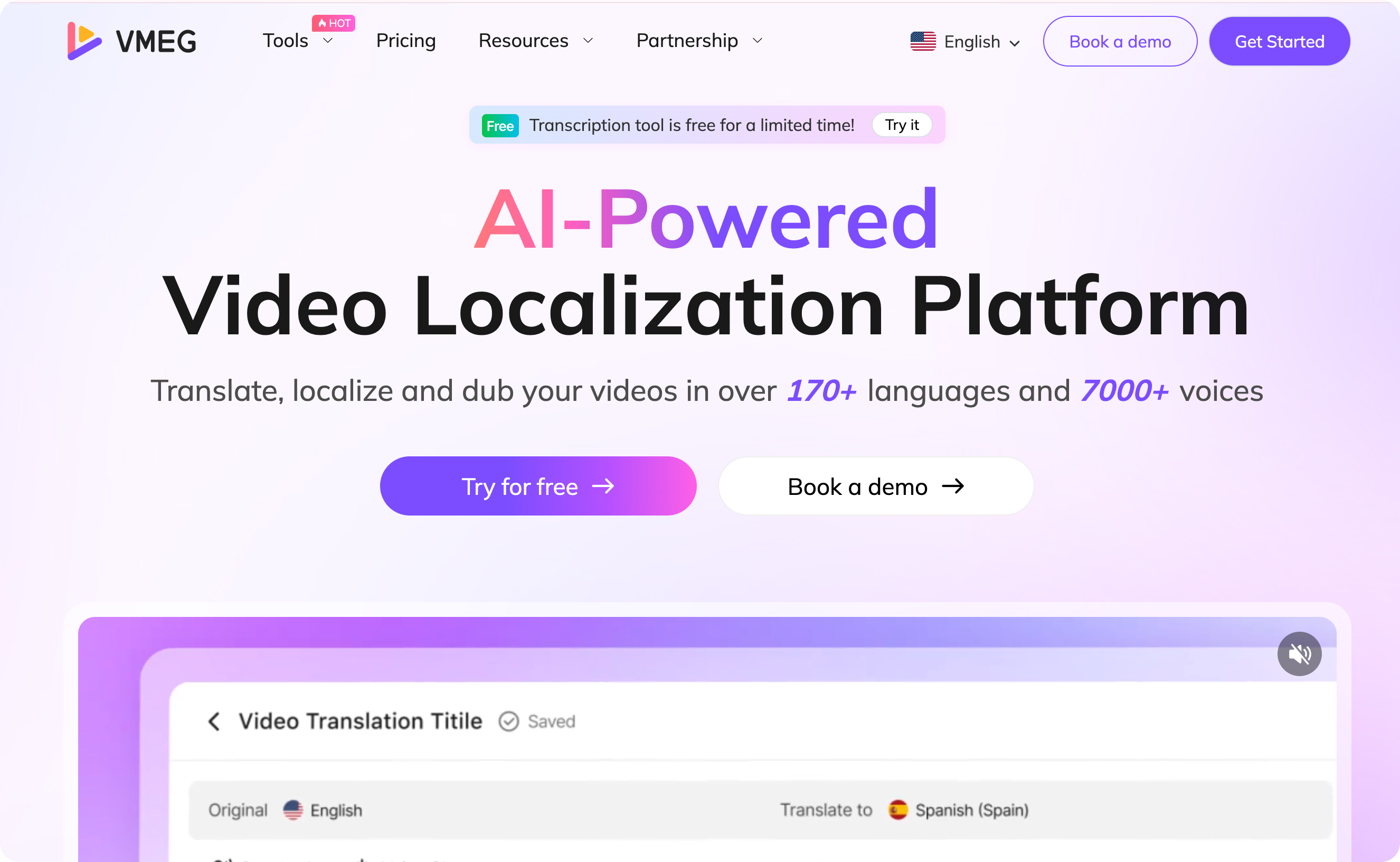
If you are looking for a platform that supports text-to-speech, VMEG AI is worth trying. You can turn text into lifelike speech in just a few seconds or minutes. It also offers a wide range of AI voices to help you choose the one that best fits your content and brand.
Why Use VMEG AI for TikTok AI Voices?
- Supports more than 170 languages and accents. You can easily localize your content across a wide range of languages.
- Has more than 7,000 lifelike voices. It offers multiple options so you can explore voices and choose the one that best suits your content.
- Customization. With VMEG AI, you can adjust speed, refine accents, insert natural pauses, and tune the pace so your audio sounds human, natural, and emotionally aligned.
How to Generate Voiceovers in 3 Simple Steps
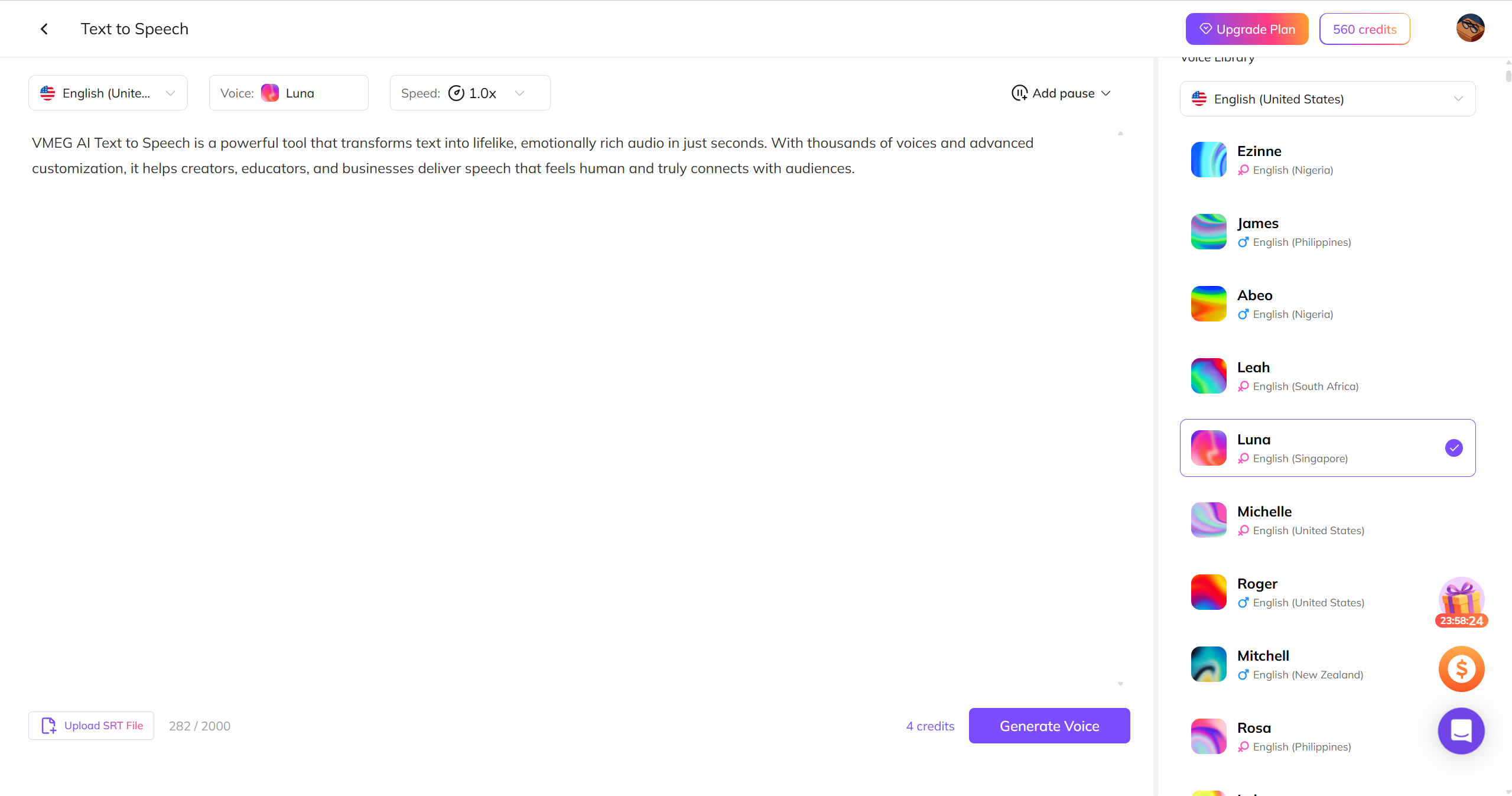
Choose a Voice. It has thousands of lifelike AI voices, giving you many options to choose the best one for your content. Whether you want a formal, casual, or other tone, there is something that fits your brand. You can clone your voice if you want to make the audio unique.
Customize and Export. After generating your audio, customize its speed, pauses, and accent to align it with the content. Then download the audio as an MP3.
Best AI Voice Styles for TikTok Content
Voice Styles That Perform Well
- Conversational and Warm. It works well for educational, explainer, and storytelling videos because it sounds like a friendly human speaking to you. It helps keep viewers engaged, encouraging them to watch and listen to the end.
- Energetic and Upbeat. This style is perfect for trends, challenges, fun clips, and some product reveals, as it has an enthusiastic tone. This adds excitement without overdoing it.
- Calm and Soothing. It is great for relaxing content, mindfulness, and ASMR-style, with a slower, gentler delivery. It makes viewers feel calm and engaged.
- Neutral & Clear. It is ideal for tutorials, informational content, or step-by-step instructions, as it has clear, simple enunciation. It keeps the audience focused on the message rather than the speaker's personality.
- Character & Themed Voices. It is best suited to personas, comedy, skits, and niche formats, offering styles for different purposes, such as quirky and dramatic.
Matching AI Voice to Content Type
It is important to match the AI voice to the content type to keep the viewers engaged and ensure that the content is presentable.
Content | Voice Style |
Educational / How-To | Conversational, Neutral & Clear |
Listicles & “Top Tips” | Energetic & Upbeat, Conversational |
Product Reviews / Unboxings | Neutral & Clear, Slightly Characterized |
Storytime / Narratives | Conversational, Calm & Soothing |
Humor & Skits | Character & Themed, Energetic & Upbeat |
ASMR / Relaxation | Calm & Soothing |
Trend Alerts & Fast Facts | Energetic & Upbeat |
AI Voice Best Practices for TikTok Growth
Script Writing Tips for AI Voices
- Write for the ear, not the eye. Use short sentences, with one idea per line. Avoid complex grammar and long clauses to make the sound pleasing to hear.
- Strong hook in the first 1–2 seconds. The first few seconds determine whether the audience will stay or scroll. Ensure the hook aligns with the content to keep the audience engaged.
- Create an effective script structure. Start with a hook that keeps the audience engaged. Then provide context with a quick explanation, followed by more details that include a lesson or twist, and a call to action.
- Use natural pacing cues. Use commas, periods, and line breaks properly to make it sound more natural.
- Write how people talk. Write naturally to make it more engaging. Use contractions and read the scripts aloud before generating audio.
Audio & Video Sync Tips
- Perfect alignment boosts retention. The audio must match the visuals to emphasize points. This helps improve retention and keeps viewers engaged from start to finish.
- Caption timing. Display captions 0.1 - 0.2 seconds before the word is spoken and highlight keywords to reinforce retention.
- Audio balance. Ensure the audio is balanced; the AI voice and background music must be balanced to ensure a pleasing audio.
- Layering tips. Use simple background music so it doesn’t cause annoyance, and add subtle sound effects only during transitions or reveals.
- Avoid common mistakes. Avoid static visuals, do not let background music overpower the voice, and ensure the voice is synchronized.
Compliance & Copyright Considerations
- AI voice licensing. Use voices that are royalty-free and licensed for commercial use. Do not use voices that mimic real celebrities or influencers.
- Music rules. Use Music that is allowed for commercial use, TikTok-approved sounds, and licensed royalty-free music. Do not upload copyrighted songs manually.
- Impersonation & safety. Do not impersonate real people and avoid misleading or deceptive narration. Always follow TikTok's community guidelines and terms and conditions.
- Disclosure. You can add an optional disclosure about the use of AI Voice to help build trust in the content.
Common Problems and Fixes
- AI Voice Sounds Robotic or Unnatural. The problem may be a flat tone, a lack of emotion, and viewers scrolling within 1-2 seconds. To fix this, choose voices that fit your content, adjust the speed, add pauses with commas and line breaks in your script, and avoid long sentences to keep the audio and message clear.
- Low Engagement Despite Clear Audio. The issue in this scenario is insufficient watch time, despite the voice being clear. To fix it, start with a hook in the first few seconds, remove generic introductions, add pattern breaks, and emphasise curiosity or tension in the opening line to keep viewers engaged.
- Audio not syncing with video or captions. If you notice the voice lags behind the visuals or captions appear late, you can fix it by adding an AI voice before final edits, manually aligning captions before the words are spoken, and keeping clips short.
- Background Music Overpowers the AI Voice. Another problem is when the voice is drowned out, leading viewers to leave due to unclear audio. To fix it, ensure the background music doesn’t overpower the voice and that it fades in and out smoothly.
- TikTok Text-to-Speech Sounds Overused. Since TikTok doesn’t offer a wide range of AI voices, the audio may feel generic because users have already heard the same sounds from other creators. Use external AI voice tools to create a unique voice that aligns with your brand or personality.
FAQs
How do I add an AI voice to a TikTok video?
To add an AI voice to TikTok, you can use the TikTok text-to-speech feature. Simply click the text icon, type the text, click Done, tap the text to see the text-to-speech option, and choose text-to-speech. The other option is to use an external text-to-speech tool to generate unique audio that matches your content.
Is an AI voice allowed on TikTok?
Yes, AI-generated voices are allowed on TikTok, but ensure they are royalty-free, not copyrighted, and suitable for different use cases.
What is the AI voice everyone uses on TikTok?
The AI voice used on TikTok is mostly the default text-to-speech voice. Others use external platforms to generate audio.
What does TTS mean on TikTok?
TTS on TikTok means Text-to-Speech. It is a feature that turns text into audio.
How do I add an automated voice to TikTok?
You can add an automated voice to TikTok using its text-to-speech feature or third-party tools, such as VMEG AI.
Conclusion
Adding an AI voice to TikTok is easy. It can be done using TikTok's text-to-speech feature. This feature saves time and effort by eliminating the need to record voice. However, this sound can feel repetitive or overused because other creators use it frequently.
Voice is an important part of branding, helping your content stand out and be easily recognizable. If you want to use a unique voice style that matches your content and brand, try VMEG AI. With its more than 7,000 lifelike voices, you can explore various sounds and choose the best one. You can also clone your voice for a more personalized audio experience.


The VMEG Team
Behind VMEG stands a passionate team of creatives, engineers, and language lovers. At the crossroads of AI and storytelling, they craft tools that bridge languages and cultures.