

'%3e%3cpath%20d='M21.0949%203.79395L13.9961%209.82854H21.0949V3.79395Z'%20stroke='black'%20stroke-width='1.38'%20stroke-miterlimit='10'/%3e%3cpath%20d='M13.998%209.82854L7.44531%203.79395V9.82854H13.998Z'%20stroke='black'%20stroke-width='1.38'%20stroke-miterlimit='10'/%3e%3cpath%20d='M13.9961%202.69922V25.1919'%20stroke='black'%20stroke-width='1.38'%20stroke-miterlimit='10'/%3e%3cpath%20d='M20.5488%2016.4113L13.9961%209.82812V18.2217L20.5488%2024.0918V16.4113Z'%20stroke='black'%20stroke-width='1.38'%20stroke-miterlimit='10'/%3e%3cpath%20d='M7.44531%2016.4113L13.998%209.82812V18.0526L7.44531%2024.0918V16.4113Z'%20stroke='black'%20stroke-width='1.38'%20stroke-miterlimit='10'/%3e%3cpath%20d='M4.71094%209.82812V18.6057H7.44125V16.4113L13.9941%209.82812H4.71094Z'%20stroke='black'%20stroke-width='1.38'%20stroke-miterlimit='10'/%3e%3cpath%20d='M13.9961%209.82812L20.5488%2016.4113V18.6057H23.2792V9.82812H13.9961Z'%20stroke='black'%20stroke-width='1.38'%20stroke-miterlimit='10'/%3e%3c/g%3e%3c/svg%3e)

'%3e%3cmask%20id='mask0_21456_29260'%20style='mask-type:luminance'%20maskUnits='userSpaceOnUse'%20x='0'%20y='0'%20width='28'%20height='28'%3e%3cpath%20d='M27.5%200.5H0.5V27.5H27.5V0.5Z'%20fill='white'/%3e%3c/mask%3e%3cg%20mask='url(%23mask0_21456_29260)'%3e%3cpath%20d='M14%2027.5C13.4854%2024.1035%2011.8974%2020.9608%209.46828%2018.5317C7.03922%2016.1026%203.89651%2014.5146%200.5%2014C3.89651%2013.4854%207.03922%2011.8974%209.46828%209.46828C11.8974%207.03922%2013.4854%203.89651%2014%200.5C14.5147%203.89644%2016.1028%207.03905%2018.5318%209.46816C20.9609%2011.8972%2024.1035%2013.4853%2027.5%2014C24.1035%2014.5147%2020.9609%2016.1028%2018.5318%2018.5318C16.1028%2020.9609%2014.5147%2024.1035%2014%2027.5Z'%20fill='url(%23paint0_linear_21456_29260)'/%3e%3c/g%3e%3c/g%3e%3cdefs%3e%3clinearGradient%20id='paint0_linear_21456_29260'%20x1='9.5'%20y1='9.5'%20x2='20.75'%20y2='21.875'%20gradientUnits='userSpaceOnUse'%3e%3cstop%20stop-color='%23F0DCD6'/%3e%3cstop%20offset='0.914506'%20stop-color='%231D6DFF'/%3e%3c/linearGradient%3e%3cclipPath%20id='clip0_21456_29260'%3e%3crect%20width='28'%20height='28'%20fill='white'/%3e%3c/clipPath%3e%3c/defs%3e%3c/svg%3e)
'%3e%3cpath%20d='M22.8019%2011.2412L23.5234%2011.6807V12.0103L23.3172%2012.7796L14.5579%2014.9771L13.7344%2012.7951L22.8019%2011.2412Z'%20fill='%23D97757'/%3e%3cpath%20d='M19.5236%204.77832L20.5322%205.00396L20.8%205.35575L21.0552%206.19876L20.9494%206.73644L15.0712%2015.3068L13.1133%2013.2191L18.5338%205.63471L19.5236%204.77832Z'%20fill='%23D97757'/%3e%3cpath%20d='M14.4577%203.43951L15.0761%203L15.5912%203.21976L16.1065%203.9889L14.6949%2013.0345L13.7364%2012.3397L13.3242%2011.131L14.0456%204.31853L14.4577%203.43951Z'%20fill='%23D97757'/%3e%3cpath%20d='M7.84766%203.5851L8.48285%202.7199L8.89716%202.61914L9.71923%202.74717L10.125%203.08581L13.0815%2010.0748L14.1509%2013.3954L12.8997%2014.1372L8.13117%204.91019L7.84766%203.5851Z'%20fill='%23D97757'/%3e%3cpath%20d='M4.77232%208.38688L4.56641%207.50742L5.18478%206.73828L5.90613%206.84816H6.11223L10.4403%2010.2544L11.78%2011.3531L13.6349%2012.8914L12.6044%2014.7594L11.6769%2013.9903L11.0586%2013.331L5.08168%208.82593L4.77232%208.38688Z'%20fill='%23D97757'/%3e%3cpath%20d='M3.53288%2014.0982L3.06641%2013.5489L3.06647%2013.0601L3.53288%2012.8896L8.78833%2013.2193L13.9408%2013.6588L13.7736%2014.7528L3.94502%2014.2082L3.53288%2014.0982Z'%20fill='%23D97757'/%3e%3cpath%20d='M6.62378%2019.8178H5.59334L5.18359%2019.3146V18.7132L6.93299%2017.3946L14.045%2012.5674L14.7648%2013.8785L6.62378%2019.8178Z'%20fill='%23D97757'/%3e%3cpath%20d='M8.57739%2022.8884L8.16518%2022.9984L7.54688%2022.6687L7.64995%2022.1193L13.7299%2013.5488L14.5543%2014.7574L10.0201%2021.1305L8.57739%2022.8884Z'%20fill='%23D97757'/%3e%3cpath%20d='M13.7361%2023.9861L13.4271%2024.4257L12.8088%2024.6454L12.2935%2024.2058L11.9844%2023.5466L13.5301%2014.6465L14.4576%2014.7563L13.7361%2023.9861Z'%20fill='%23D97757'/%3e%3cpath%20d='M18.9869%2021.5713V22.4503L18.8838%2022.7799L18.4716%2022.9997L17.7503%2022.8974L12.7969%2015.0367L14.7617%2013.4404L16.4104%2016.6269L16.5652%2017.7805L18.9869%2021.5713Z'%20fill='%23D97757'/%3e%3cpath%20d='M21.3629%2020.2507L21.4659%2020.8L21.1568%2021.2396L20.8476%2021.1297L19.0958%2019.8112L16.4165%2017.284L14.3555%2015.7457L14.9736%2013.6582L16.0041%2014.3175L16.6226%2015.5259L21.3629%2020.2507Z'%20fill='%23D97757'/%3e%3cpath%20d='M20.0232%2014.6482L22.5995%2014.8679L23.2178%2015.3074L23.6299%2015.9667V16.441L22.4964%2016.9556L16.7256%2015.4173L14.3555%2015.3074L14.9737%2013L16.6226%2014.3185L20.0232%2014.6482Z'%20fill='%23D97757'/%3e%3c/g%3e%3c/svg%3e)
Key Points
- YouTube's auto-dubbing feature automatically translates audio for wider reach, but viewers can easily revert to the original language by adjusting the "Audio Track" settings on the video player.
- By accessing YouTube Studio, creators can uncheck "Allow automatic dubbing" in the Upload defaults section to ensure their original voice is heard.
- If the dubbed audio persists, simple fixes like clearing the cache or updating the app usually resolve the issue. For high-quality, professional video localization, tools like VMEG AI offer more precise control than automated defaults.
YouTube is a popular social media platform for creating and watching content. One feature introduced by YouTube is automatic dubbing for videos. Since this is still a new feature, some users may not be used to it yet and may be affected, especially when watching their favorite content.
If you prefer not to use it and are wondering how to turn off auto dubbed on YouTube, you’ve come to the right place. In this article, we will discuss what YouTube auto-dubbing is, who is affected by it, how it is enabled automatically, how to turn off automatic dubbing on YouTube, and troubleshooting methods to improve the experience.
What Is YouTube Auto-Dubbing?
Auto-dubbing is one of YouTube's features, where audio tracks are translated into different languages. In the video description, you will see an “auto-dubbed” mark for content with audio tracks.
These dubs are automatically generated when a video is published. However, this feature may not be available to all creators, and some still need to apply for it. Not all languages are supported, so some videos cannot be dubbed.
These dubs are automatically generated when a video is published. However, this feature may not be available to all creators, and some still need to apply for it. Not all languages are supported, so some videos cannot be dubbed.
Auto-dubbing is different from auto-generated captions or subtitles in videos. In auto-dubbing, the original voice is replaced by a new voice. On the other hand, auto-generated captions or subtitles are text that appears on the screen for viewers to read while watching the video, while the original audio is retained.
Why Does YouTube Use Auto-Dubbing?
YouTube uses auto-dubbing to help content creators reach a wider audience. In this way, your audience can easily understand the message you want to convey and hear it in their local language. The content will be more accessible and can drive greater engagement, making your brand known to more people.
Benefits for creators:
· Reach a wider audience
· Build a strong relationship with the audience
· Get more engagements
· Breaks down the language barrier
· Reduces the cost of hiring a professional dubbing service
Benefits for the viewers:
· Easily understand the message of the video
· Discover more content
· Helps in multitasking
· Supports accessibility needs
Who Is Affected by YouTube’s Auto-Dubbed Audio?
YouTube’s auto-dubbing feature may not be for everyone. Some may like this feature because it can be beneficial, but others may prefer the original audio because they are used to it. It depends on what will give them the best platform experience. Since the auto-dubbing feature is still new, there may be challenges with accuracy and quality, which may affect the output.
Users who might be affected by auto-dubbed audio may ask or search for “how to turn off auto dubbed on YouTube.”
Here are the affected users by auto-dubbed audio:
1. Viewers
Some viewers prefer the original language or other languages, such as English. In a Reddit discussion, a user said that it is annoying. This can disrupt the overall user experience and affect the watch time and engagement.
2. Creators
Some creators may benefit from this feature, but some may be affected. Video engagement may be affected if viewers lose interest in the content. It can affect viewers' watch time, impacting the channel or brand. For creators, it is best to understand your audience's feedback to see whether the feature helps them understand the message clearly or disrupts them so that you can adjust it in the settings.
How YouTube Auto-Dubbing Gets Enabled Automatically
According to YouTube, when an eligible creator uploads a video, YouTube will automatically dub the video. YouTube will detect the language and dub it into different languages. There are still limitations: this feature is not yet available to all users, and not all languages are supported.
The creator can also delete or unpublish the dub if it is irrelevant, if they think it is not advantageous to them, or if they prefer the original audio. Creators can also review the video dubs before publishing to ensure that they are satisfied with their content.
How to Turn Off Auto Dubbed on YouTube
If you prefer to turn off auto-dubbing on YouTube, you can do so easily with these simple steps.
Step-by-step Guide to Turn Off Auto Dubbing on YouTube for Viewers
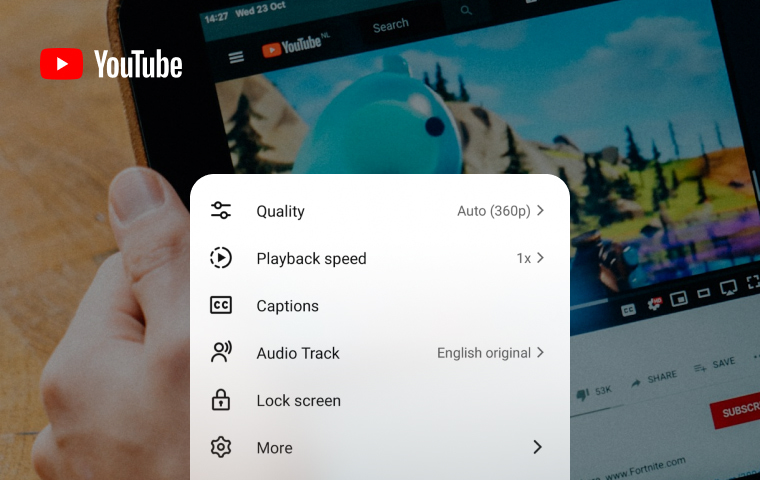
- Open the video and click the settings. If you are using a mobile, click the settings icon in the upper-right corner. On a desktop, the settings icon is in the lower-right corner.
- Click “Audio Track”. Some videos don’t have “Audio Track”.
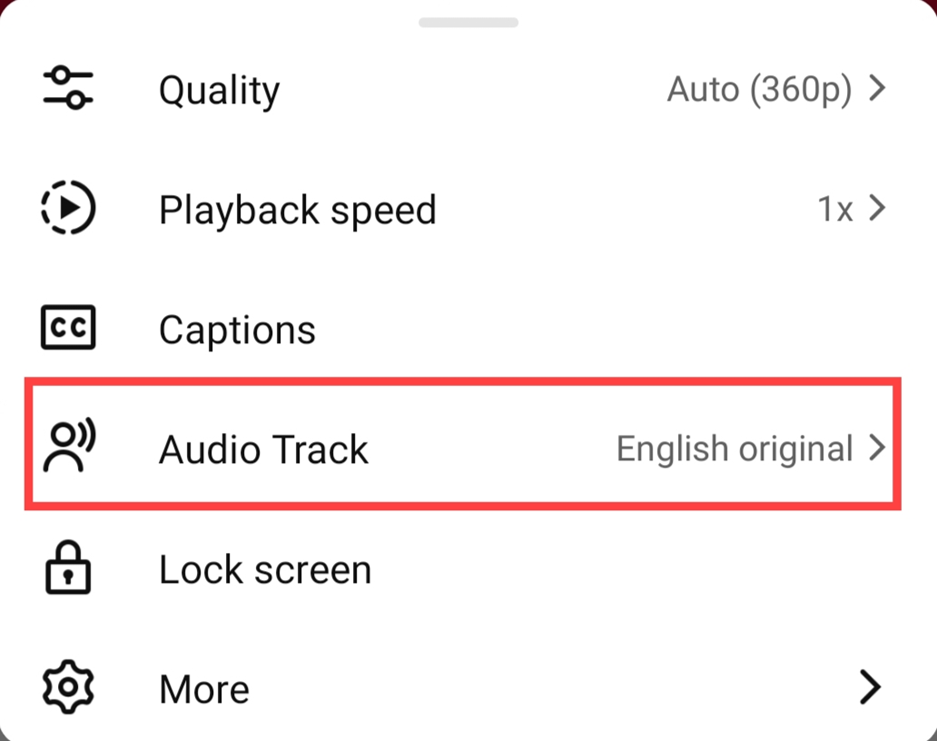
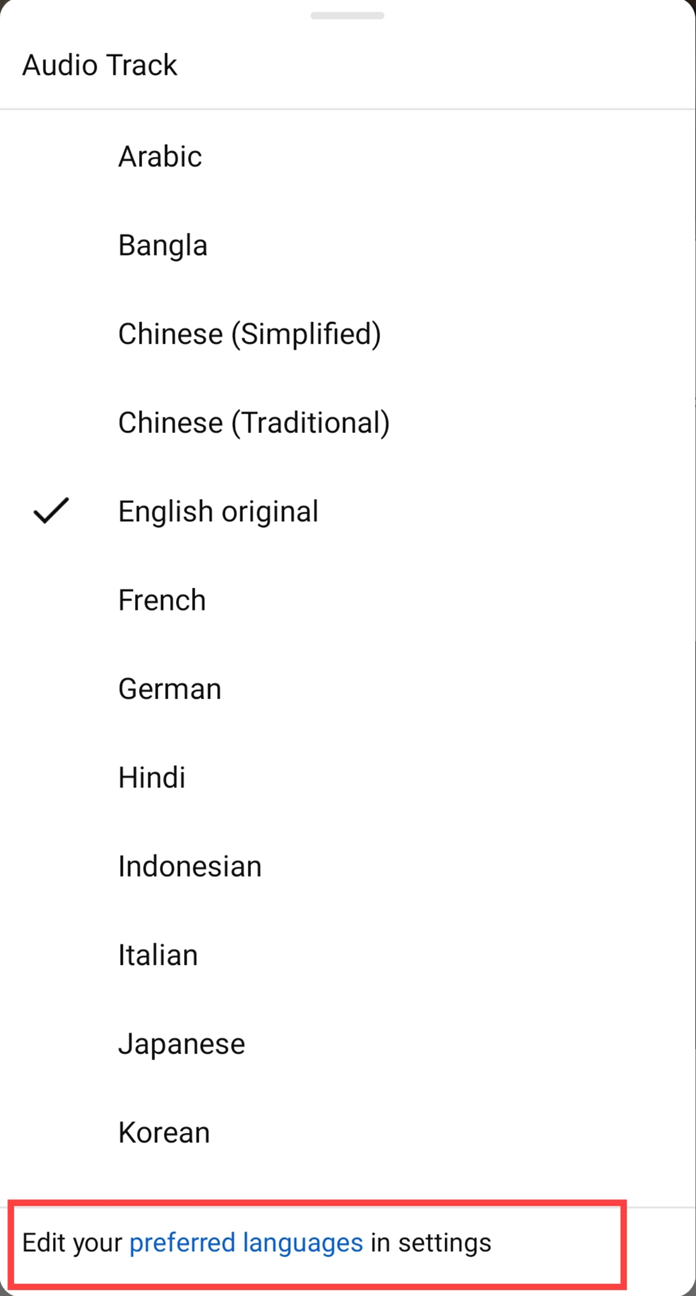
- Choose the language you prefer. After choosing the language, go back to the video to see if the language you chose has already been applied.
- In addition to the previous steps, you can also edit preferred languages to customize them. Click “preferred languages.”
- After clicking “preferred languages,” you will be redirected to the settings page. If you are using a mobile, click “Preferred Languages,” and if you are on a desktop, click “add or edit languages” on the language section.
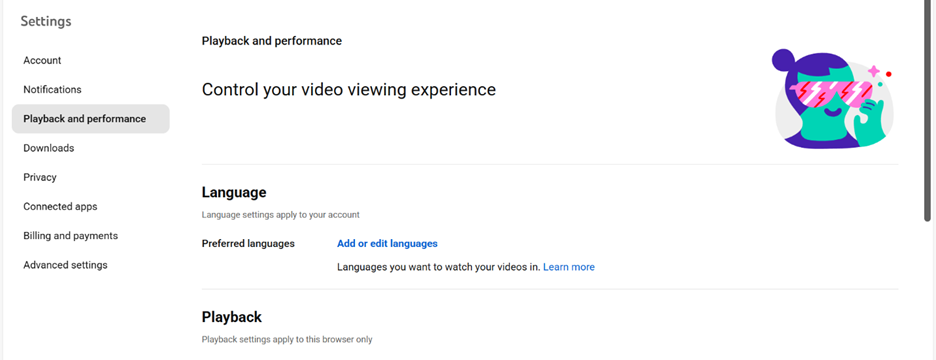
- Choose the languages you want and click “confirm”.
Step-by-Step Guide to Turn Off Auto Dubbing on YouTube for Creators
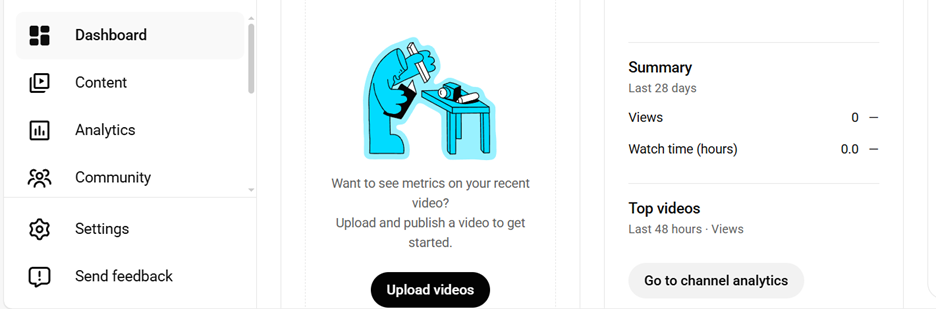
- Go to YouTube Studio and click Settings on the left side of the dashboard.
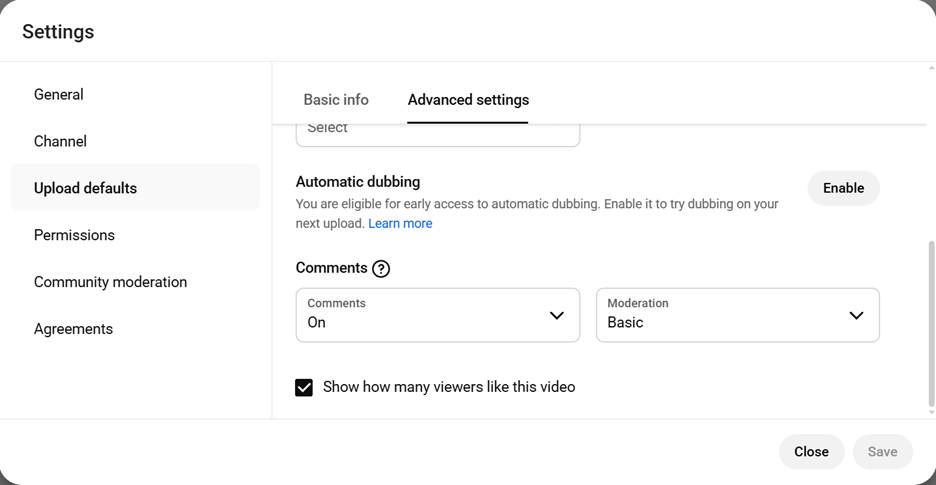
- Click “Upload defaults” and go to “Advanced Settings”. Scroll down to see automatic dubbing. Click enable if it is not yet enabled.
- Uncheck “Allow automatic dubbing.” Click “OK” to save.
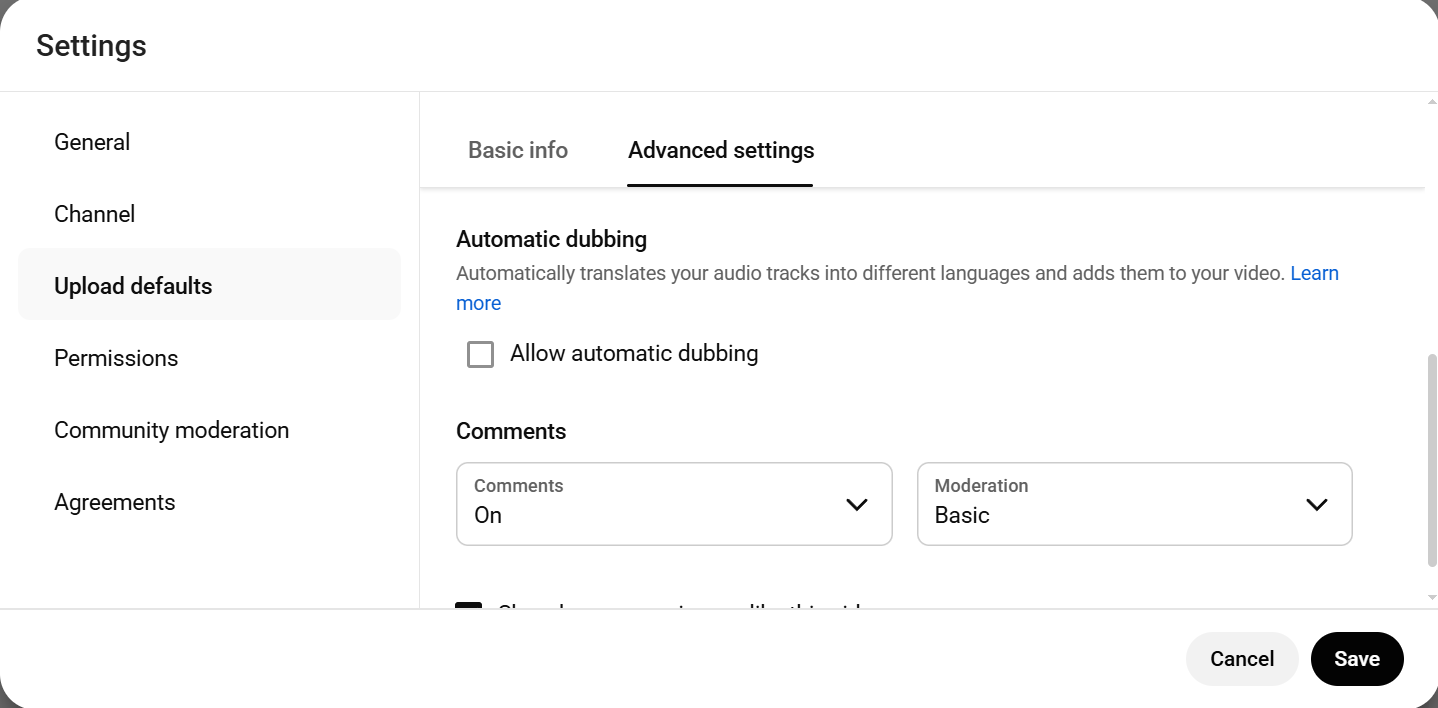
*Image Credits: Screenshots from YouTube mobile and desktop accessed November 2025 for illustrative purposes.
Troubleshooting If Auto-Dubbing Still Won’t Turn Off
After you turn off auto-dubbing, check the video to see if the audio is in the original language or in the language you prefer. If you have already turned off auto-dubbing and the audio has not yet been applied to the video, try some troubleshooting.
Method 1: Recheck the turning off process to see if your preferences were applied.
For viewers, in some instances, parts of the process may not be applied immediately. Check the audio track and the selected language to see if it was applied. There is a check mark beside the specific language you chose. If it doesn’t have a check mark, it means it wasn’t successfully applied previously.
For creators, check the video settings and make sure that the automatic dubbing is unchecked.
Method 2: Check the audio tracks.
The audio track option is not available to all videos. Click the settings to see if the audio track is available.
Method 3: Clear cache
Clearing the cache can fix glitches by refreshing the platform.
Method 4: Update the app
If you are using the YouTube app, make sure it is up to date. Open the App Store and search for YouTube to see if an update is needed. Click the update button to install the latest version of the app.
Method 5: Sign out and back in.
Try signing out of your YouTube account, then sign back in.
Method 6: Ask for Help or Report the issue to YouTube
Click the “Help” option to see the resources that might help you, ask the help community, or send your feedback. Try messaging them on their social media account, like X (formerly Twitter). Before sending a message on your chosen platform, check if it is the official account to avoid being scammed.
Method 6: Ask a Friend or a Professional
Ask someone knowledgeable about YouTube audio dubbing and its settings, as they can help you turn it off.
Dub Your Videos with VMEG AI
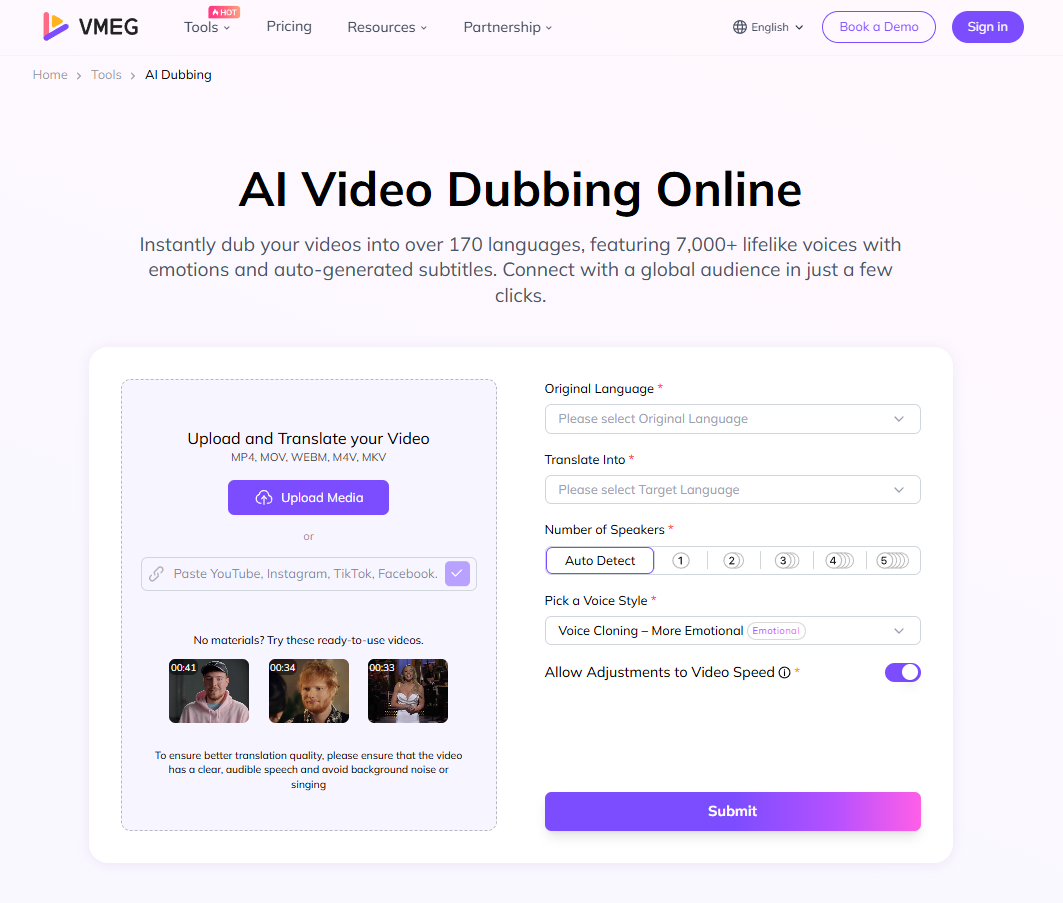
Dubbing videos brings the content to a global audience. If you are looking for a tool to dub your videos, try VMEG AI’s video dubbing. It features more than 7.000 lifelike voices and over 170 languages.
The dubbing process is easy and takes only a few simple steps: upload and dub your video, then review and export it in the file format you prefer.
Final Thoughts
Language is important when watching a YouTube video. Not all users may prefer YouTube’s auto-dubbing feature, and some are looking for ways to turn it off. Turning it off is easy, whether you are a creator or a viewer.
Creators can uncheck automatic dubbing in YouTube Studio settings, and viewers can change the audio track and choose their preferred language. Turning the auto-dubbing feature on or off helps everyone customize their viewing and sharing experience on the platform. Users can also explore language and other settings to personalize their content.
Creators can uncheck automatic dubbing in YouTube Studio settings, and viewers can change the audio track and choose their preferred language. Turning the auto-dubbing feature on or off helps everyone customize their viewing and sharing experience on the platform. Users can also explore language and other settings to personalize their content.
If you are a content creator or a social media manager, and want to create dubs for your videos to reach a global audience, try VMEG AI’s auto-dubbing tool. Dub your videos into more than 170 languages and explore the perfect lifelike voice that fits your style from its more than 7,000 voices. It is easy to use and can turn your videos into different languages with just a few clicks.
Keywords
- how to stop youtube from translating audio
- how to turn off auto translate on youtube
- how to turn off auto dubbed on youtube
- remove dubbed audio youtube
- change YouTube video language
FAQs
How do I turn off auto-dubbing on YouTube as a creator?
Go to YouTube Studio, click Settings > Upload defaults > Advanced Settings. Scroll down to see the automatic dubbing, uncheck the “Allow automatic dubbing” box, then click Save.
How do I turn off auto-dubbing on YouTube as a viewer?
Click the Settings icon in the video player, then select Audio Track and choose your preferred language.
Why is YouTube auto-dubbing my videos?
YouTube automatically dubs videos, but it still depends on the user's settings. For creators, YouTube automatically dubs the video if the “automatic dubbing” is enabled. Viewers can change the audio track language.
How do I change the language dubbing on YouTube?
Click the settings icon and choose “Audio Track,” then select your preferred language.
How do I enable auto-dubbed videos on YouTube?
For creators, go to YouTube Studio > Settings > Upload Defaults > Advanced Settings. Scroll down to see the automatic dubbing, and check the box, then click “Save” to apply the changes. For viewers, click the settings icon, then Audio Track, and select the language.
Why is my YouTube audio in another language?
The YouTube audio is in another language, depending on your language settings. You can check the Audio Track to see which language is applied.


The VMEG Team
Behind VMEG stands a passionate team of creatives, engineers, and language lovers. At the crossroads of AI and storytelling, they craft tools that bridge languages and cultures.