In the previous post, we turned a mantra into engineering practice: decode once, stream in memory, encode once. Watermarking, subtitle burn-in, and multi-clip TTS mixing all went into one Complex Filtergraph. CPU utilization went up, intermediate files disappeared, and render time came down.
There is no free lunch. Filtergraphs are fast because they keep what used to be on-disk intermediates as in-memory queues of raw frames. Once inputs pile up and the video gets long, that graph's working set can blow the process up. In memory-constrained environments (a single render process, a container cgroup), the usual ending is OOM.
In VMEG video translation export pipeline, this shows up quickly: a long video needs multilingual subtitle burn-in, watermark overlay, and dozens or hundreds of TTS clips mixed onto one timeline. Peak memory has to stay predictable, and each segment still has to decode once and encode once.
The Real Problem: OOM Is Not About File Size
Many people assume memory explodes because "the video is too big." FFmpeg does not load an entire mp4 into RAM. What actually occupies memory is already-decoded data that downstream filters have not consumed yet: YUV frames for video, PCM for audio.
Peak memory of a Filtergraph is roughly:
peak ≈ concurrent decoded streams × frame (or PCM block) size × filter queue depthSo there are three knobs, not one:
- Stream count: how many TTS clips enter amix at once? How many overlay streams sit on the main picture?
- Frame size: resolution. A 4K frame has 9× the pixels of 720p, so memory is close to 9× at the same queue depth.
- Graph lifetime: if a 2-hour video goes through one graph, those queues stay alive until encoding finishes.
The previous post's "merge everything into one command" is right for short clips with few inputs. Once stream count and lifetime run away together, the accelerator becomes an OOM factory.
❌ Anti-pattern: one graph eats the entire video
import ffmpeg

# 2-hour output + 200 TTS clips + hundreds of subtitle overlays, all in one graph
inputs = [ffmpeg.input(f"tts_{i}.wav").audio for i in range(200)]
mixed = ffmpeg.filter(inputs, "amix", inputs=200, duration="longest")
# Same on the video side: main picture, stickers, and subtitles all overlaid together
# The process queues decoded data and memory climbs
The fix is clear: put a budget on the work. Do not fall back to one-command-per-step serial scripts. Cut the large graph into a sequence of small ones. Inside each segment, still decode once, stream in memory, encode once. Between segments, connect with compact intermediate files.
Cut 1: Split Video by Pixel-Seconds, Not a Fixed Duration
A single graph cannot live forever. A 2-hour 1080p video and a 2-minute 720p clip are not the same working set.
If you always cut at 60 seconds, 720p is often too conservative, while 4K can still blow up. A more stable budget keeps the pixel volume per segment roughly constant:
segment duration = base duration × base pixel count / current pixel countUsing 720p (1280×720) and 90 seconds as the baseline:
| Resolution | Pixels vs 720p | Segment duration (clamped to 10–300s, frame-aligned) |
|---|---|---|
| 720p | 1× | ≈ 90 s |
| 1080p | 2.25× | ≈ 40 s |
| 4K | 9× | hits the floor ≈ 10 s |
Higher resolution means larger frames, so segments must be shorter to keep the peak down. Segment duration should also align to the frame period (round(duration * fps) / fps). Otherwise the cut lands between two frames, and concat produces a duplicated or missing frame.
There is another cap that is easy to miss: overlay nodes per segment. Subtitle burn-in is a chain of overlay filters. Node count grows with subtitle count, and each subtitle also hangs an image or a subtitle stream. We cap subtitles per segment in the tens. When the cap is hit, the cut moves forward to the start of the next subtitle, instead of letting one graph grow without bound.
After cutting, fragments shorter than about 1 second are merged into the previous segment. Tiny fragments barely help memory, but they force extra concat steps and encoder cold starts.
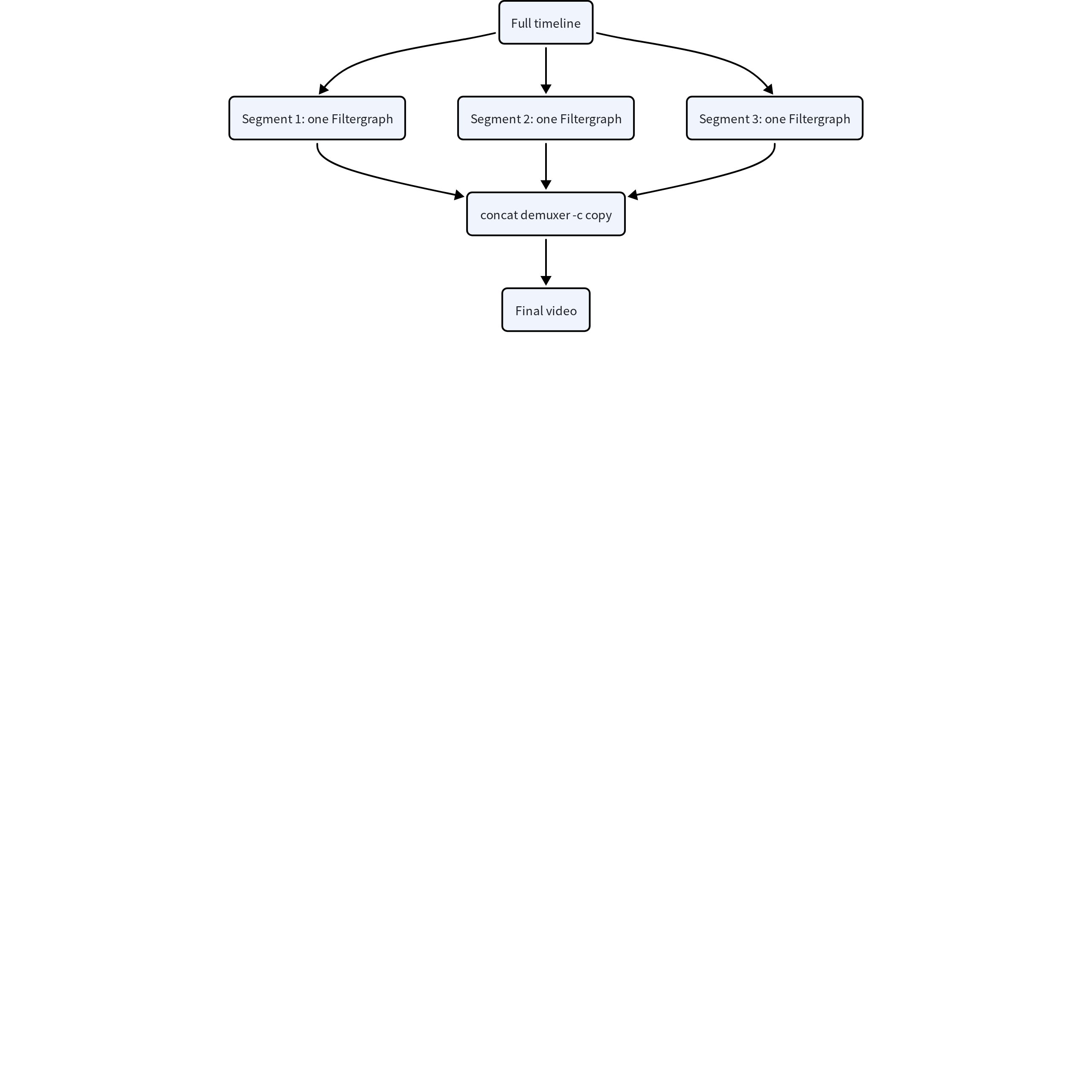
Inside each segment, it is still the same composite graph from the previous post: main picture, subtitles, and watermarks finish in memory, with a single encode. Between segments, write ordinary video files, then join them with the concat demuxer and -c copy. Copy does not re-encode, so the extra encodes equal the number of segments, not "segments × processing steps."
Cut 2: Audio Is a Different Kind of Memory; Do Not Feed amix Everything
Video working set is driven mainly by frame size. Audio fails differently: amix holds every input until the longest one ends. In video translation, dozens or hundreds of TTS clips are normal. Feeding them all into one amix means decoding and buffering all of that PCM at once.
The approach is simple: each graph amixes a bounded number of streams, writes an intermediate file, then concat joins the chunks in time order. Segment duration does not need to be fixed in advance. It is whatever span those clips cover on the timeline. Dense speech makes a short segment; sparse speech makes a long one. The peak stays pinned to "how many streams mix at once," not "how many seconds this chunk is."
❌ One amix of 200 streams
streams = [ffmpeg.input(f"tts_{i}.wav").audio.filter("adelay", delays=str(i * 1000), all=True) for i in range(200)]
out = ffmpeg.filter(streams, "amix", inputs=200, duration="longest")
✅ amix in bounded batches, then concat
MAX_MIX = 50
chunks = []
for i in range(0, len(tts_items), MAX_MIX):
    group = tts_items[i : i + MAX_MIX]
    start, end = group[0].start, max(item.end for item in group)
    duration = end - start
    streams = [shifted(item, origin=start) for item in group]
    # Silent bed fills [start, end] so concat can tile the timeline
    base = ffmpeg.input("aevalsrc=0", f="lavfi", t=duration).audio
    mixed = ffmpeg.filter(streams + [base], "amix", inputs=len(streams) + 1, normalize=0)
    path = f"/tmp/mix_{i}.m4a"
    ffmpeg.output(mixed, path, acodec="aac").overwrite_output().run()
    chunks.append(path)

# Chunks are already AAC; concat demuxer -c copy builds the full track
Workflow comparison:
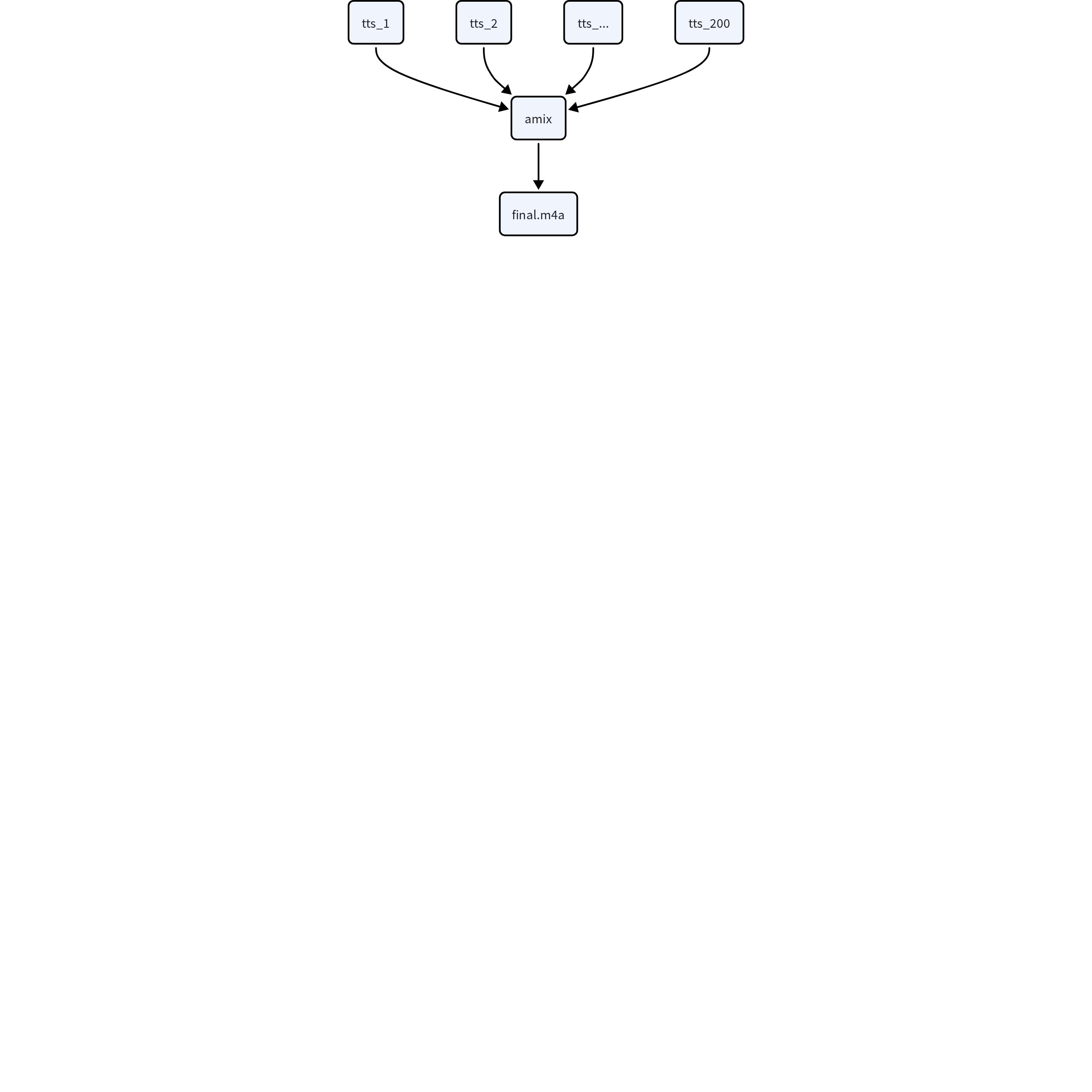
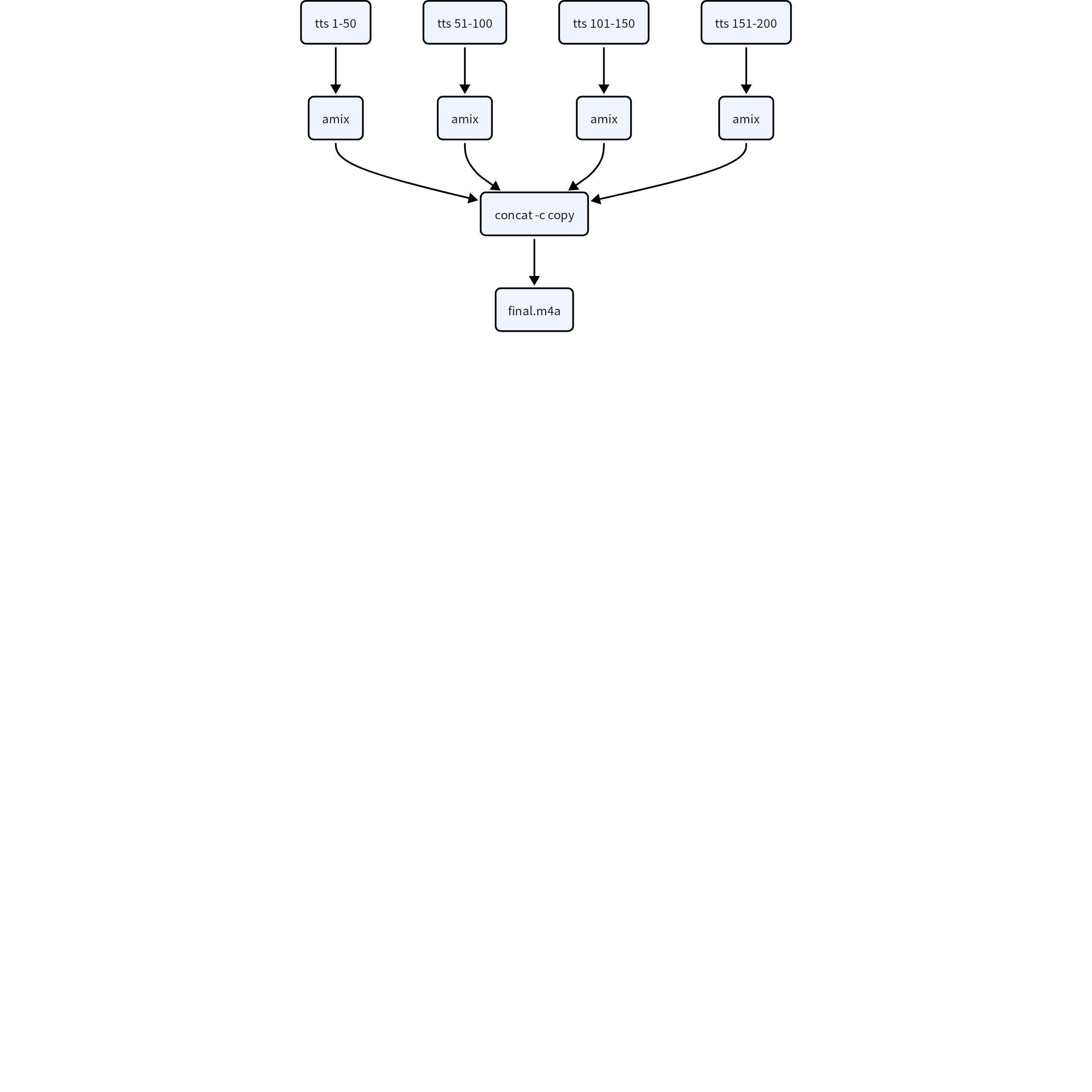
The first graph queues 200 PCM streams at once. The second mixes at most 50 streams, then joins with -c copy. Each graph stays at most MAX_MIX + 1 active inputs. Intermediates are encoded AAC, not PCM. Video segments are budgeted by pixels; audio segments are budgeted by stream count. Do not mix the two budgets.
Two More Engineering Details
The Filtergraph string itself can blow up. A dynamically built -filter_complex can run to thousands or tens of thousands of characters. Besides being hard to debug (the previous post already switched to ffmpeg-python), oversized arguments hit command-line length limits. Past a threshold, stop stuffing the graph into argv: write it to a script file and let FFmpeg read it with -/filter_complex.
Cuts must be joinable. Frame-align video boundaries, keep audio chunks duration-aligned, and merge tiny fragments so timestamps stay continuous under -c copy. If the memory scheme produces misaligned shards, you have to re-encode to concat, and the encode passes saved in the previous post come back.
Conclusion
The composite pipeline is still the right idea. To keep it alive on long videos, add a working-set budget outside the single graph:
- Bound lifetime: split video by pixel-seconds, and cap overlay nodes separately; split audio by amix stream count, then concat.
- Do not retreat inside a segment: each segment still decodes once, streams in memory, and encodes once; join segments with -c copy, so splitting does not become a second re-encode.
The mantra gets a second half: decode once, stream in memory, encode once, but the graph must be bounded.
In VMEG video translation export path, these caps turn long-video render memory from "grows linearly with duration" into "predictable from resolution." A single machine can finish hours-long dubbed output. The cost is more segments and one extra concat step. The gain is that the OOM killer no longer takes the process down.
Once graphs are bounded, those segments become natural units of parallelism. The next post will cover how to fan them out and turn a single-machine budget into multi-machine speedup.