In multimedia backend engineering, FFmpeg is an unavoidable cornerstone. In vmeg's video translation pipeline, the video export stage involves TTS voiceover processing (speed adjustment, volume control), multi-track mixing, subtitle burning, watermark overlay, and audio-video merging. Many teams, in the early stages of development, tend to split these processing steps into independent sequential operations.
This "procedural" serial processing approach may seem fine at low volume, but when facing large-scale, high-concurrency video export tasks, it becomes a nightmare: low CPU utilization, disk I/O bottlenecks, and agonizing rendering times.
Today, we'll start from the underlying principles and explore how to push FFmpeg performance to its limits by eliminating intermediate files, building complex Filtergraphs, and introducing the ffmpeg-python engine.
Core Pain Points: Why Is Your FFmpeg So Slow?
Before diving into optimization, we need to identify the culprits slowing down rendering and tackle them one by one. The core principle is simple: whenever memory permits, combine all operations into a single Complex Filtergraph to complete all work in one encode-decode pass. Let's break it down.
Pain Point 1: Fatal Re-encoding
In video processing, encoding is the most CPU-intensive step. If your pipeline looks like: Video A -> (watermark + encode) -> Intermediate Video B -> (subtitle + encode) -> Final Video C, then the same frames are decoded and re-encoded twice. This not only causes generation loss but also wastes multiples of compute power.
❌ Anti-pattern (same frames encoded twice):
# Step 1: Add watermark (first encode)
ffmpeg -i bg.mp4 -i watermark.png -filter_complex "[0:v][1:v]overlay" -c:v libx264 temp.mp4

# Step 2: Add subtitles from intermediate file (second encode, same frames re-encoded)
ffmpeg -i temp.mp4 -vf subtitles=sub.ass -c:v libx264 final.mp4
✅ Solution: Merge into a single encode pass with Complex Filtergraph
FFmpeg's -filter_complex parameter allows us to build a Directed Acyclic Graph (DAG) in memory. After decoding, audio-video data flows through the filter graph as raw pixels (YUV) or raw samples (PCM), undergoing overlay, subtitle, and other processing, with only a single encode at the final output.
# Watermark and subtitles in a single encode pass
ffmpeg -i bg.mp4 -i watermark.png \
  -filter_complex "[0:v][1:v]overlay[vmark];[vmark]subtitles=sub.ass[vout]" \
  -map "[vout]" \
  -c:v libx264 final.mp4
Pain Point 2: I/O Bottlenecks and Idle Multi-Core from Serial Operations
Many beginners like to chain multiple FFmpeg commands in Bash scripts. Each command requires: read file -> decode -> process -> encode -> write to disk. In this mode:
- Disk I/O becomes the bottleneck: frequent read/write of large temporary files (e.g., lossless intermediate formats).
- Multi-core CPU utilization is extremely low: modern servers have 32 or 64 cores, but a single simple FFmpeg command often saturates only a few cores, with the rest waiting on I/O.
✅ Solution: In-memory streaming + multi-core concurrency
When multiple filter nodes are assembled in a single Complex Filtergraph, FFmpeg's internal scheduler automatically assigns different nodes to different threads for concurrent execution. All intermediate data flows in memory as raw formats, eliminating disk I/O and enabling true multi-core parallelism.
Take a common video translation scenario: "multiple TTS audio clips each undergoing speed adjustment, volume control, timeline offset, then final mixing":
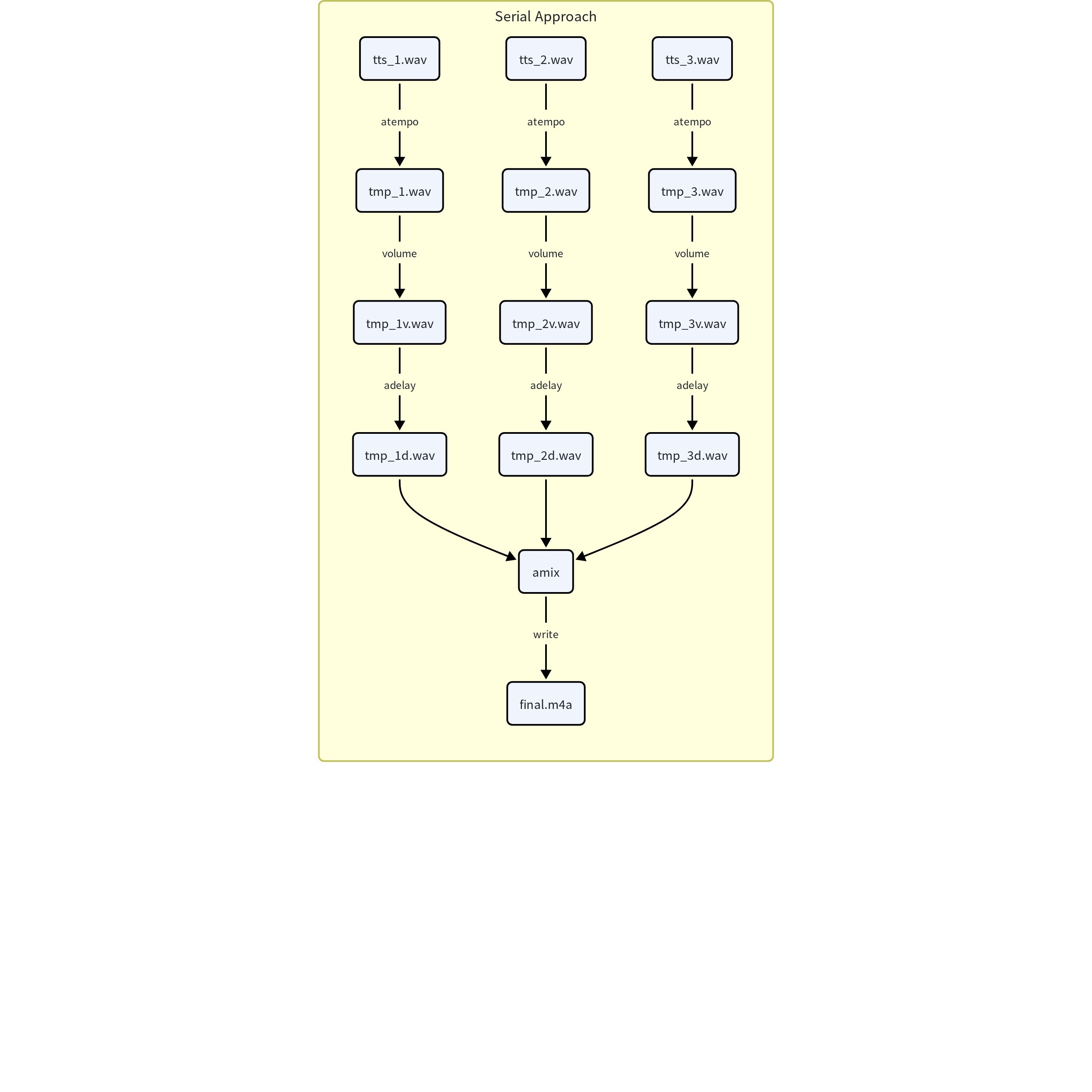
❌ Serial approach: multiple FFmpeg commands + intermediate files
# Step 1: Adjust speed for each TTS clip
ffmpeg -i tts_1.wav -filter:a atempo=1.2 tmp_1.wav
ffmpeg -i tts_2.wav -filter:a atempo=1.5 tmp_2.wav
ffmpeg -i tts_3.wav -filter:a atempo=1.0 tmp_3.wav

# Step 2: Adjust volume
ffmpeg -i tmp_1.wav -filter:a volume=0.8 tmp_1v.wav
ffmpeg -i tmp_2.wav -filter:a volume=1.2 tmp_2v.wav
ffmpeg -i tmp_3.wav -filter:a volume=0.9 tmp_3v.wav

# Step 3: Set start offsets
ffmpeg -i tmp_1v.wav -filter:a adelay=0|0 tmp_1d.wav
ffmpeg -i tmp_2v.wav -filter:a adelay=5000|5000 tmp_2d.wav
ffmpeg -i tmp_3v.wav -filter:a adelay=10000|10000 tmp_3d.wav

# Step 4: Final mix
ffmpeg -i tmp_1d.wav -i tmp_2d.wav -i tmp_3d.wav \
  -filter:a amix=inputs=3:duration=longest final.m4a
9 commands, 9 disk read/write operations. Each step goes through the full "decode -> process -> encode -> write" cycle, with massive time wasted on I/O.
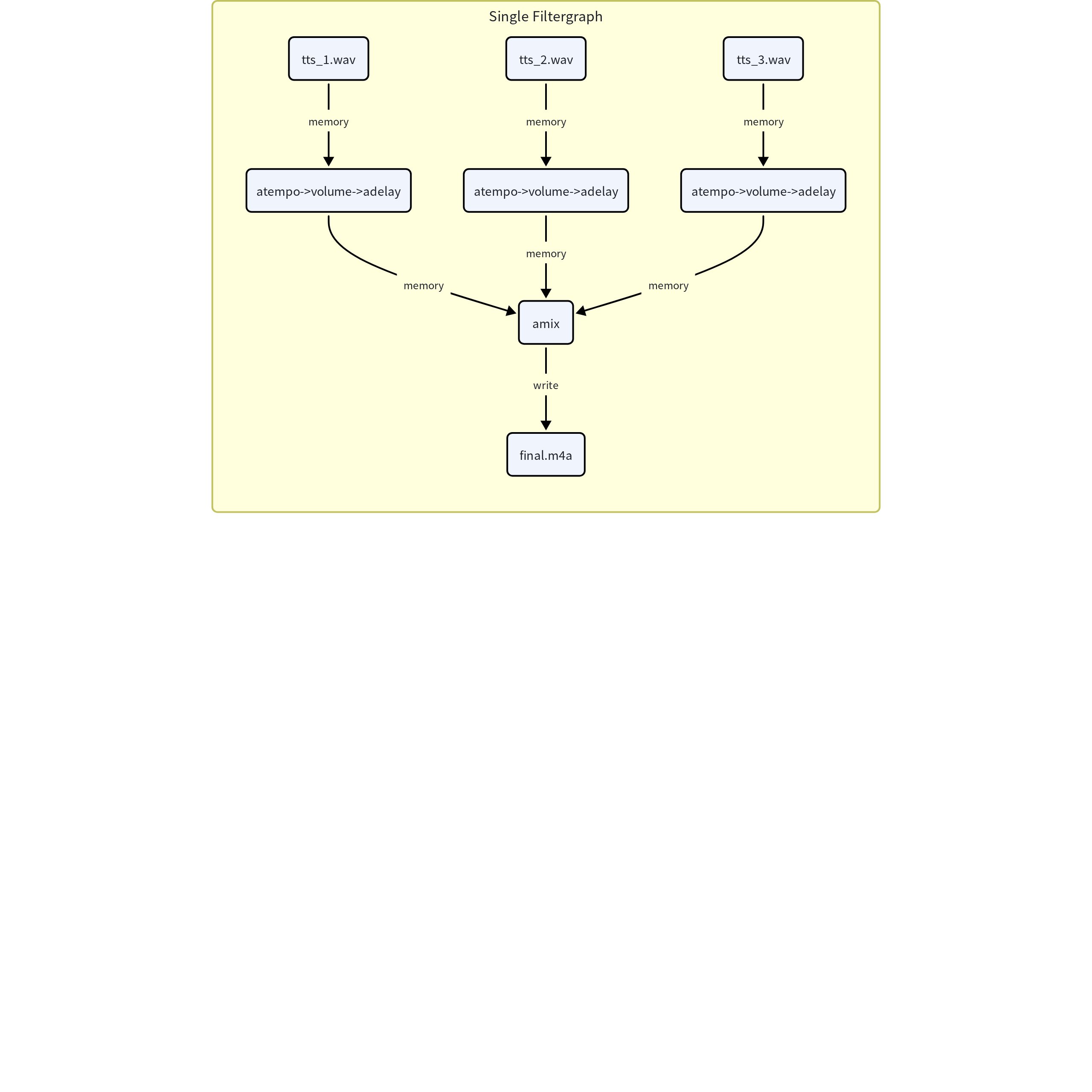
✅ Single Filtergraph: all in one step
ffmpeg -i tts_1.wav -i tts_2.wav -i tts_3.wav \
  -filter_complex \
  "[0:a]atempo=1.2,volume=0.8,adelay=0|0[a1]; \
   [1:a]atempo=1.5,volume=1.2,adelay=5000|5000[a2]; \
   [2:a]atempo=1.0,volume=0.9,adelay=10000|10000[a3]; \
   [a1][a2][a3]amix=inputs=3:duration=longest[aout]" \
  -map "[aout]" \
  -c:a aac final.m4a
1 command, all intermediate data flows in memory. atempo, volume, and adelay execute concurrently in different threads, delivering multiple times the speed.
Workflow comparison:
Engineering Challenge: Managing Complex Filtergraphs Elegantly
While Complex Filtergraphs deliver extreme performance, real-world engineering presents a critical maintainability problem: command string concatenation is practically inhumane.
When business logic gets complex -- say, dynamically adding N image stickers, M audio segments, and multi-language subtitles based on user input -- the resulting FFmpeg command can be thousands of characters long. Single quotes, double quotes, escape characters, and stream labels (like [v1], [a2]) are error-prone and nearly impossible to debug.
Introducing ffmpeg-python for Declarative Pipelines
To solve this engineering pain point, we need to abandon the primitive subprocess.run(f"ffmpeg -i ...") string concatenation approach and adopt the ffmpeg-python library.
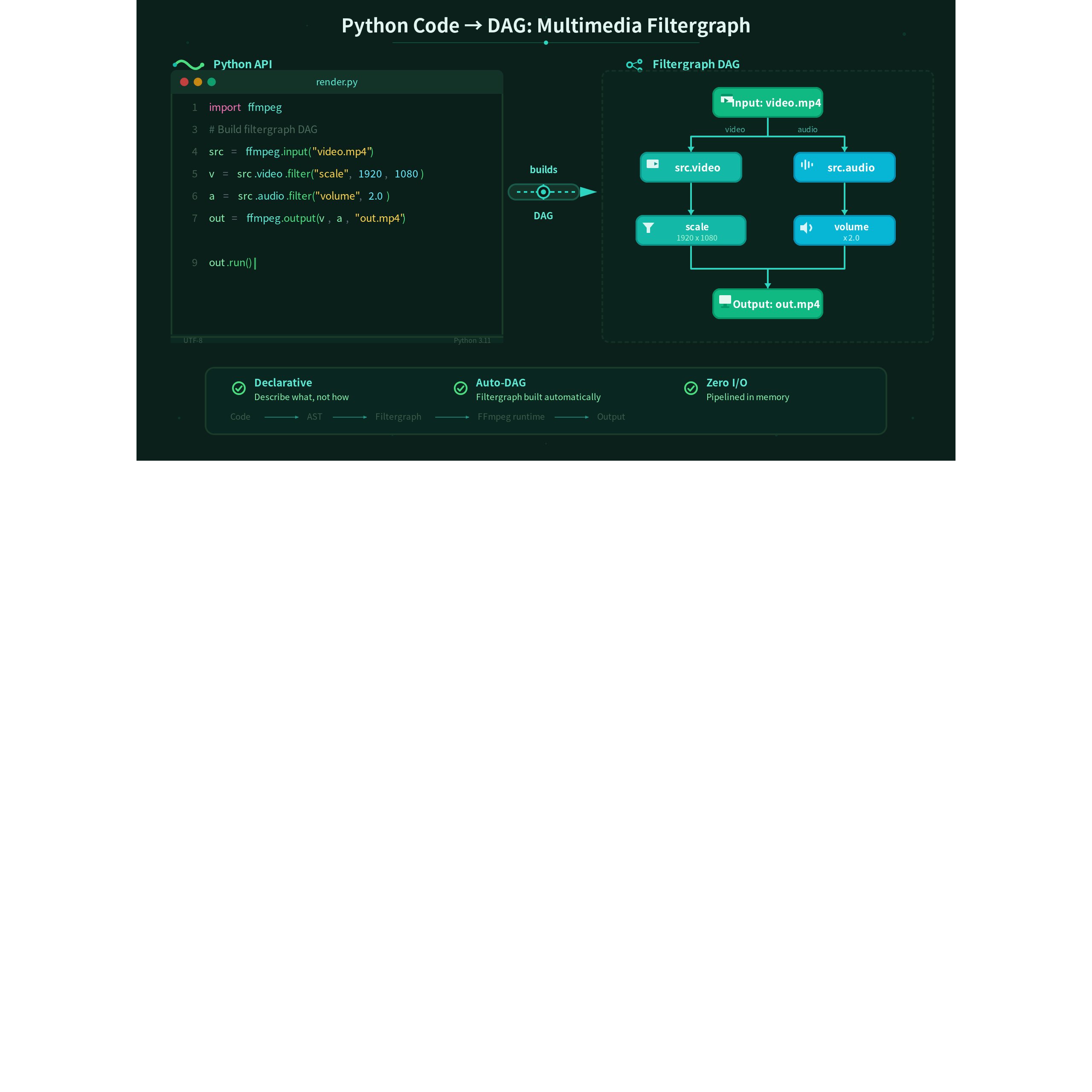
ffmpeg-python provides a declarative API that doesn't execute commands immediately. Instead, it helps us build the complex DAG in Python, then compiles it into the correct FFmpeg command at the end. Stream label management is handled by the library, business logic becomes modular and reusable functions, and it's ideal for dynamic assembly in complex business scenarios -- balancing FFmpeg's raw performance with high-level language maintainability.
Rewriting the TTS audio processing example above with ffmpeg-python:
import ffmpeg

# Declare input sources
tts_1 = ffmpeg.input('tts_1.wav').audio
tts_2 = ffmpeg.input('tts_2.wav').audio
tts_3 = ffmpeg.input('tts_3.wav').audio

# Chain processing for each TTS: speed -> volume -> offset
a1 = tts_1.filter('atempo', 1.2).filter('volume', 0.8).filter('adelay', '0|0')
a2 = tts_2.filter('atempo', 1.5).filter('volume', 1.2).filter('adelay', '5000|5000')
a3 = tts_3.filter('atempo', 1.0).filter('volume', 0.9).filter('adelay', '10000|10000')

# Mix and output
audio_out = ffmpeg.filter([a1, a2, a3], 'amix', inputs=3, duration='longest')
output = ffmpeg.output(audio_out, 'final.m4a', acodec='aac')
ffmpeg.run(output, overwrite_output=True)
No hand-written stream labels, no string concatenation -- each processing step is a clear Python object chain. Compared to hand-writing FFmpeg command strings, the declarative API brings significant benefits: complex commands are easier to decompose and debug, with each filter node being an independent Python object that can be inspected, reused, and unit-tested individually; input-output connections are crystal clear, no more tracing [a1], [vout] stream labels through hundreds of characters; fewer mistakes, avoiding common string concatenation errors like nested quotes, missing semicolons, and typos in parameter names.
Conclusion
To unlock FFmpeg's peak performance, the core mantra is: decode once, stream in memory, encode once. In engineering practice, abandon fragile string concatenation and embrace declarative tools like ffmpeg-python to achieve approximately 10x performance gains while keeping code elegant and robust. In vmeg's video translation pipeline, this methodology alone has already significantly compressed large-scale video export rendering times. To achieve the full 100x improvement, additional advanced techniques are needed -- which we'll cover in upcoming blog posts. Only by combining hardware and software can you navigate the deep waters of multimedia processing with ease.
What's Next
There's no free lunch. While pushing Complex Filtergraphs to squeeze every drop of CPU, we've hit our share of pitfalls. The most typical is the OOM (Out of Memory) risk: when large numbers of input files are simultaneously decoded and queued in memory for merging, memory usage can spike, easily triggering OOM in memory-constrained environments.
How do we solve the memory problem in long-video rendering? Stay tuned for the next post.