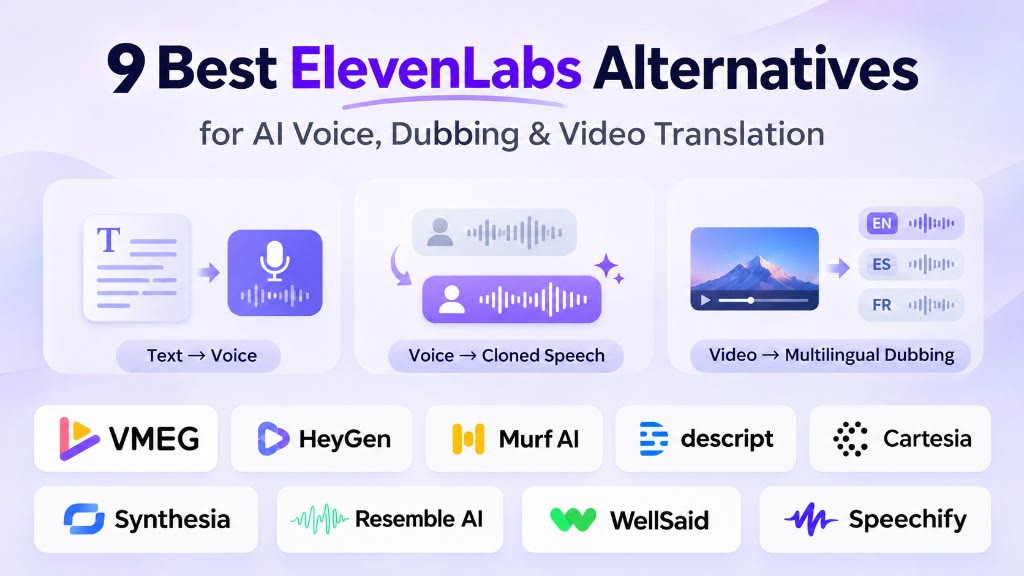
ElevenLabs is one of the most versatile AI voice platforms available, offering text-to-speech, voice cloning, speech-to-text, and multilingual dubbing. However, depending on your project, another tool may provide a more suitable editing workflow, video translation features, or pricing model.
The best ElevenLabs alternative depends on what you need to create. Cartesia is worth considering for real-time voice applications, Murf and WellSaid for professional voiceovers, and HeyGen or Synthesia for video dubbing with lip sync. VMEG focuses on multilingual video localization, while Descript combines voice tools with audio and video editing.
This guide compares nine alternatives based on their features, practical strengths, limitations, and pricing approaches.
Best ElevenLabs Alternatives at a Glance
| Tool | Best For | Main Strength |
|---|---|---|
| HeyGen | Video translation with lip sync | Translated videos, visual synchronization, and AI avatars |
| VMEG | Multilingual video localization | Dubbing, subtitles, translation editing, and optional lip sync |
| Murf AI | Professional voiceover creation | Studio-based narration with voice customization |
| Descript | Podcast and video editing | Text-based editing, transcription, and AI speech |
| Cartesia | Real-time voice applications | Streaming text-to-speech API |
| Synthesia | Business training videos | AI presenters, video production, and multilingual dubbing |
| Resemble AI | Custom voice cloning | Voice creation, API integration, and deployment flexibility |
| WellSaid | Enterprise narration | Licensed voice talent and team-oriented production |
| Speechify | Reading and content narration | Text-to-speech for documents, plus creator-focused voice tools |
These tools are not interchangeable. Some specialize in speech generation, while others provide complete video production or localization workflows.
What Does ElevenLabs Offer?
Before comparing alternatives, it's useful to understand what ElevenLabs itself can do.
ElevenLabs has expanded well beyond basic AI voice generation. Its product offering includes text-to-speech, voice cloning, voice changing, speech recognition, sound effects, dubbing, and developer APIs.
Its Dubbing v2, introduced in May 2026, supports more than 90 languages and is designed to preserve characteristics of the original speaker, including voice identity, tone, and emotional delivery.
ElevenLabs also supports editing translated text and regenerating individual dubbing segments in its web interface. API access to these editing operations depends on the plan.
Its strengths include:
- Expressive AI voice generation and voice cloning.
- Multilingual audio and video dubbing.
- Voice customization and speech generation APIs.
- A broad set of audio production tools.
- Editing and regeneration of translated speech.
However, there are practical considerations.
Dubbing does not include native lip synchronization within that workflow, although lip-sync capabilities are available elsewhere in the ElevenLabs ecosystem through third-party models. Its credit usage also varies significantly across products and dubbing modes.
ElevenLabs remains a strong option for voice-first projects. An alternative becomes more relevant when your primary requirement is a specific video workflow, deployment environment, editing process, or cost structure.
Sources: ElevenLabs Dubbing Documentation and ElevenLabs Pricing.
9 Best ElevenLabs Alternatives
HeyGen — Best for Video Translation With Lip Sync
HeyGen combines AI video generation, digital avatars, and multilingual video translation.
Its video translation workflow can replace the original speech with translated audio while adjusting visible mouth movements to match the new language.
HeyGen provides different video translation processing modes, allowing users to balance credit consumption and lip-sync requirements.
Key features
- Multilingual video translation.
- Voice preservation and lip synchronization.
- AI avatar and presenter creation.
- Translation proofreading options.
- Different processing modes for video translation.
Its most relevant use cases include talking-head videos, presenter-led tutorials, product demonstrations, and marketing content.
Limitations: Lip-sync results depend on the source video. Side profiles, obstructed faces, multiple speakers, and frequent camera changes may require more advanced processing or additional review. Translation credits vary by processing mode.
Pricing: Subscription and credit-based, with different credit consumption for audio-only translation and lip-sync modes. See HeyGen Pricing.
Choose HeyGen if: Matching translated speech to visible facial movements is a major priority.
Source: HeyGen Video Translation Guide.
VMEG — Best for Multilingual Video Localization
VMEG is a video and audio localization platform designed for translating existing video and audio content into other languages.
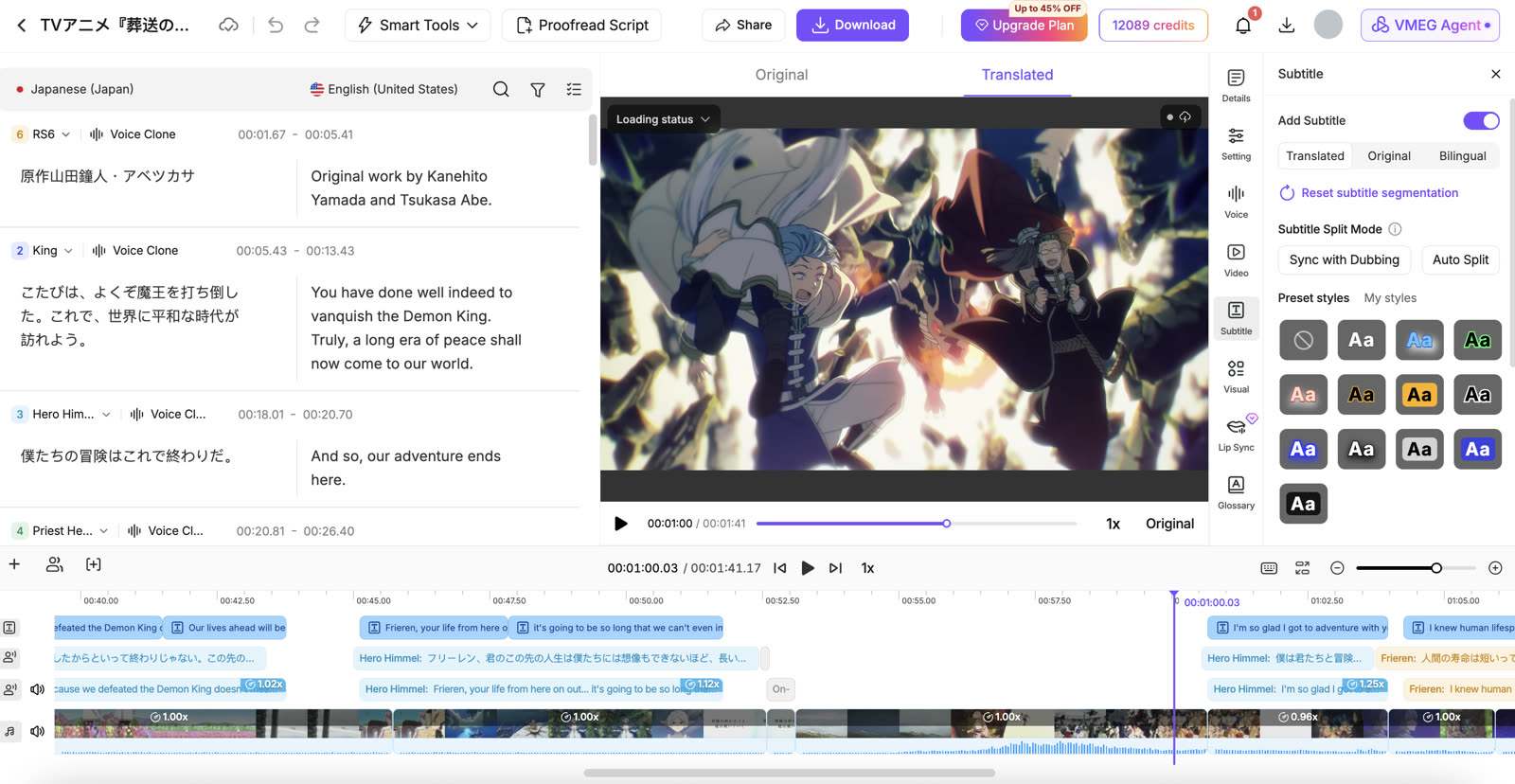
Rather than focusing only on generating speech from text, it combines transcription, translation, dubbing, subtitle processing, and editing in one workflow. VMEG supports more than 100 languages across its localization services.
Key features
- AI dubbing and audio/video translation.
- Voice cloning and multi-speaker processing.
- Translation editing with segment-level audio regeneration.
- Glossaries, pronunciation dictionaries, and translation prompts.
- Subtitle generation and translation.
- Optional lip sync and batch processing.
VMEG is particularly relevant for creators, training teams, and localization agencies working with existing videos across multiple languages.
For example, a team translating a training video can correct terminology in the translated script, update the generated audio, and export a localized video and subtitles from the same project.
Limitations: VMEG is more specialized in content localization than in general-purpose voice application development. Lip sync is an additional processing option and may require extra credits. Results involving multiple faces, rapid cuts, or overlapping dialogue can require further review.
Pricing: Credit-based. Video dubbing and transcription consume different credit amounts, and optional lip sync is charged separately. See VMEG Pricing for current plans.
Choose VMEG if: Your main task is translating and editing existing video or audio content, rather than building a real-time speech application.
Murf AI — Best for Professional Voiceover Production
Murf AI offers AI voice generation for narrated content, including presentations, e-learning, advertisements, and product demonstrations.
Murf Studio lets users generate and adjust voiceovers without recording every line manually. Murf also offers dubbing and developer-oriented voice services.
Key features
- Text-to-speech with customizable voices.
- Controls for pronunciation, pacing, and delivery.
- Voiceover production tools.
- AI dubbing services.
- Text-to-speech API and conversational voice solutions.
Murf is especially relevant when the project begins with a written script and requires clear, consistent narration.
Limitations: Users seeking a highly specialized video localization pipeline should compare Murf's dubbing workflow with dedicated video translation platforms. Studio, API, and dubbing services may have different usage rules.
Pricing: Varies by product, subscription, and usage. See Murf for current offerings.
Choose Murf if: You're producing narration for courses, training materials, presentations, or marketing videos.
Descript — Best for Podcast and Video Editing
Descript is an audio and video editing platform built around text-based workflows.
Instead of editing only through a traditional timeline, users can work with transcripts to revise spoken content. Descript also supports AI speech, captions, translation, and dubbing.
Key features
- Transcript-based audio and video editing.
- AI voice generation and voice cloning.
- Automatic transcription and captions.
- Audio enhancement and filler-word removal.
- Video translation and AI dubbing.
Descript is useful for podcast creators, interview producers, and marketing teams that regularly need to edit their original footage before publishing.
For example, a podcaster can remove unwanted sections, correct the transcript, generate captions, and prepare translated content within the same editing environment.
Limitations: Translation features and manual editing permissions depend on the subscription tier. Descript is particularly valuable as an editor, while dedicated localization services may be preferable for large multilingual delivery projects.
Pricing: Subscription-based with included media hours and AI credits. See Descript Pricing.
Choose Descript if: Editing spoken-word content is just as important as generating or translating speech.
Source: Descript Video Translation Guide.
Cartesia — Best for Real-Time Text-to-Speech APIs
Cartesia develops speech models and APIs for applications that need responsive, natural-sounding voice output.
Its Sonic speech synthesis models support streaming audio, making Cartesia relevant for conversational applications where users expect quick spoken responses.
Key features
- Streaming text-to-speech API.
- Real-time speech generation.
- Voice selection and customization.
- Multilingual speech synthesis.
- Integration with conversational applications.
Cartesia is designed for developers building voice interfaces, customer support agents, interactive products, and other software that speaks to users.
Limitations: Text-to-speech synthesis is not the same as complete video translation. Developers generally need additional components for transcription, translation, media processing, and video delivery.
Pricing: API usage and plan-based pricing. Check Cartesia for current rates and supported models.
Choose Cartesia if: Low-latency speech generation and API integration are more important than an all-in-one video editing interface.
Source: Cartesia Speech Synthesis.
Synthesia — Best for Business Training and Presenter Videos
Synthesia is an AI video platform used to create presenter-led content without traditional filming.
It also provides AI dubbing for existing videos, supporting more than 130 languages and optional lip synchronization.
Key features
- AI avatar and presenter videos.
- Multilingual video dubbing.
- Voice preservation and lip sync.
- Subtitles and translation-related workflows.
- Bulk dubbing and team-oriented features.
Synthesia is especially useful for organizations producing onboarding, internal communications, product education, and employee training materials.
A team can create original presenter videos and localize them for different regions using the same platform.
Limitations: The value of Synthesia depends partly on whether you need its wider video and avatar ecosystem. Dubbing usage, lip sync, and advanced features vary by plan.
Pricing: Subscription and usage-based, with certain advanced or enterprise features charged separately. See Synthesia Pricing.
Choose Synthesia if: You need to create or localize presenter-led videos for business audiences.
Source: Synthesia Dubbing Documentation.
Resemble AI — Best for Custom Voice Cloning
Resemble AI focuses on voice creation, cloning, and speech technology for developers and organizations.
Its voice creation tools include rapid voice cloning, more extensive professional cloning, and custom voice design. The platform also offers API integration and deployment options for organizations with specific infrastructure requirements.
Key features
- Rapid and professional voice cloning.
- Custom voice design.
- Multilingual voice generation.
- Speech APIs.
- Cloud and self-hosted deployment options.
Resemble AI is relevant for applications that need consistent character voices, branded voices, or greater control over voice infrastructure.
Limitations: Creating custom speech is different from translating a complete video. Projects involving subtitles, speaker alignment, or video delivery may need additional tooling.
Pricing: Depends on voice generation, cloning, deployment, and service requirements. See Resemble AI.
Choose Resemble AI if: Building and deploying a custom voice is the central requirement.
Source: Resemble AI Voice Creation.
WellSaid — Best for Enterprise Narration
WellSaid specializes in AI-generated narration using voices developed with professional voice actors.
Its platform emphasizes consistent voiceovers, pronunciation control, and collaborative production for businesses.
Key features
- Licensed AI voices based on professional voice actors.
- Script-based voiceover generation.
- Pronunciation and delivery controls.
- Collaborative workspaces.
- Integrations for content production.
WellSaid can be a practical option for organizations producing recurring training materials, product announcements, advertising scripts, and internal communications.
Limitations: Its primary focus is scripted voice generation rather than an end-to-end multilingual video dubbing workflow. Teams requiring video translation, speaker matching, or lip sync should evaluate separate tools.
Pricing: Plan-based, with enterprise options. Check WellSaid for current pricing.
Choose WellSaid if: Your team needs repeatable, professional narration with a controlled production process.
Speechify — Best for Reading and Content Narration
Speechify is known for text-to-speech tools that read documents, articles, and other written content aloud.
Speechify also offers creator-focused products through Speechify Studio, including AI voiceovers, video tools, and dubbing.
Key features
- Text-to-speech for documents and webpages.
- Mobile and browser-based listening tools.
- Adjustable playback speeds.
- AI voiceover generation.
- Dubbing and video creation through Speechify Studio.
Speechify is relevant to users who want to listen to written material as well as creators who need accessible narration tools.
Limitations: Speechify's reading application and Studio serve different purposes. Users evaluating dubbing should compare Studio's actual features and pricing rather than assuming the reading subscription includes every creation tool.
Pricing: Varies across reading subscriptions and creator tools. See Speechify Studio.
Choose Speechify if: Reading assistance, document narration, or straightforward content voiceovers are your primary needs.
How Do ElevenLabs and Its Alternatives Compare?
Rather than comparing voice counts alone, it is more useful to look at the workflow each product is designed to handle.
| Product | Primary Focus | Video Dubbing | Lip Sync | Developer-Oriented Voice Tools |
|---|---|---|---|---|
| ElevenLabs | Voice generation and audio AI | Yes | Separate workflows | Yes |
| HeyGen | AI video and localization | Yes | Yes | API available |
| VMEG | Video and audio localization | Yes | Optional add-on | API available |
| Murf AI | Voiceover and speech AI | Yes | Depends on workflow | Yes |
| Descript | Audio/video editing | Yes | Check selected workflow | API/integrations |
| Cartesia | Real-time speech AI | Not its main product | Not its main product | Yes |
| Synthesia | AI video production | Yes | Yes | API available |
| Resemble AI | Voice cloning and speech AI | Not its main product | Not its main product | Yes |
| WellSaid | Professional narration | Not its main product | Not its main product | Enterprise/API options |
| Speechify | Reading and voice creation | Through Studio | Check selected workflow | Product-dependent |
Feature availability can vary by model, plan, or product. This table compares product focus and documented capabilities, not independently tested voice quality.
ElevenLabs Alternatives: How Pricing Compares
AI voice platforms use different billing models, so comparing monthly subscription prices alone can be misleading.
For example, a $30 subscription with limited dubbing minutes may cost more for a video localization project than a larger plan with a lower effective rate. Similarly, a low-cost TTS API may not include translation, speaker detection, or video editing.
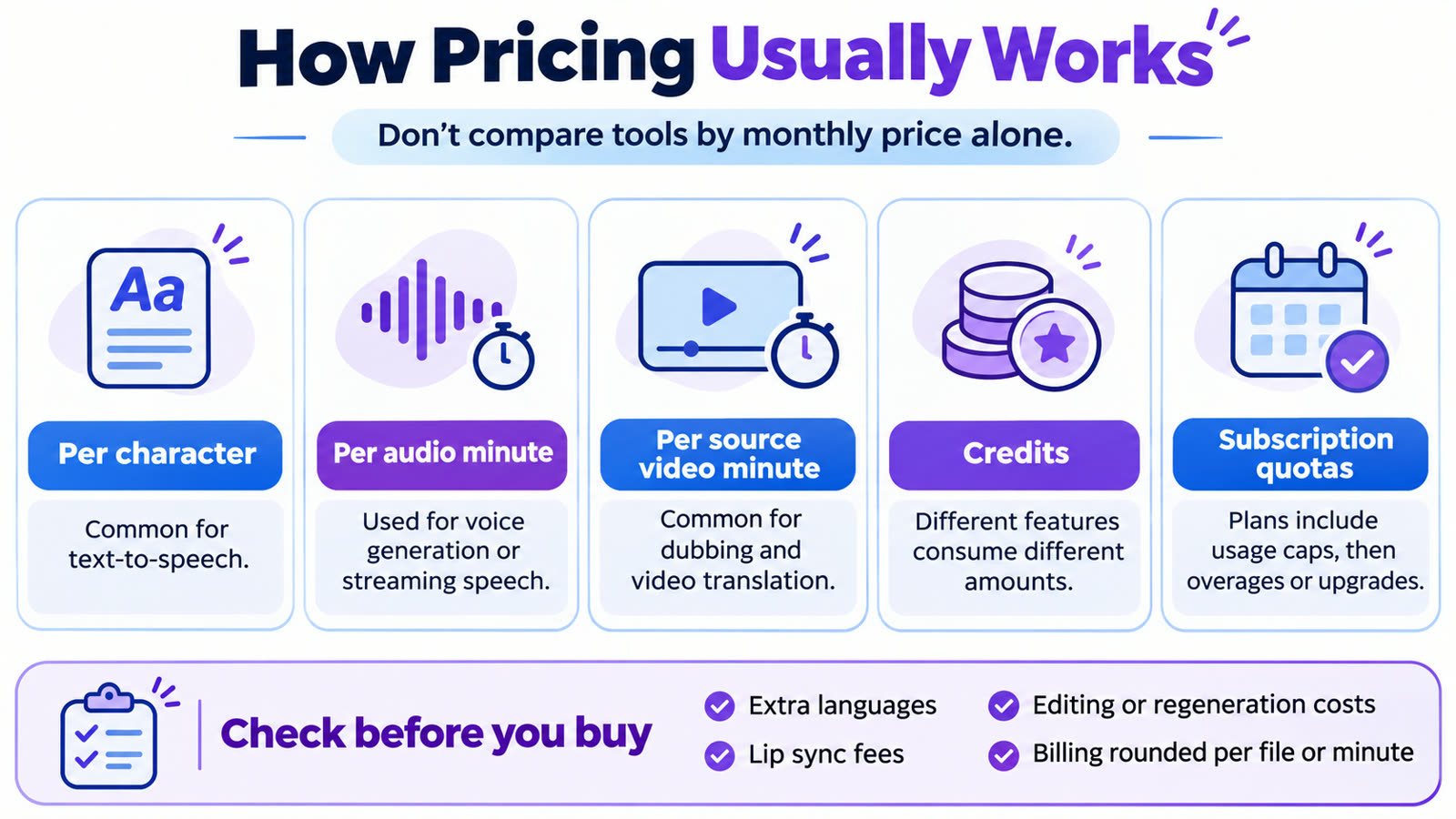
The main pricing models are:
| Pricing Model | Common Use Case | What to Check |
|---|---|---|
| Per character | Text-to-speech | Characters included, model rates, output limits |
| Per generated audio minute | Voice generation and APIs | Model, streaming usage, and billing units |
| Per source video minute | Video dubbing | Target languages, model, and editing costs |
| Credits | Mixed audio/video workflows | Credits consumed by each feature |
| Subscription with quotas | Creator and editing platforms | Included minutes, rollover, and overages |
| Custom enterprise pricing | Large-scale production | Volume, concurrency, support, and service levels |
Example: Translating a 30-Minute Video Into Two Languages
Suppose you have one 30-minute English video and want Spanish and French versions.
The basic workload is:
30 minutes × 2 target languages = 60 translated minutes.
If the dubbing service charges by source minute for each target language, you would usually calculate the base dubbing cost using 60 minutes.
However, the final price may change depending on:
- Whether lip sync is included or charged separately.
- Which dubbing model or quality mode you choose.
- Whether subtitles are included.
- Whether editing or regeneration consumes additional credits.
- Whether your subscription includes enough credits or minutes.
- Whether your provider rounds each file's duration for billing.
For example, VMEG's documented standard dubbing consumption is 60 credits per minute. Under that rate, 60 translated minutes would consume 3,600 credits, before any optional services. Lip sync would add further credit consumption.
ElevenLabs charges according to its selected dubbing model and current pricing rules. HeyGen also uses different credit rates for audio-only translation and lip-sync processing.
For accurate budgeting, calculate the same deliverables on each platform and check the current quote before purchasing.
Official pricing references: ElevenLabs, VMEG, HeyGen, and Descript.
Pricing and features were reviewed on November 2, 2026, and may change. The example above illustrates billing calculations; it is not a verified end-to-end price quote for every provider.
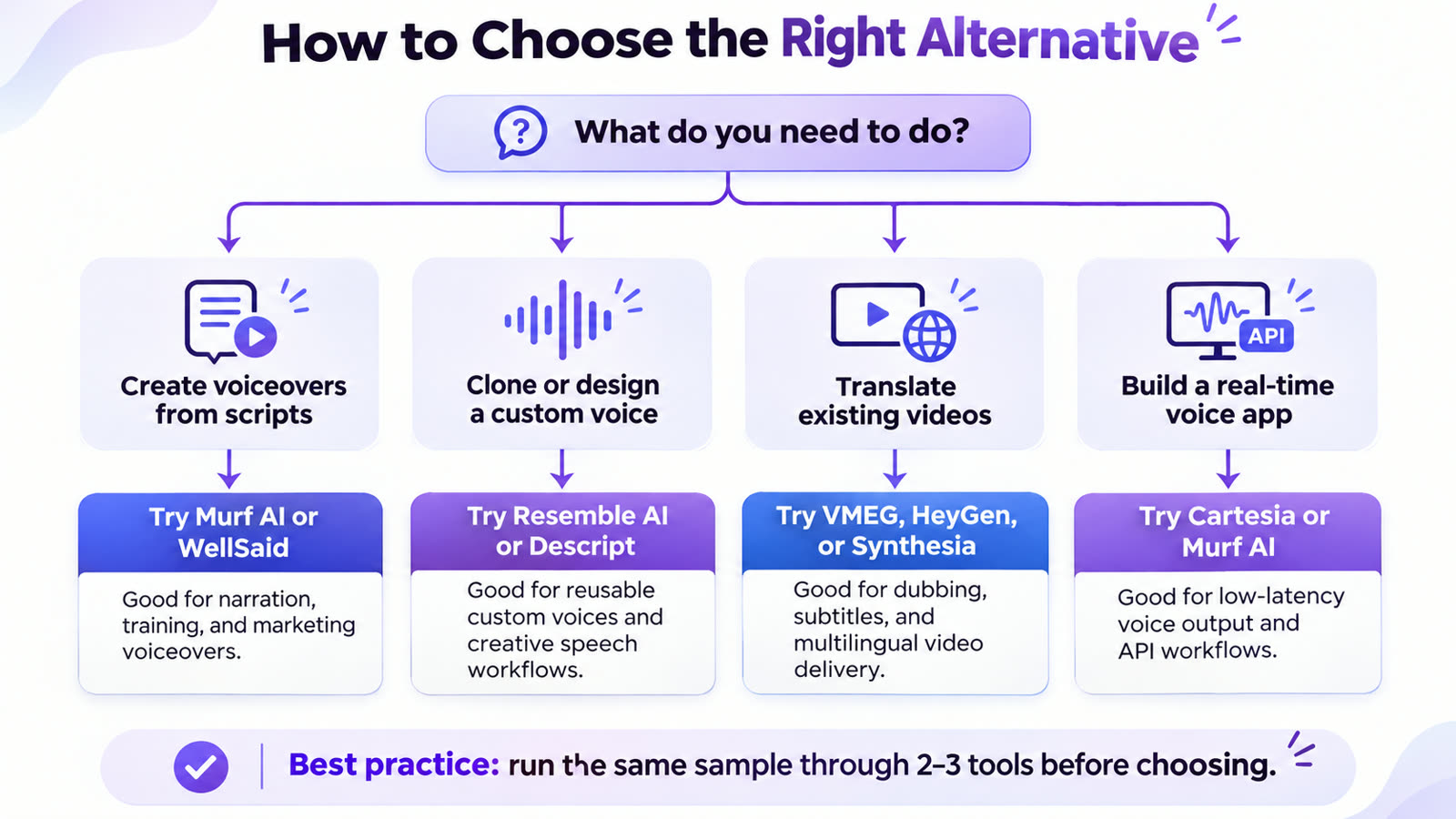
How to Choose the Right ElevenLabs Alternative
The right tool depends on your input, desired output, and production requirements.
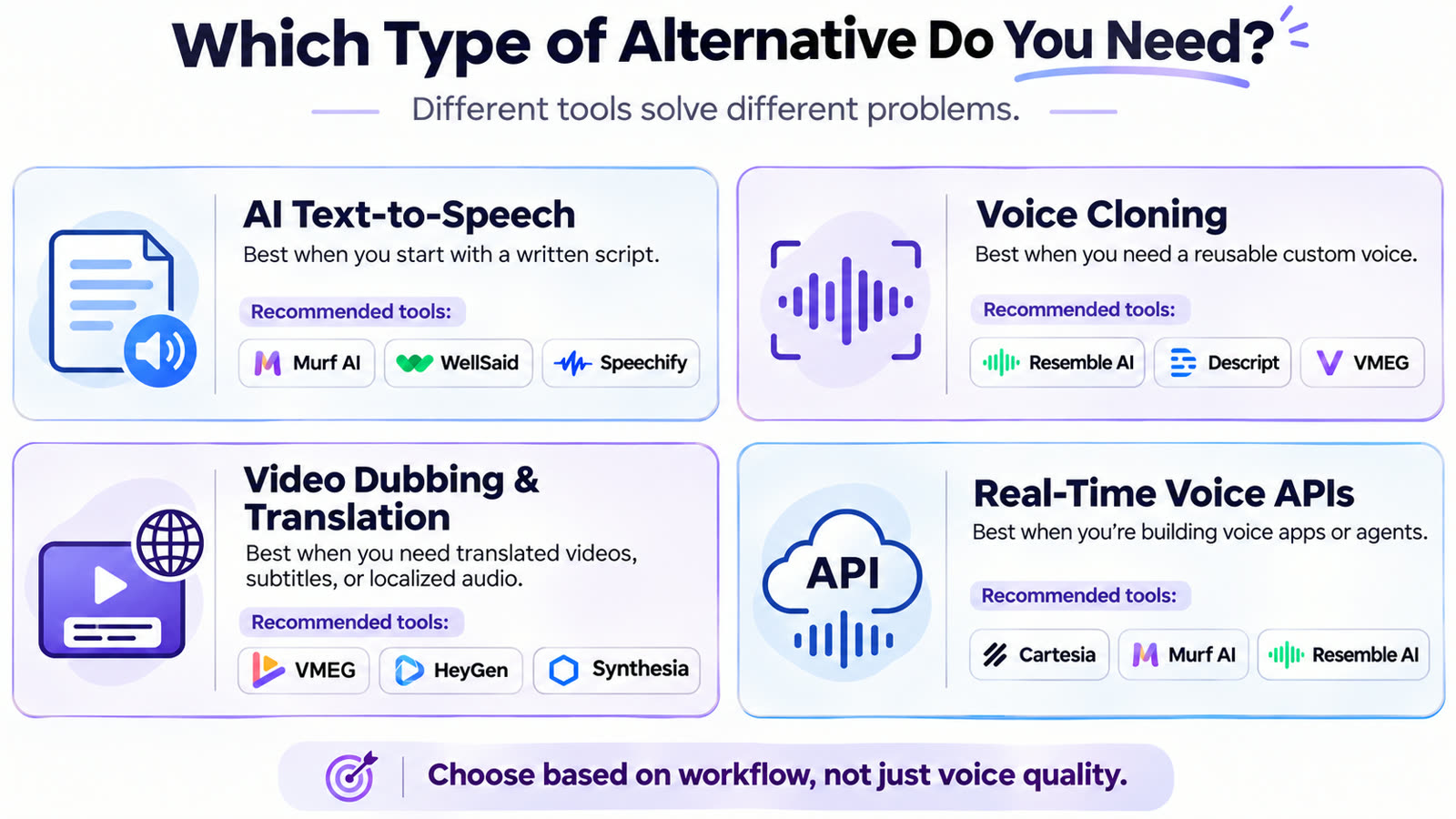
If You Need AI Text-to-Speech
Start with Murf, WellSaid, Cartesia, or ElevenLabs.
Compare samples using your actual script, including names, numbers, uncommon terminology, and longer passages. A short demonstration may not reveal pronunciation or pacing issues that appear in real projects.
If You Need Voice Cloning
Consider ElevenLabs or Resemble AI.
Evaluate voice similarity, consistency across sentences, supported languages, consent requirements, and whether the voice can be reused in your production environment.
If You Need to Translate Existing Videos
Consider ElevenLabs, VMEG, HeyGen, or Synthesia.
Compare the full process: importing video, identifying speakers, reviewing translations, regenerating audio, preserving background sound, and exporting the final files.
If you need synchronized mouth movements, check whether lip sync is included in the selected workflow and how it is billed.
If You Edit Podcasts or Interviews
Descript is worth evaluating because transcription, editing, captions, and audio cleanup are closely connected.
If You're Building a Real-Time Voice Application
Cartesia, ElevenLabs, and Murf offer developer-focused speech solutions.
Test latency, streaming behavior, pronunciation, API reliability, and operational cost with your own application.
Before committing to a platform, run the same representative sample through two or three shortlisted tools. Review voice naturalness, terminology, editing effort, output quality, and actual cost. No single provider performs equally well in every language and content type.
Frequently Asked Questions
What is the best alternative to ElevenLabs?
There is no single best alternative for every use case. Murf and WellSaid are worth considering for narration, Cartesia for real-time speech APIs, and VMEG or HeyGen for video-oriented workflows.
Are there free ElevenLabs alternatives?
Several platforms provide free plans, trials, or limited testing credits. However, usage limits, watermarks, commercial rights, and access to voice cloning or dubbing features vary. Check the current terms before using generated content commercially.
Which ElevenLabs alternatives support AI dubbing?
VMEG, HeyGen, Synthesia, Murf, Descript, and Speechify Studio offer dubbing-related capabilities. Their workflows differ in editing options, supported languages, voice preservation, lip sync, and export formats.
Can I clone a voice without ElevenLabs?
Yes. Resemble AI, VMEG, Descript, and other providers offer voice cloning or custom voice features. You should only clone voices you own or have the appropriate consent and rights to use.
Does ElevenLabs support video dubbing and lip sync?
ElevenLabs supports multilingual video dubbing through Dubbing v2. Its Dubbing workflow does not include built-in lip sync, but lip synchronization is accessible through other ElevenLabs products that use third-party models.
Which ElevenLabs alternative is best for video translation?
It depends on your priorities. VMEG focuses on translation and editing workflows, HeyGen emphasizes video generation and lip synchronization, and Synthesia combines business video creation with multilingual dubbing. ElevenLabs itself remains a capable video dubbing option.
Final Thoughts
ElevenLabs remains a capable platform for AI voice generation, cloning, and multilingual dubbing. The reason to consider an alternative is not necessarily that ElevenLabs lacks a feature, but that another product may fit your workflow better.
The most useful comparison is the one based on your actual project: the languages you need, the output you want, the amount of editing required, and the full cost of producing a usable result.
Editorial note: Tool descriptions are based on publicly available product information and official documentation. The recommendations are based on intended use cases, not an independent controlled benchmark of voice quality or translation accuracy. Features, plans, and prices may change after the review date.