
Cue by Manus is a standalone app for personal agents, built on the same infrastructure as Manus. You give an agent a cue, and it is meant to carry that task on its own computer, with its own email, phone number, and wallet. That identity is what makes it an AI personal agent: the work can continue outside the chat thread.
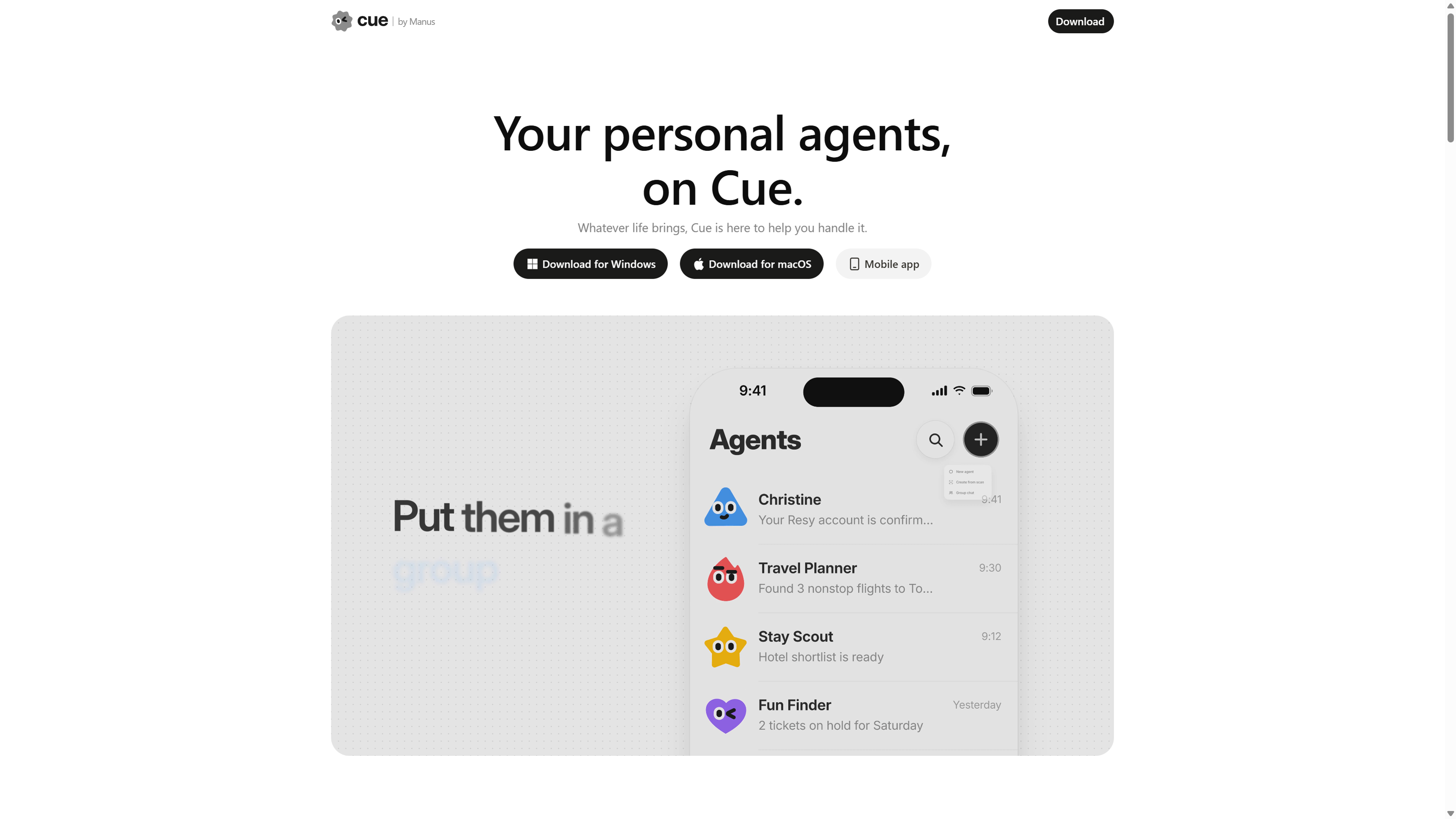
Access still starts with an invite code. The Manus 2.0 announcement says early access is free. After login, the client labels the plan Cue Plus at $20 a month and marks that price as limited-time free. Usage is counted by the week. On cue.im, checked 30 September 2026, Download for Windows and Download for macOS are both enabled, next to a Mobile app button. The launch post still says iOS follows App Store review.
What Cue by Manus Is as an AI Personal Agent
Manus describes Cue as a new app for personal agents on your phone and desktop. Each agent gets an email, a phone number, a wallet, and a computer. With those, it can send messages, pay inside a budget you set, finish work on its own machine, and take a call, then leave a summary in the app.
The practical question is which accounts the agent actually holds, and which actions still come back to you. A personal agent that can email and call is useful for coordination. It does not, by itself, transcribe speech, time subtitles, or render a dubbed video. How an AI agent plans and uses tools is a separate localization topic. For a launch video, the agent can collect notes and pass a file along. The spoken track still needs a translator.
Cue and Manus share infrastructure and cover different jobs. Manus 2.0 is the wider product: Cascade, Studio, Cloud Computer, and automations. Cue is the personal-agent app beside it. VMEG's connector docs name Manus. Cue is the app opened for this review.
Cue by Manus Invite, Plan, and Downloads
Login asks for an invite code. Manus published MEETCUE for a limited set of early users, first come, first served, and said people who get in also receive extra codes to share. Treat that code as a launch code that can run out. The live gate is whatever the app asks for when you open it.
Platforms move with the download settings on cue.im. Recheck the buttons before you send someone a link.
| Surface | Current public status |
|---|---|
| Mac desktop | Download for macOS is enabled on the homepage. |
| Windows | Download for Windows is enabled on the homepage checked 30 September 2026. An earlier pass of the same page could show Coming soon when that flag is off. |
| Mobile app | A separate button. The launch post says iOS follows App Store review. |
| Web | The launch post lists the web next to desktop and mobile. |
Inside the client, the plan name is Cue Plus. The price on screen is $20 a month, shown as limited-time free. That $20 label is in the client. It is not in the public launch post, which only says early access is free with an invite code. A promo and a sticker price can both be on screen, and either can change. Click your name at the lower left to see the weekly allowance.
That session also included a $20 membership credit. After the tasks run there, the credit was still holding. There is no published burn table, so this is a qualitative note from one session, not a forecast for every workflow.

AI Agent Email, Phone Number, and Wallet
Setup asks what to call you and what to name the agent. From that name, Cue provisions a Google mailbox the agent can send from. Connect your own Google mailbox after that, and the agent can send file contents back to you. The useful loop is simple: the agent has an address of its own, and your inbox is where the file returns.
You can add more mailboxes. The extra addresses use @bot.cue.im. The first Google mailbox is not a cap.
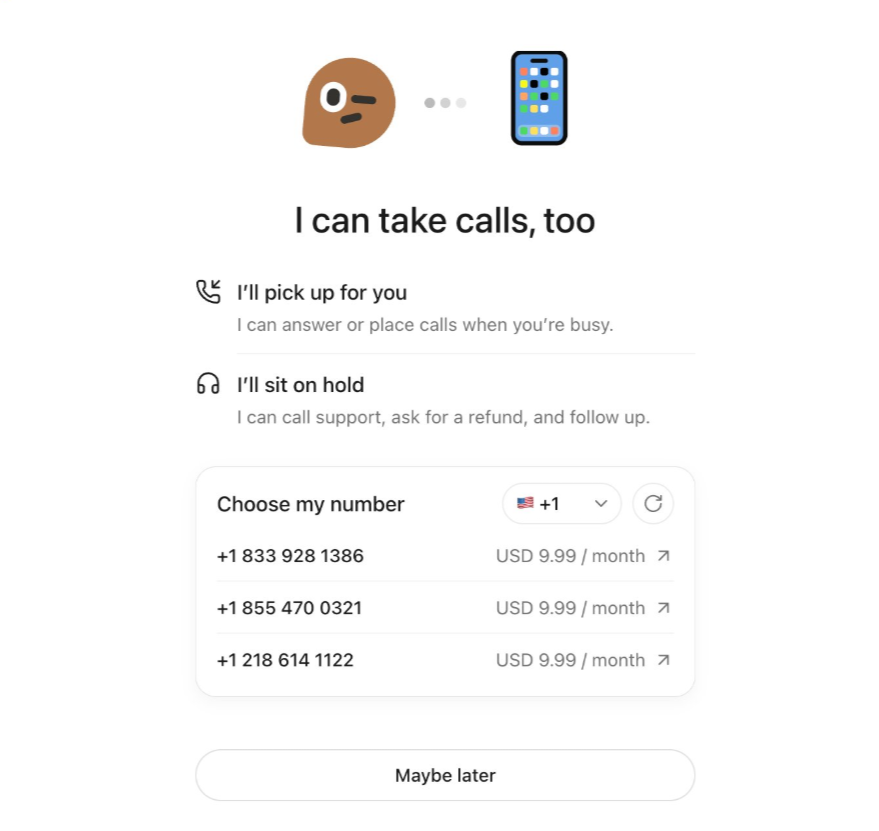
The phone is a US +1 number. In this session it supported voice calls and did not send SMS. Manus's public line says the agent can send messages and take your calls. "Messages" in that sentence is broader than SMS from the +1 line. A workflow that depends on texting a vendor will not get that from this number. Alipay was an available way to pay for the number in the same setup.
Payment is a separate switch. Cue asks you to authorize a Link wallet so the agent can pay on your behalf, inside the budget you set. In this client, that path is offered in the United States only. Outside the US, checkout stays with you. Inside the US, read the charge before you raise the budget. An agent that can spend is a permissions decision. The summary in Cue is a log of what happened. It is not approval.
How Cue by Manus Uses a Team of AI Agents
Manus's example is a group chat with a shared goal. One agent researches venues for a New York launch, another makes a shortlist, a third drafts the deck. You set the direction and make the final call. That split matches the product: agents hand off research, and a person owns the decision.
The same post says Cue works with services around you. At a restaurant, you scan a QR code and the agent can order or hold a place in line. That line is official product copy. This review does not add a separate restaurant test. Try the specific venue before you rely on it.
Cue by Manus Advantages and Limits
Cue is a reasonable install when the task needs an identity: a mailbox that sends, a call that can be answered, a file returned to your inbox, or a small group of agents splitting a brief. The weekly meter is visible, which is clearer than a balance you notice only when it hits zero. The opening credit covered the tasks in this session.
Wait, or skip a feature, in these cases:
- You need iPhone while the launch post still says iOS is in App Store review. If cue.im later marks Windows as coming soon again, trust the button on that visit.
- You need SMS. The +1 number in this session was voice only.
- You need the agent to pay outside the United States. Link was US-only here.
- You expect the agent to dub a video with no media tool attached.
Keep a person on anything that leaves the app: a sent email, a live call, and any payment.
Translate Video From Cue by Manus With VMEG
When the cue is "turn this launch video into another language," the agent needs a media tool. The VMEG video translator takes a video or a link and can return a dubbed cut, subtitles, or an audio track you can still edit before export.
The agent connection is VMEG Remote MCP. Setup is manual:
- Create an API key in VMEG.
- In the agent, add a custom MCP connector. Marketplace one-click install is not available yet.
- Set the server URL to https://www.vmeg.ai/api/mcp.
- Send the key as Authorization: Bearer plus the key.
- Ask the agent to translate the video, including the target language and one source: a file already in the project, a public HTTPS file URL, or a YouTube URL.
The job is asynchronous. The agent should check task status instead of treating the request as finished. Translation spends credits on your VMEG plan. That bill is separate from Cue's weekly allowance. Free and paid VMEG accounts can connect. Submitting a task still spends credits.
VMEG's supported-product list names Manus, Cursor, Claude, Claude Code, and Gemini CLI. It does not publish a Cue-only click path. Cue is built on the same infrastructure, so use the quick start when the Cue client offers a custom MCP field. If Cue only shows a closed connector list, use the documented Manus connector, or wait until the same field is there.
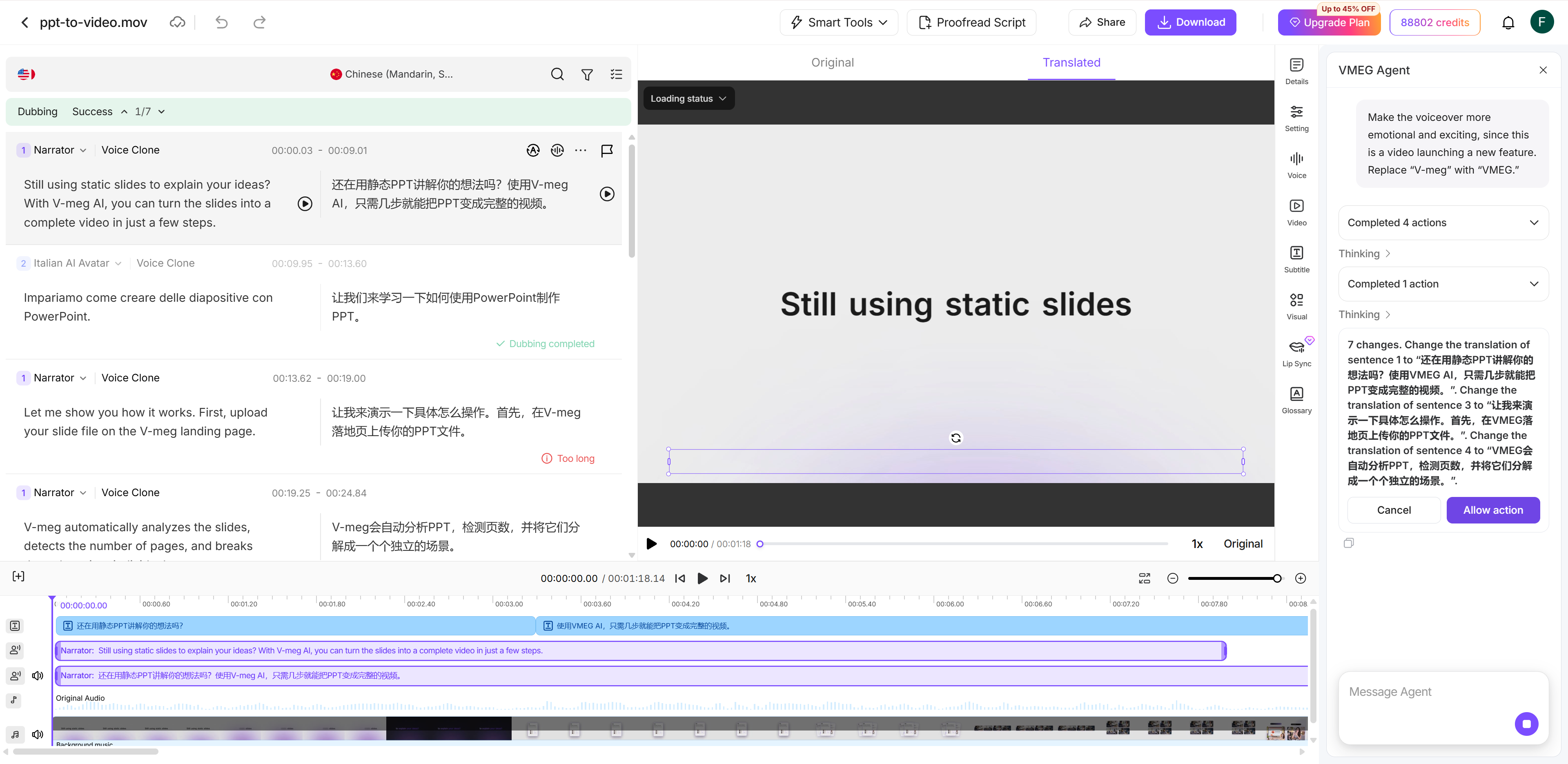
After the task exists, review the script, speakers, and timing, then export. The agent can start the job. A person should approve the line readings. Emotion, tone, background audio, and volume are edited in VMEG, in the next section.
Use the VMEG AI Dubbing Translation Agent in the Editor
Cue by Manus can hand a file to a translator. When you want to shape the performance, use the VMEG AI Dubbing Translation Agent directly.
Submit the form on the VMEG AI dubbing page with the video and the target language. After that submit, the job opens in the editor. There, have the agent set the speaker's emotion and tone, separate background audio from the dialogue, and change the volume. Use those controls when the words are already right and the read is not: a line that should sound urgent, music that disappeared under the new voice, or a voice that is too loud for the scene.
Who This AI Personal Agent Is For
Open Cue if you have an invite, cue.im offers a download for your computer, and you want an AI personal agent that holds its own email and can take a call. On 30 September 2026 that homepage included Windows and macOS. Set a budget before you turn on Link, and only if you are in the United States.
Stay on the waitlist if you need iPhone and the Mobile app path still waits on App Store review, or if your computer's button says coming soon. Skip the phone feature if you needed texts. Skip the wallet if you needed checkout outside the US.
Use Cue with VMEG when the personal agent is coordinating the work and the deliverable is a localized video. The agent can pass the file and report status. VMEG runs the translation. For emotion, tone, background separation, and volume, continue in the VMEG editor. You approve the cut.
Cue by Manus FAQ
Is Cue the same product as Manus?
Cue is a separate personal-agent app on Manus infrastructure. Manus 2.0 is the wider product, including Studio and automations. VMEG's connector guide names Manus, not a separate Cue screen.
Is Cue free, or is it $20 a month?
The launch post says early access is free with an invite code. The client behind this review showed Cue Plus at $20 a month, marked limited-time free, plus a $20 credit and a weekly usage meter. Confirm the label in your own client. Public pages have not published a price for after the promo.
Does the Cue phone number send SMS?
In this session, the +1 number was for voice calls and did not send text messages. Alipay was available as a way to pay for that number.
Can I install Cue on Windows or iPhone today?
Check the buttons on cue.im. On 30 September 2026 the homepage enabled Download for Windows and Download for macOS. iOS still follows the launch post: after App Store review. Use the Mobile app button for the phone build.
Can this AI agent translate a video on its own?
It can ask a connected tool to start a translation. It does not replace the translator. Connect VMEG Remote MCP, wait until the task finishes, and review the draft before export.
Should the agent be allowed to pay?
Only inside a budget you set, and only where Link is offered. In this client, that was the United States. Read the payment before you widen the budget.