What Is Text to Speech (TTS) and How Does It Work?
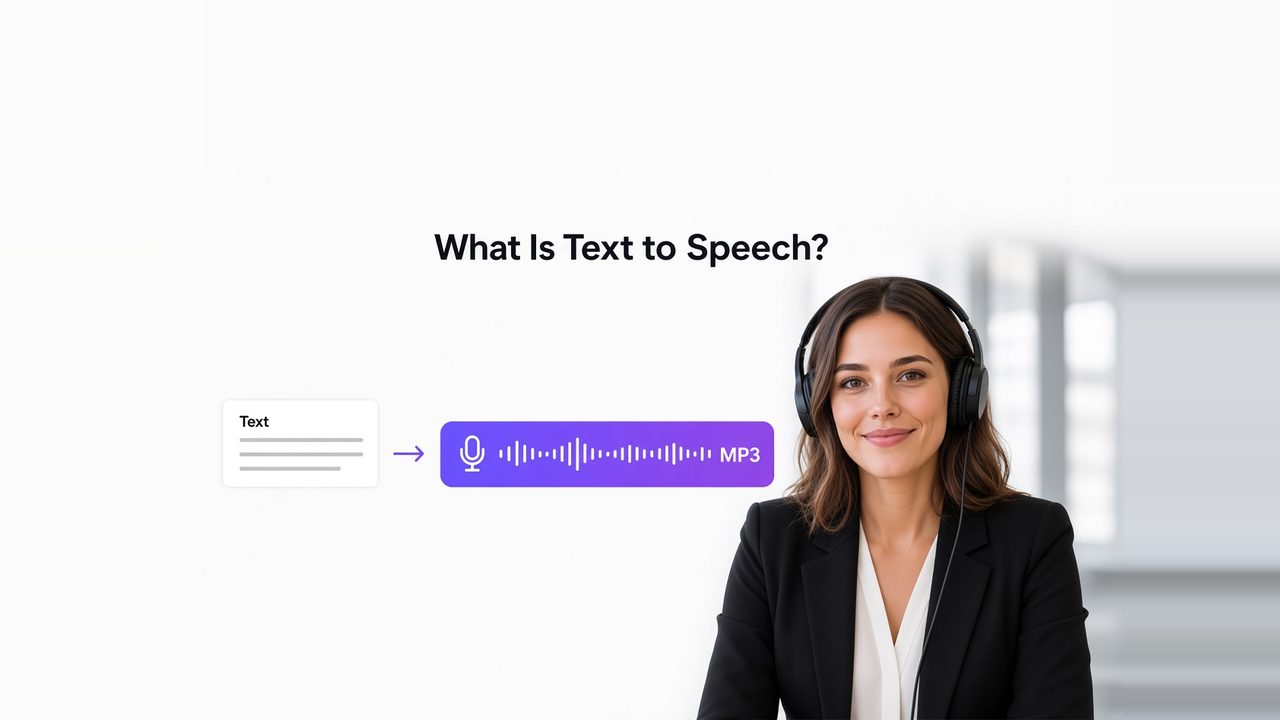
Text to speech (TTS) is technology that converts written text into spoken audio. It is the most common form of speech synthesis: a system reads a script, article, caption, or interface message and generates a voice that speaks those words. Modern systems often use neural models to produce pronunciation, rhythm, pauses, and intonation that sound closer to recorded speech than older concatenative or rule-based engines.
At a practical level, TTS follows text input → linguistic interpretation → synthesized voice → playable audio. Architectures differ. The job is the same: produce understandable speech that matches the words, language, and intended speaking style.
Key takeaways
- TTS turns writing into synthetic speech. Speech-to-text (STT) does the reverse: it turns spoken audio into writing.
- Speech synthesis is the broader technical name. TTS usually means synthesis from ordinary written text. Other synthesizers can start from phonetic or other linguistic symbols.
- Naturalness is more than correct words. The system also has to handle pronunciation, phrasing, stress, pauses, rate, and prosody.
- TTS and voice cloning answer different questions. TTS decides how the text should sound as speech. Cloning decides whose voice should speak it.
- In video localization, TTS is one stage, not the whole job. Translation, speaker handling, timing, dubbing, subtitles, and lip sync may still be required.
What is text to speech?
Text to speech is a form of speech synthesis that renders written language as audio. Google Cloud describes synthesis as translating text input into audio data. Microsoft describes TTS as converting text into human-like synthesized speech.
The simplest task looks like this:
Input: “Welcome to our product tutorial.”
Output: A generated voice speaking that sentence.
Useful TTS has to interpret how the text should sound when spoken. Written language hides many speaking decisions:
- Should “Dr.” be read as “doctor” or as letters?
- How should “2026” be spoken in this sentence?
- Where should the speaker pause?
- Which word should carry emphasis?
- Is the sentence a question, a warning, or a neutral statement?
- How should a product name or unfamiliar proper noun be pronounced?
That is why production tools usually expose controls for voice, speed, pauses, pronunciation, or speaking style.
What is speech synthesis?
Speech synthesis is the computer-generated production of human speech. TTS is the usual product name for systems that start from ordinary text. Wikipedia and speech-research groups treat TTS as one synthesis path: other systems can render phonetic transcriptions or other linguistic symbols instead of raw orthography.
Two evaluation criteria show up across the field:
- Intelligibility: can listeners identify the words?
- Naturalness: does the delivery resemble ordinary human speech, including rhythm and intonation?
A voice can be easy to understand and still sound stiff. It can also sound lively and still misread a brand name. Production work has to check both.
How does text to speech work?
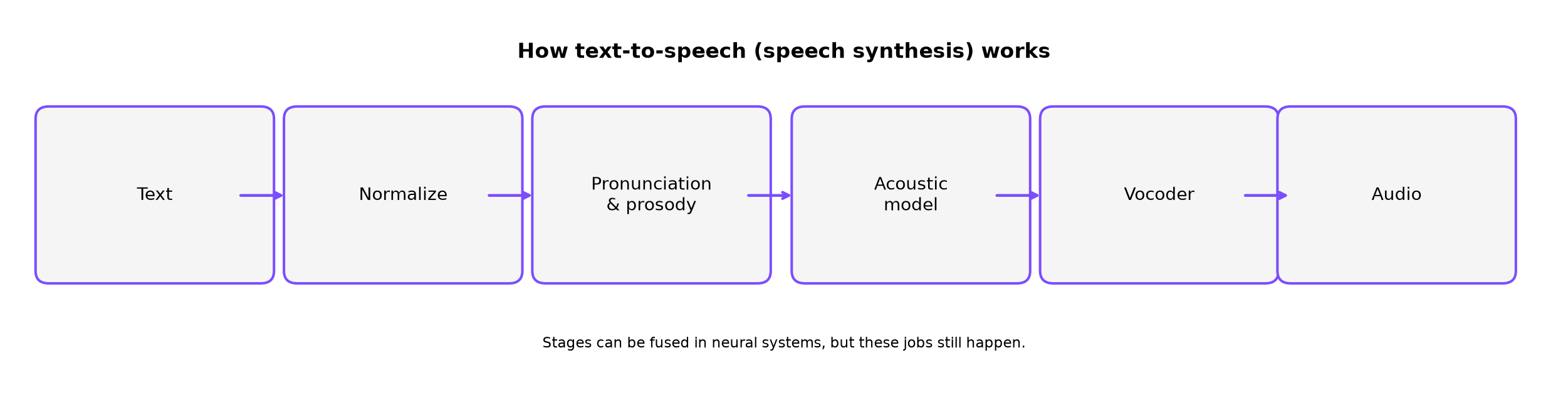
Implementations differ. Neural systems can fuse several stages into one model. Conceptually, a TTS system still has to complete a small set of jobs: clean the text, decide pronunciation and delivery, generate a speech representation, then produce a waveform. NVIDIA describes the acoustic half as turning text into time-aligned features such as a spectrogram, then using a vocoder to turn those features into audio.
1. The system prepares and normalizes the text
Written language contains forms that cannot always be spoken literally. A TTS frontend may need to expand numbers, dates, currencies, abbreviations, URLs, and symbols.
- $25 may become “twenty-five dollars”
- 10:30 may become “ten thirty”
- Dr. Lee may become “Doctor Lee”
- 1/2 may become “one half”
The correct spoken form depends on context. Punctuation and formatting are clues. Many embarrassing TTS errors start here, before the neural voice model runs.
2. The system determines pronunciation and prosody
Next the system decides what sounds to produce and how those sounds should be delivered. That can include pronunciation of words and names, sentence boundaries, pauses, emphasis, stress, speaking rate, pitch movement, and rhythm.
These delivery features are often grouped under prosody. Two voices can pronounce every word correctly and still sound different if one uses flat intonation or poorly placed pauses.
Speech Synthesis Markup Language (SSML) is a W3C format for marking pronunciation, volume, pitch, and speaking rate. Consumer editors may not expose SSML directly. Many still offer related controls, such as speed sliders and inserted pauses.
3. A speech model generates an acoustic representation
Older systems concatenated recorded speech fragments or used hand-built vocal-tract rules. Modern neural TTS systems learn patterns from speech data and generate an intermediate representation of the intended sound, often a mel spectrogram or a sequence of audio tokens.
This stage strongly influences vocal identity, timbre, smoothness, speaking style, and, when the model supports it, emotional coloring.
4. A vocoder or decoder creates the final audio
The acoustic representation is still not a playable file. A vocoder or neural codec decoder converts it into a waveform that can be streamed or exported, for example as MP3. Amazon Polly documents the same user-facing contract: provide text or SSML, choose a voice, and receive an audio stream in a selected format.
After export, review still matters. A technically complete file can be wrong if a brand name is mispronounced, a pause lands in the wrong place, or the speaking style does not fit the scene.
TTS vs speech-to-text vs voice cloning
Several speech technologies are discussed together. They solve different problems.
| Technology | Input | Output | Main purpose |
|---|---|---|---|
| Text to speech (TTS) | Written text | Spoken audio | Generate a voice from a script |
| Speech to text (STT) | Spoken audio | Written text | Transcribe speech |
| Voice cloning | Voice sample plus a speech workflow | Speech using a replicated vocal identity | Preserve or reproduce a particular voice |
| Speech translation | Speech in one language | Text or speech in another language | Translate spoken content |
| AI dubbing | Existing video or audio plus a target language | Replaced or translated voice track | Create a localized spoken version |
A compact way to keep the terms separate:
TTS answers “What should this text sound like?”
Voice cloning answers “Whose voice should it sound like?”
Dubbing answers “How should the new voice replace or line up with the original content?”
The technologies can be combined. They are not synonyms. If you already have source audio and need a transcript first, that is an STT task, such as audio to text. If you need the same person to remain recognizable after the script is generated, that is a voice cloning decision, then a TTS decision.
What makes text-to-speech sound natural?
Natural TTS is not a single switch. It is several decisions working together.
Pronunciation
Names, acronyms, product terms, technical vocabulary, and mixed-language phrases are common failure points. A model may be fluent in a language and still mispronounce a company name. For published work, listen to those tokens instead of assuming the first generation is correct.
Prosody
Natural speech changes speed, stress, pitch, and pauses according to meaning. A product tutorial may need measured narration. A short social clip may need faster delivery. The same script can sound convincing or robotic depending on phrasing.
Voice-content fit
A realistic voice is not automatically the right voice. Tone should match the content and audience. A calm instructional voice often fits onboarding better than a high-energy promotional voice. For multilingual work, regional accent and listener expectations also matter.
Source-text quality
TTS begins with the script. Weak punctuation, long run-on sentences, ambiguous abbreviations, and copy written only for silent reading all reduce spoken quality. Scripts often need an extra pass for listening.
Human review and controls
Speed, pause, pronunciation, and alternate-voice options exist because no model infers every production choice. The more public the audio, the more valuable a full listen becomes.
Where does TTS fit in a video localization workflow?
This is where the search query and the production task often diverge.
If you already have a translated script and only need a target-language voiceover, TTS may be enough. Localizing an existing video usually needs more:
- Speech recognition to transcribe the original dialogue.
- Translation to adapt the transcript into the target language.
- Speaker handling to keep different speakers or roles distinct.
- Voice generation with TTS or cloned voices.
- Timing so the new speech fits the scene duration.
- Dubbing and audio editing to replace or mix speech against the original soundtrack.
- Lip sync, when needed, so visible mouth movement matches the new speech.
- Subtitle review and export for accessibility or distribution.
A TTS tool and a full localization workflow solve different levels of the same problem. VMEG’s video translator is the broader path when the starting point is a video rather than a finished script: translation, speaker assignment, timing, optional lip sync, and export of dubbed video, subtitles, or audio.
When to use TTS, cloning, or a full localization stack
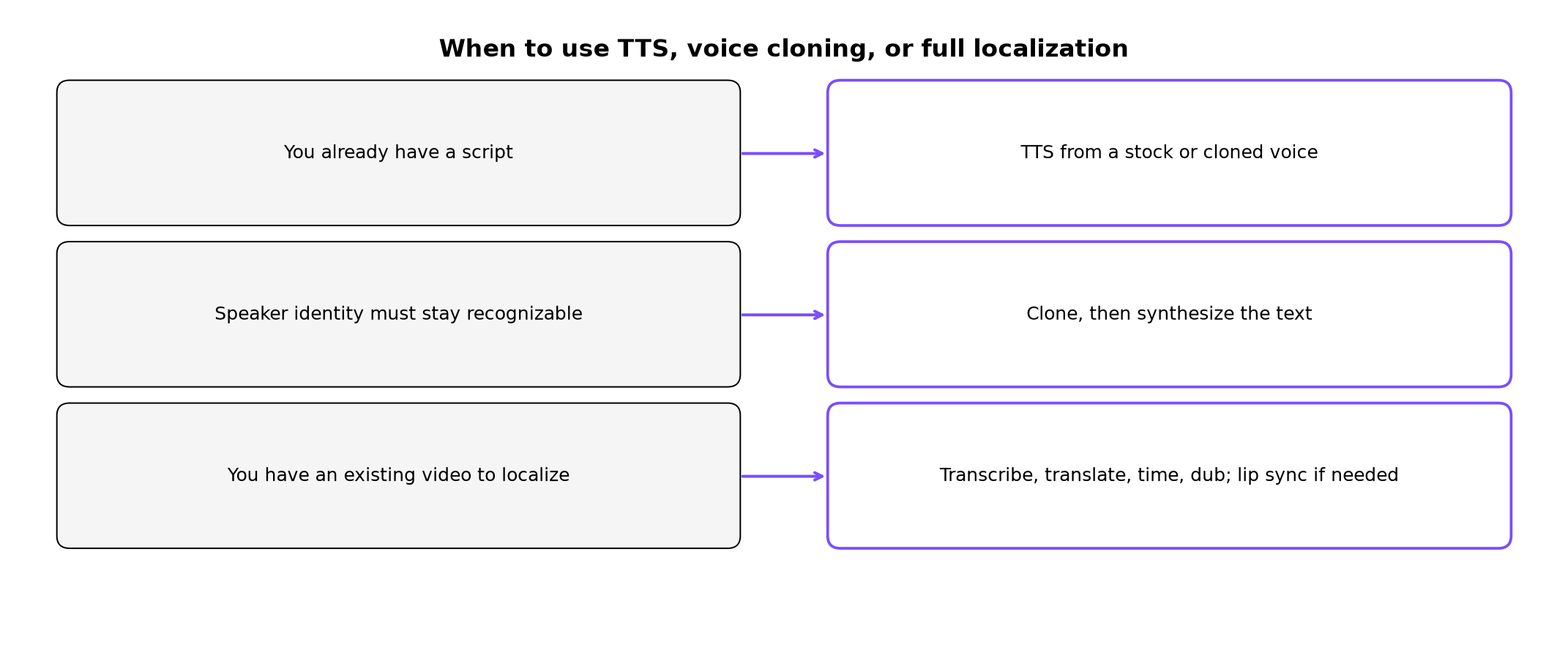
Use this as a decision check before you open a tool.
| Starting point | Need | Usually sufficient |
|---|---|---|
| A clean script in the target language | A narration or voiceover file | TTS |
| A script plus a required personal or brand voice | The same speaker identity across lines or languages | Voice clone, then TTS |
| An existing video with spoken dialogue | A localized watchable version | Transcription, translation, TTS or cloning, timing, optional lip sync |
| On-screen speakers with visible mouths | Audio that does not fight the picture | Localization plus lip-sync review |
If the translation is wrong, a natural voice will still deliver the wrong meaning. Separate translation quality from voice quality during review.
How to create text-to-speech audio
For users who already have a script, the production loop is short.
1. Edit the text for the ear
Fix punctuation, expand risky abbreviations, and check names, numbers, and mixed-language phrases before generating a long file. A 10-second sample of hard tokens is cheaper than regenerating a 10-minute track.
2. Choose a voice that fits the job
Match language, audience, and content style. If the project needs a consistent personal or brand voice, clone first, then synthesize. A stock voice is enough when identity is not part of the product.
3. Generate, listen all the way through, then refine
Do not judge quality from the first sentence only. Adjust speed, pauses, pronunciation, or voice selection where the delivery slips.
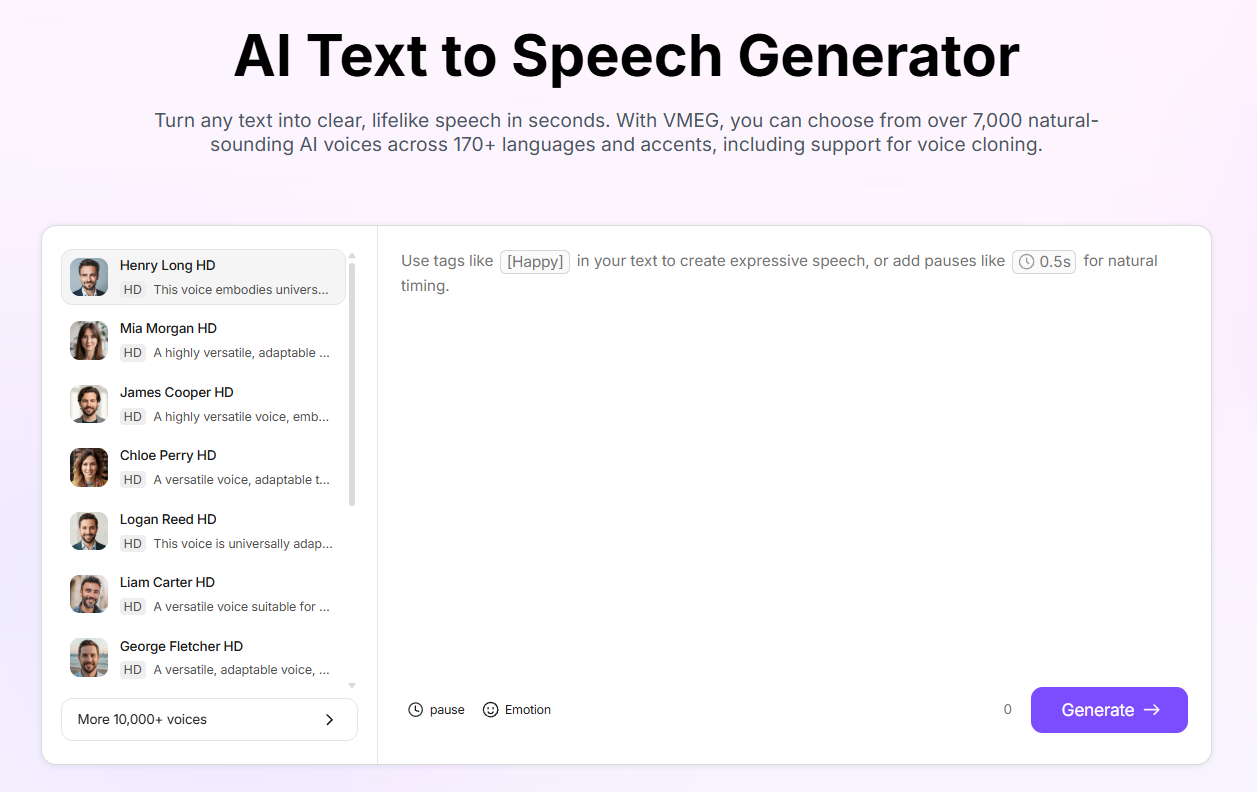
If you already have a script and need a voice track, VMEG’s Text to Speech tool supports pasting text, choosing a voice, inserting pauses, adjusting speed, using a cloned voice, and exporting MP3. Recheck those controls on the live product page before publication, because editors change.
Limitations of text-to-speech technology
Modern TTS can produce highly usable speech. It should not be described as automatically correct.
- Incorrect pronunciation: proper nouns and specialized terms often need a manual fix.
- Context mistakes: the same spelling can be spoken differently depending on meaning.
- Mixed-language text: language switches inside a sentence can produce inconsistent accent or pronunciation.
- Emotional mismatch: a voice may sound natural and still deliver the wrong attitude for the scene.
- Long-form drift: pacing and emphasis problems are easier to miss in a short demo than in a full lesson.
- Timing: a translated sentence may be much longer or shorter than the original, which matters for dubbing and lip sync.
- Consent: when cloning is involved, users need permission to reproduce a person’s voice.
These limits are reasons to build review into the workflow, not reasons to avoid TTS.
Practical tips for better TTS output
- Write for the ear. Shorter sentences and clear punctuation usually read better aloud.
- Test hard words first. Names, acronyms, and product terms belong in a short sample before a long render.
- Match voice to content, not only to a demo.
- Use pauses on purpose. One well-placed pause can do more for clarity than slowing the entire track.
- Review the complete audio. Errors often appear later in long-form content.
- Do not use voice quality to hide translation problems.
- Escalate the workflow when the asset is a video. Speaker matching, timing, subtitles, and lip sync are outside TTS alone.
Frequently asked questions
Is text to speech the same as speech synthesis?
TTS is the usual product name for speech synthesis from written text. Speech synthesis also covers systems that start from phonetic or other linguistic input rather than ordinary spelling.
Is TTS the same as AI voice generation?
TTS is one kind of AI voice generation when the engine is a learned model. “AI voice” can also include cloning, speech-to-speech conversion, and other voice-generation methods.
Is TTS the same as speech-to-text?
No. TTS converts text into speech. Speech-to-text converts speech into written text.
Is TTS the same as voice cloning?
No. TTS is the conversion from text to speech. Voice cloning reproduces a particular vocal identity. A cloned voice can then be used inside a TTS workflow.
Can TTS be used for video dubbing?
Yes, TTS can generate a new voice track from a translated script. Complete dubbing may also need translation, speaker management, timing, background-audio handling, editing, and optional lip synchronization.
Does a consumer TTS editor need SSML?
Not always. SSML is useful when you need precise, repeatable control. Many editors expose a subset of the same ideas as pause markers, speed controls, or pronunciation fields.
Final takeaway
Text to speech is the technology that turns written language into synthetic speech. Speech synthesis is the broader technical process behind that conversion. Modern systems interpret text, predict pronunciation and prosody, generate a voice representation, and produce playable audio.
The useful production question is not only “Can this text become speech?” It is “Does the generated speech fit the language, speaker, timing, and purpose of the final content?” Voice selection, editing, human review, and, when the source is video, translation and dubbing tools are how that second question gets answered.