What Is AI Voice Cloning? How It Works, Uses & Risks
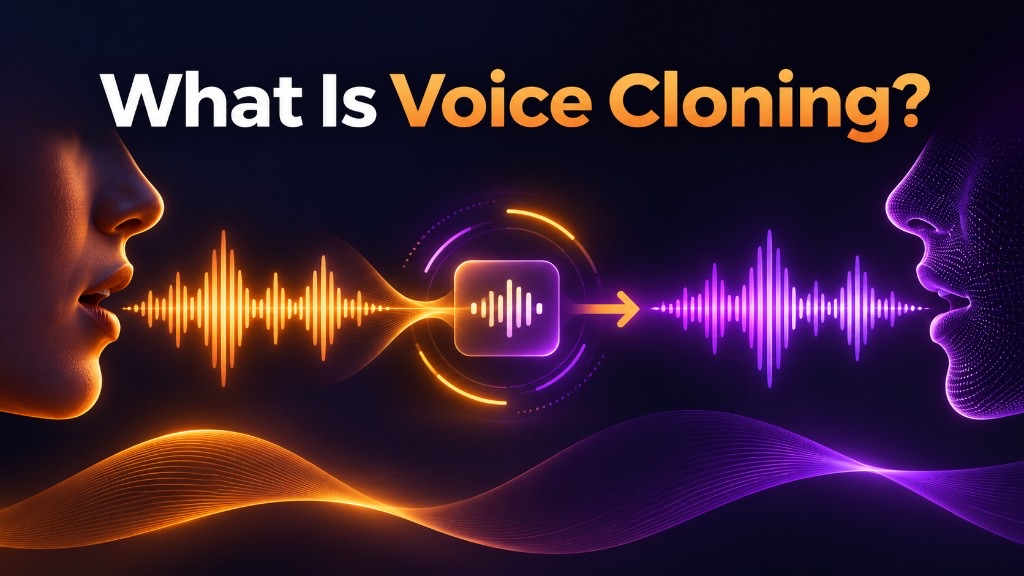
AI voice cloning is a technology that creates a synthetic version of a person's voice using recorded speech. It can generate new sentences that sound similar to the original speaker, even when that person has never recorded those words.
Modern voice cloning tools can work with short audio samples, although the quality depends on the recording, the model, and the intended language.
This guide explains how AI voice cloning works, how it differs from text-to-speech, how much audio it needs, and what to consider before using a cloned voice.
What Is Voice Cloning?
Voice cloning is a form of AI speech synthesis that reproduces the recognizable vocal characteristics of a specific speaker.
These characteristics can include:
- Pitch: How high or low a voice sounds.
- Timbre: The distinctive tone or texture of a voice.
- Accent: Pronunciation patterns associated with a speaker.
- Rhythm and pacing: How quickly someone speaks and where they pause.
- Intonation: How pitch changes throughout a sentence.
Unlike a regular recording, a cloned voice isn't limited to words the speaker has already said.
For example, imagine a course instructor who has recorded several lessons in English. With an authorized voice clone, the instructor could generate additional narration from a new script without recording every sentence again.
The goal is to preserve a recognizable voice identity. However, a voice clone does not necessarily reproduce every emotion, accent, or speaking habit perfectly.
How Does AI Voice Cloning Work?
AI voice cloning generally uses a reference recording to identify a speaker's vocal characteristics, then uses those characteristics to guide speech generation.
The underlying technology varies between providers. Some models use speaker embeddings or acoustic representations, while others rely on neural audio tokens and more integrated speech-generation architectures.
At a practical level, the process can be understood in four steps.
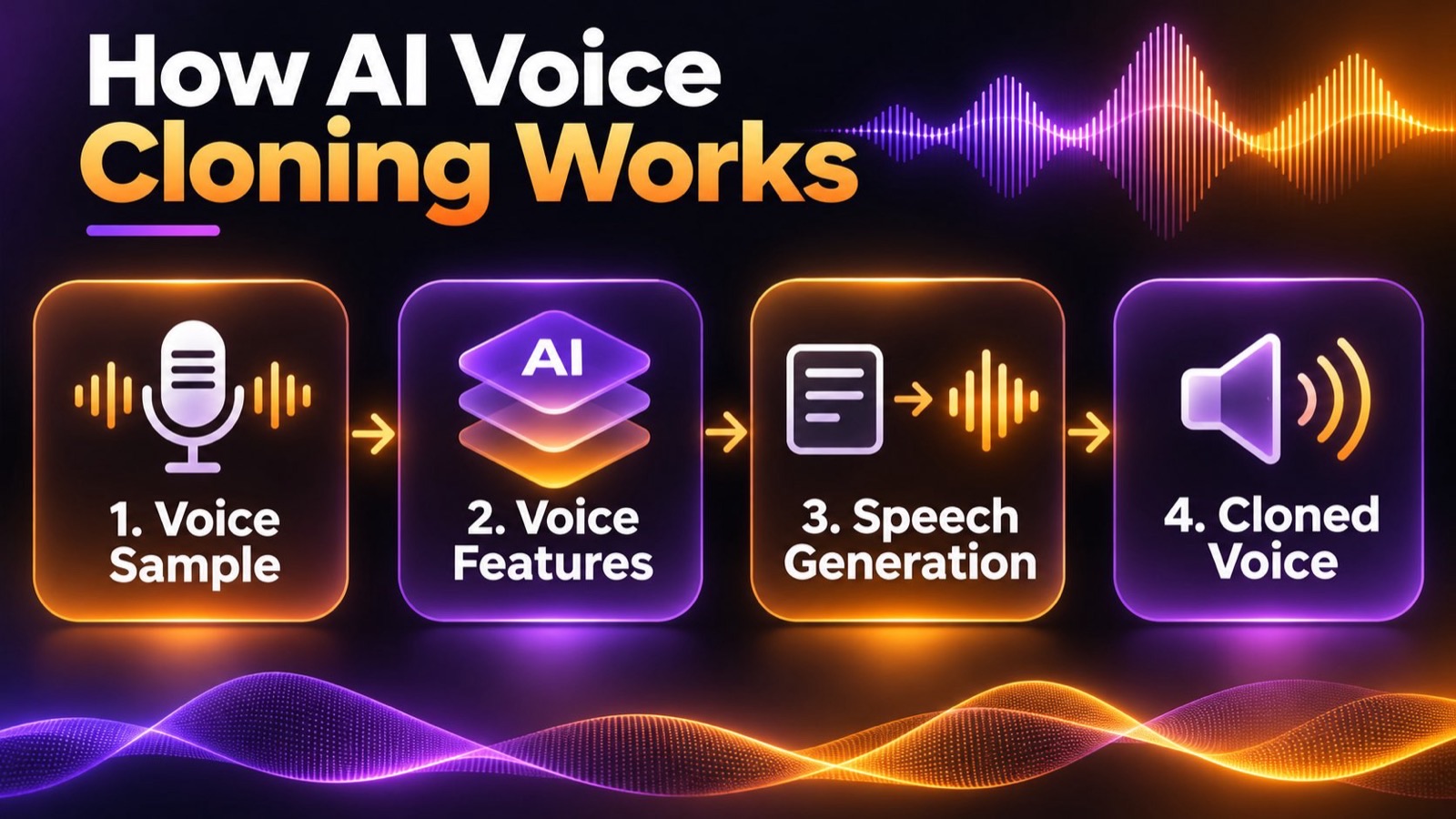
Step 1: Collect a Voice Sample
The process begins with a recording of the person whose voice will be cloned.
A clear recording helps the model identify the speaker's natural pitch, pronunciation, rhythm, and tonal characteristics.
Ideally, the recording contains one speaker, minimal background noise, and consistent audio quality.
Step 2: Analyze the Speaker's Voice
The AI processes the sample to extract information about the speaker's voice.
Depending on the model, this information may be represented as a speaker embedding, acoustic features, or another form of learned voice representation.
The purpose is to capture characteristics that distinguish the speaker from other voices, rather than simply memorize the original recording.
Step 3: Generate New Speech
Once the system has a usable voice representation, it can generate new audio.
In a text-to-speech workflow, the user provides written text. The speech model generates audio based on that text while attempting to preserve the reference speaker's voice.
Some systems also support speech-to-speech conversion, where an existing spoken performance is transformed to sound like another voice.
These approaches have different inputs, but both can use a cloned voice identity.
Step 4: Review the Cloned Audio
The generated speech should be checked for voice similarity, pronunciation, pacing, and audio quality.
A model might reproduce the speaker's basic vocal tone while struggling with an unfamiliar word, a strong emotion, or a different language.
Users may need to revise the text, adjust the speaking style, or provide a better reference recording.
The important distinction is that voice cloning learns characteristics of a voice; it doesn't simply copy and rearrange existing recordings.
Types of AI Voice Cloning
Voice cloning systems differ mainly in how they use the reference audio.
Instant or Zero-Shot Voice Cloning
Zero-shot voice cloning allows a pretrained model to generate speech resembling a new speaker without additional speaker-specific training.
The model uses reference audio to condition speech generation.
Many consumer-facing tools describe their short-sample workflows as instant voice cloning. However, the term instant describes the user experience, while zero-shot describes the underlying technical approach. They are related but not identical concepts.
This approach is useful for quick voiceovers, testing, and content production.
Fine-Tuned or Custom-Trained Voice Cloning
Some systems adapt or fine-tune a model using a larger collection of recordings from a particular speaker.
This process can offer more control or consistency, depending on the model and training data. It generally requires more preparation than short-sample cloning.
For example, ElevenLabs documents separate instant and professional voice cloning workflows with different audio requirements.
Neither approach guarantees a perfect match. Recording quality, speaking style, model capabilities, and evaluation remain important.
How Much Audio Do You Need to Clone a Voice?
Some voice cloning tools accept only a few seconds of audio, but the minimum supported length is not the same as the recommended length for reliable results.
Different providers have different requirements:
| Provider or Workflow | Published Audio Requirement |
|---|---|
| MiniMax Voice Clone API | 10 seconds to 5 minutes |
| VMEG Voice Cloning | Minimum 3 seconds; MP3 or WAV under 20 MB |
| ElevenLabs Instant Voice Cloning | Recommends 1–2 minutes of clear audio |
| ElevenLabs Professional Voice Cloning | Recommends 30–180 minutes of clear audio |
Sources: VMEG Voice Cloning, MiniMax Documentation, and ElevenLabs Voice Cloning Requirements.
These figures describe specific products, not universal technical requirements.
What Makes a Good Voice Sample?
For better results:
- Record one speaker at a time. Overlapping voices can confuse the model.
- Reduce background noise. Music, echo, and traffic can interfere with voice analysis.
- Use a consistent speaking style. Abrupt changes in volume, emotion, or microphone distance can reduce consistency.
- Speak naturally and clearly. Avoid exaggerated delivery unless that is the style you want to reproduce.
- Test the result before recording more. A longer sample is not automatically better if its audio quality is poor.
A clean, consistent recording can be more useful than a longer recording with noise, multiple speakers, or changing acoustic conditions.
Voice Cloning vs. Text-to-Speech vs. Voice Changing
Voice cloning is often confused with other speech technologies.
The clearest distinction is that voice cloning determines whose voice to reproduce, while text-to-speech generates spoken audio from written text.
| Technology | Main Input | Main Purpose |
|---|---|---|
| Text-to-Speech (TTS) | Written text | Generate spoken words |
| Voice Cloning | Reference voice audio | Reproduce a particular voice identity |
| Voice Changing | Existing spoken audio | Transform the sound of a recorded or live voice |
| AI Dubbing | Source video or audio and target language | Generate a new spoken version of existing content |
These technologies can work together.
For example, when translating an English training video into Spanish, a system may:
- Transcribe the English dialogue.
- Translate the text into Spanish.
- Use a cloned voice to generate Spanish speech.
- Align the new audio with the video.
Voice cloning is one component of that workflow. It does not perform the translation or video synchronization by itself.
For a deeper explanation of speech synthesis, see What Is Text to Speech?.
Common Uses of AI Voice Cloning
Multilingual Video Dubbing
Video creators can use authorized voice clones to produce translated narration while preserving some of the original speaker's vocal identity.
This is useful for educational videos, interviews, tutorials, and international content distribution.
The final result still requires translation review, pronunciation checks, and audio synchronization.
Podcasts and Content Creation
Creators who regularly produce narrated content can generate additional spoken segments using a consistent voice.
Voice cloning can support corrections, updated announcements, or new versions of scripted material without requiring a complete re-recording.
Training and Educational Content
Organizations can use a consistent instructor or narrator voice across multiple lessons, courses, and localized versions.
This may simplify updates when training materials change frequently.
Accessibility and Personal Voice Preservation
Voice cloning can also support personal voice preservation. With appropriate recordings and tools, someone who may lose or has lost the ability to speak could use a synthetic voice resembling their own.
The suitability of a particular solution depends on its accessibility features, technical requirements, and the individual's needs.
What Are the Limitations of Voice Cloning?
Even with modern speech models, voice cloning has practical limitations.
Voice similarity is not guaranteed. A generated voice may resemble the speaker without matching every characteristic.
Emotional expression can differ. The system may reproduce a calm speaking style but struggle with shouting, whispering, laughter, or dramatic delivery.
Cross-language results vary. A cloned voice may retain recognizable characteristics when speaking another language, but pronunciation, accent, and naturalness depend on language support and the model.
Poor recordings can affect output. Background noise, compression artifacts, and inconsistent speaking styles may reduce quality.
Long-form speech needs review. Pronunciation, pacing, and voice consistency can change across longer scripts.
For published audio, test the voice on representative sentences, including names, numbers, technical terminology, and changes in speaking style.
Is AI Voice Cloning Safe and Legal?
Voice cloning has legitimate applications, but it can also be misused to impersonate people or create misleading audio.
Whether a particular use is lawful depends on the jurisdiction, applicable rights, consent, and intended use.
Obtain Permission Before Cloning a Voice
Only create or use a voice clone when you have the necessary authorization.
Recording availability does not automatically grant permission to clone or commercially reproduce someone's voice.
Providers may also impose additional consent, identity verification, or usage requirements.
Be Transparent About Synthetic Audio
When generated speech could reasonably be mistaken for a real person's words, appropriate disclosure helps prevent misleading audiences.
This is particularly important for advertisements, testimonials, public statements, and other contexts where identity matters.
Protect Voice Recordings
Voice samples can be sensitive personal data.
Before uploading recordings, review the provider's privacy policy, data retention practices, access controls, and options for managing or deleting voice assets.
Understand Impersonation Risks
Voice cloning can be used for scams in which someone pretends to be a trusted person.
The U.S. Federal Trade Commission warns that a familiar-sounding voice is not sufficient proof of someone's identity. If a caller makes an unusual or urgent request, verify it through an independent, trusted contact method.
Responsible voice cloning starts with consent, accurate representation, and secure handling of voice data.
How to Clone Your Own Voice With VMEG
If you want to try voice cloning using your own recording, VMEG Voice Cloning provides a browser-based workflow.
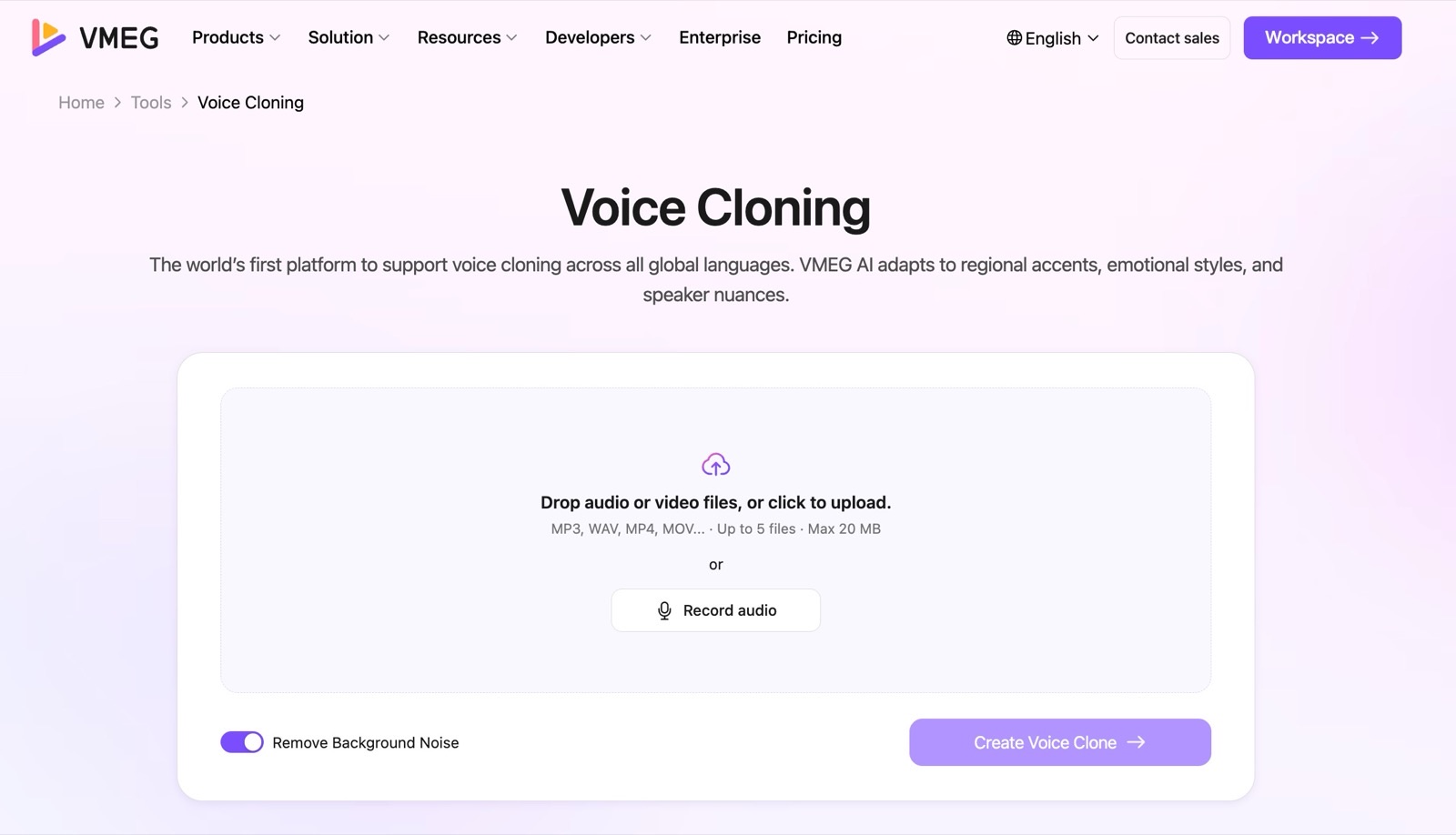
Step 1: Upload Your Voice Sample
Open VMEG's Voice Cloning tool and select Add Voice Clone.
Upload a supported MP3 or WAV recording. VMEG's published minimum is 3 seconds, with a file-size limit of 20 MB for this workflow.
For more consistent results, use a clean recording without background music or overlapping voices.
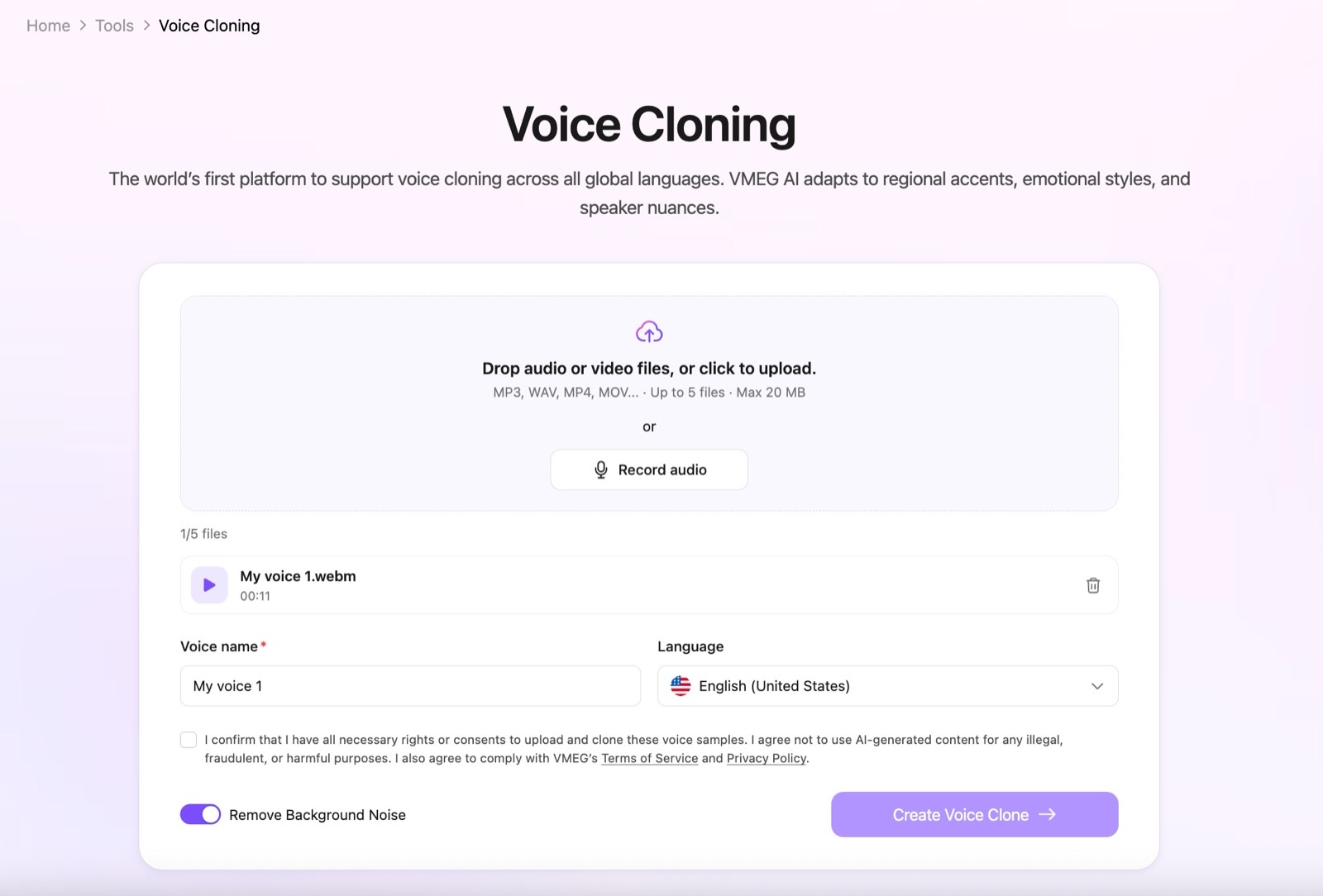
Step 2: Create and Preview Your Voice
Give the voice a name and select Submit.
Once processing is complete, preview the generated voice. Listen for similarity, pronunciation, and overall clarity.
If the result isn't satisfactory, try a clearer or more representative recording.
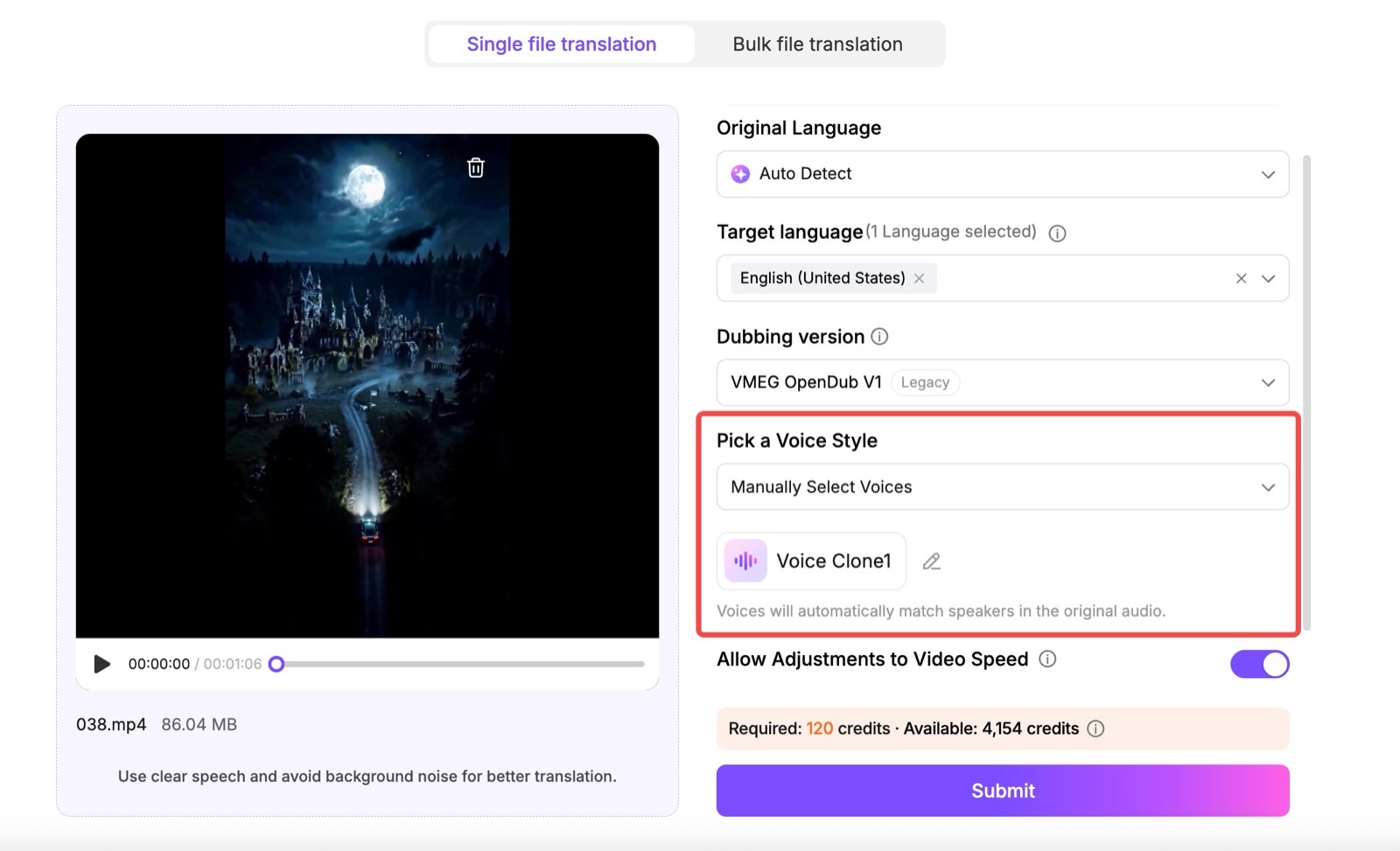
Step 3: Use the Cloned Voice
The created voice can be selected in supported VMEG workflows, including text-to-speech and video translation.
For example, you can generate narration from a script or use a custom voice when producing translated audio.
Remember that voice cloning and translation are separate processes. Even when a cloned voice sounds convincing, translated scripts still need review for accuracy and naturalness.
For a comparison of available products, see our guide to AI Voice Cloning Tools.
Frequently Asked Questions
Can AI clone a voice from just a few seconds of audio?
Yes. Some tools accept samples as short as a few seconds. However, short-sample cloning may not capture the full range of a speaker's voice, and the result can vary across models and languages.
Does voice cloning copy an existing recording?
No. Voice cloning generally generates new audio using characteristics learned from reference speech. It does not need the speaker to have recorded the exact words being generated.
Can a cloned voice speak another language?
Some multilingual speech models can generate speech in a different language while retaining aspects of the original speaker's voice. Results depend on the model, target language, and reference sample. Voice cloning does not automatically translate the source content.
Can a cloned voice sound exactly like a real person?
A voice clone can be highly recognizable, but an exact match is not guaranteed. Pitch, accent, timing, emotional expression, and audio quality may differ from the original speaker.
Can I clone someone else's voice?
You should only clone another person's voice when you have the necessary permission and rights. Some platforms impose stricter requirements, including identity verification or restrictions on cloning voices other than your own.
Conclusion
AI voice cloning allows new speech to be generated using the vocal characteristics of a particular speaker. It works by analyzing reference audio and using what the model learns to guide speech generation.
The technology can support content creation, multilingual dubbing, training, and accessibility. But successful results depend on the recording, the speech model, and the intended use.
Before using a cloned voice, check its similarity and pronunciation, confirm that you have the necessary rights, and review any generated content before publishing.
Editorial note: This article explains voice cloning technology using publicly available documentation and official resources. Technical capabilities and audio requirements vary between providers and may change. Product information was reviewed on November 2, 2026. This article is for general educational purposes and is not legal advice.