Free Studio Sound Online
Give home-recorded narration a cleaner, more controlled tone with Voice, Warm, or Bright presets. Preview the treatment before exporting a WAV.
Home Recordings for Studio-style Polish
Compare untreated narration with a preset-processed take before exporting the full result.
Desk-recorded Voiceovers
Add controlled presence to narration before placing it under motion graphics or a product demo.
Original audioStudio soundHome Talking-head Lessons
Process the embedded speech track from an explainer or course video recorded in a spare room.
Original audioStudio sound
How to Get Studio Sound Online
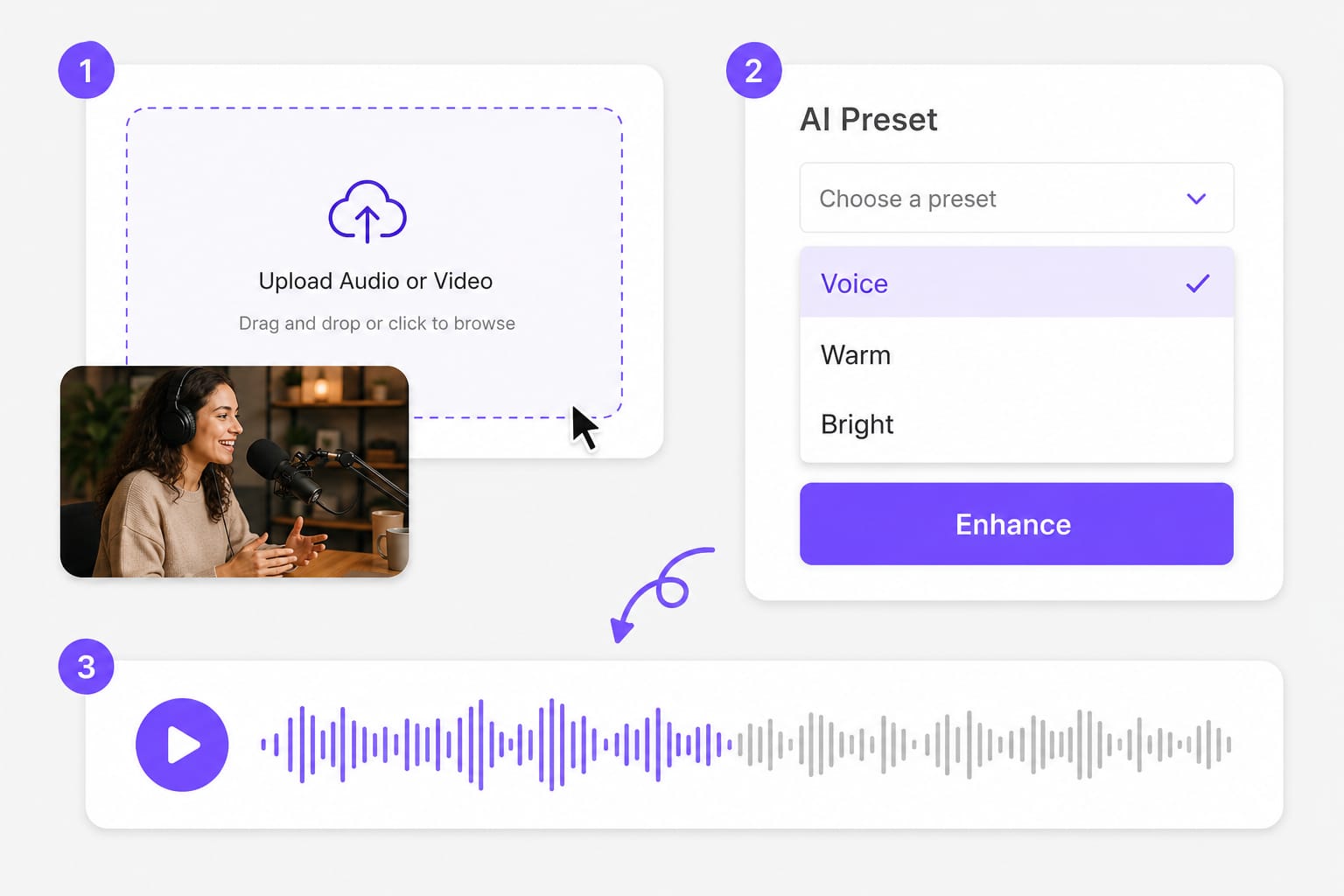
01Add the home-recorded take
Upload narration, a course lesson, or talking-head video captured outside a treated recording room.
02Set the recording character
Try Voice for neutral speech, Warm for a softer edge, or Bright when consonants lack presence.
03Compare the room take
Listen to the treated sample beside the original, then generate the full WAV and sign in to download.
Why Add Studio-style Sound to Voice
Preset processing can make a usable home take more controlled, but it does not recreate a studio or repair missing detail. Drop a voice memo, podcast clip, or talking-head video, pick a preset, preview beside the original, then download when the treatment sounds right.
Control a roomy narration take
High-pass filtering reduces low rumble while compression keeps the voice level more consistent through the recording. Drop narration, podcast clips, or dialogue pulled from MP4 and MOV, then compare treated audio beside the original take.
Shape desk-recorded voiceovers
Use Warm to soften an edgy desktop microphone or Bright when a blanket-heavy setup sounds closed in. No desktop software to configure — open Studio Sound in a modern browser, adjust settings in the same tab, and export when the preview looks right.
Match lessons within a session
Apply the same preset to course narration or product demos captured with one microphone and room setup. Listen beside the untreated take so you can judge vocal presence, room tone, or noise reduction before processing the full recording on Studio Sound.
Compare treatment before export
A short A/B preview lets you judge vocal presence before processing the full recording. Preview stays free in your browser; sign in only when you download the finished Studio Sound output so exports stay reliable.
Prepare voice for a larger edit
Download the processed WAV for use under slides, motion graphics, or a talking-head timeline. Choose the export format shown in the picker, preview the result on the page, then sign in when you are ready to download from Studio Sound.
Accepts voice inside video
Upload an audio file or process the soundtrack from MP4, MOV, MKV, and WebM footage in the same workflow. Add your source file or link on this Studio Sound page, preview the output in the browser, then sign in only when you download the finished export.
Studio Sound Questions
What does studio sound mean here?
Here it means preset filtering, compression, presence shaping, and gain for voice recordings. It is not a simulation of a specific studio. Drop a voice memo, podcast clip, or video with dialogue into Studio Sound, pick a preset, preview the enhanced audio, then download when it sounds right.
Does this replace acoustic treatment?
No. It can improve a captured take, but it cannot remove every reflection or recover detail the microphone did not record. Drop a voice memo, podcast clip, or video with dialogue into Studio Sound, pick a preset, preview the enhanced audio, then download when it sounds right.
Which preset suits studio-style voice?
Start with Voice for natural clarity. Use Warm if the take is harsh, or Bright if it sounds dull and distant. Drop a voice memo, podcast clip, or video with dialogue into Studio Sound, pick a preset, preview the enhanced audio, then download when it sounds right.
Which home-recording files are supported?
Upload narration as MP3, WAV, M4A, AAC, or FLAC, or use an MP4, MOV, MKV, or WebM talking-head file. The file limit is 100 MB. Drop a voice memo, podcast clip, or video with dialogue into Studio Sound, pick a preset, preview the enhanced audio, then download when it sounds right.
Can I use a public video link?
Supported public links from YouTube, TikTok, Vimeo, Facebook, Instagram, and X can be imported for studio-style voice processing. Public links from major platforms work best; if a private or region-locked URL fails, download the media locally and upload it to Studio Sound instead.
What file does Studio Sound export?
It generates a processed WAV. Upload and preview are available before you sign in for the download. Drop a voice memo, podcast clip, or video with dialogue into Studio Sound, pick a preset, preview the enhanced audio, then download when it sounds right.
Translate podcasts and interviews in minutes
Upload MP3 or WAV and get accurate speech translation across 170+ languages — built for long-form audio.